#
 ParticleLayer
A ParticleLayer draws 2D particles over the UI: confetti for a win, sparkles on a reward, dust from a drill, or coins that fly from a chest to the coin counter. The layer fills its parent and ignores the pointer, so add it as the last child of the root. The ParticlesDemo example has rewards, a burst editor and emitters. The Driller game sends the ore to the cargo bar and the coins to the cash.
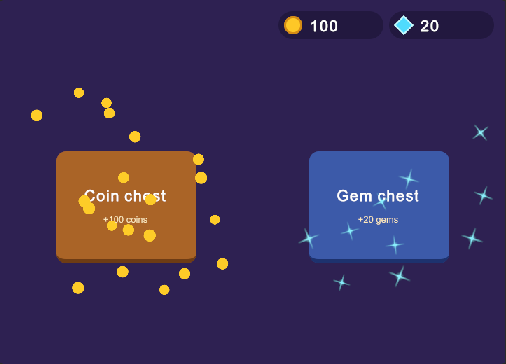
<tb:ParticleLayer name="particles" />
var layer = root.Q<ParticleLayer>("particles");

// Coins fly from the chest to the counter
layer.Burst(chestButton, new ParticleSettings
{
    Count = 20,
    Shape = ParticleShape.Circle,
    StartColor = gold, EndColor = gold, // no fade
    Target = coinCounter,
});

// The counter counts as the coins arrive, not before them
layer.Arrived += target =>
{
    if (target == coinCounter) coins += 5;
};

// A continuous source that follows an element
var dust = layer.Emit(drill, new ParticleSettings { Shape = ParticleShape.Square, Gravity = 300 }, rate: 40);
dust.Stop();
#ParticleLayer
| Member |
Description |
Burst(VisualElement, settings) |
Sends Count particles from random points in the rect of an element. |
Burst(Vector2, settings) |
Sends Count particles from a point in the coordinates of the layer. |
Burst(Camera, Vector3, settings) |
Sends Count particles from a point in the 3D scene, as the camera sees it. Use it for a hit on an enemy. |
Emit(VisualElement, settings, rate) |
Starts a continuous source in the rect of an element, with rate particles per second. The source follows the element. Returns a ParticleEmitter. |
Emit(Vector2, settings, rate) |
Starts a continuous source at a point. |
WorldToLayer(Camera, Vector3) |
Converts a point in the 3D scene to the coordinates of the layer. |
Arrived |
Fired when a particle reaches its Target, with the target. |
Clear() |
Removes all particles and stops all emitters. |
TimeScale (time-scale) |
The speed of the simulation (1). 0 freezes the particles, 0.5 runs them at half speed. Use 0 for a pause menu. |
MaxParticles (max-particles) |
The most particles alive at one time (2000). A new particle over the limit is not made. The highest value is 16000. |
ParticleCount |
The number of particles alive. |
Advance(seconds) |
Moves the simulation forward. The layer calls it each frame; a test can call it directly. |
#ParticleEmitter
| Member |
Description |
Settings |
The settings of the new particles. A change applies to the next particles. |
Rate |
The particles per second. |
Source |
The element that the particles come from. Null uses Point. |
Point |
The point that the particles come from, in the coordinates of the layer. |
IsPlaying |
False after Stop. |
Stop() |
Stops new particles. The particles that are alive finish their lives. |
#ParticleSettings
Each range is (minimum, maximum), and each particle takes a random value in it. Positions and sizes are in pixels; times are in seconds.
| Property |
Description |
Count |
The number of particles in a burst (20). An emitter uses its rate instead. |
Lifetime |
The life of a particle (0.6, 1.2). A particle with a Target lives until it arrives. |
Speed |
The start speed in pixels per second (80, 200). |
Direction |
The middle of the start directions, in degrees clockwise from up (0). |
Spread |
The width of the cone of start directions, in degrees (360). 360 sends particles in all directions. |
Gravity |
The pull down, in pixels per second per second (0). A negative value pulls up, for smoke. |
Drag |
The part of the speed that a particle loses each second (0). |
Size |
The start size (8, 12). |
EndScale |
The size at the end of the life, as a fraction of the start size (1). |
StartColor, EndColor |
The color at the start and at the end of the life. The default end color is clear white, so the particles fade out. |
Spin |
The turn speed in degrees per second (0, 0). |
Shape |
The built-in image: Square (confetti, pixel art), Circle (a sharp disc), Glow (a soft glow for dust, smoke and magic; the default) or Sparkle (a star with four rays). |
Texture |
An image for the particles, for example a coin. It replaces Shape. |
Target |
An element that attracts the particles. After TargetDelay each particle curves to the center of the target in TargetTime. |
TargetDelay |
The time that a particle moves freely before it flies to the Target (0.25, 0.45). |
TargetTime |
The time of the flight to the Target (0.45, 0.65). |
- The layer draws all particles in one mesh for each image, so thousands of particles cost a few draw calls.
- The timer of the layer runs only while particles are alive.
- In the UI Builder, the layer shows a dashed outline with its name, so you can find it. The outline does not show in Play mode or in a build.
- A long frame, for example a hitch, runs the simulation slower. The particles do not jump.
#Styling
| Class |
Element |
tb-particle-layer |
The layer: it fills its parent and ignores the pointer. The particles take their colors from ParticleSettings, not from USS. |
