

 Separator
A Separator is a thin line between two parts of a panel. It goes across a column, or down a row. Text or other elements in a separator show in a gap in the line: -- Sound ----------.
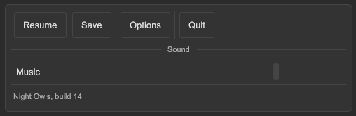
How to part a column and a row:
<ui:Label text="Account" />
<tb:Separator />
<ui:Label text="Privacy" />

<ui:VisualElement style="flex-direction: row;">
    <ui:Button text="Cut" />
    <tb:Separator vertical="true" />
    <ui:Button text="Paste" />
</ui:VisualElement>
toolbar.Add(new Separator { Vertical = true });
How to put a title, an icon or any element in the line:
<tb:Separator text="Sound" />
<tb:Separator text="Chapter 2" align="Center" />
<tb:Separator align="End">
    <ui:Button text="Show more" />
</tb:Separator>
panel.Add(new Separator { Text = "Sound" });
| Member | Description |
|---|---|
Vertical (vertical) |
Draws the line down a row. False (the default) draws the line across a column. |
Text (text) |
A label in a gap in the line. Empty (the default) shows no label. |
Align (align) |
Where the text and the child elements sit: Start (the default) after a short piece of line, Center, or End before a short piece of line. |
| Child elements | Go into the gap in the line, after the text. A separator with no text and no child is a plain line. |
- The line has the color and the width of the borders of the theme, like the separator of a menu.
- The line does not take pointer events.
- A vertical line takes the height of its row.
Tips:
- The classes work on any element. Use
class="tb-separator"on aVisualElementwhen you do not want thetbnamespace in a document. - Use a vertical separator only in a parent with
flex-direction: row. - For more room around the line, set the margin of the element.
Styling
| Class | Element |
|---|---|
tb-separator |
The line: --tb-border-width high, in --tb-color-border, with a --tb-spacing-xs margin above and under it. |
tb-separator--vertical |
Set for a vertical line: --tb-border-width wide, as high as the row, with the margin at the left and the right. |
tb-separator--with-content |
Set when the separator has text or child elements. The separator is then a row of a line, the content and a line, and has no background. |
tb-separator--start, --center, --end |
The value of Align. |
tb-separator__line, __line--before, __line--after |
The two pieces of line around the content. The short piece is --tb-spacing-lg long. |
tb-separator__content |
The gap in the line, with a --tb-spacing-md margin on each side. |
tb-separator__text |
The label of Text, small and in the muted text color. |
.tb-separator { margin-top: 12px; margin-bottom: 12px; background-color: var(--tb-color-accent); }
.tb-separator__line { background-color: var(--tb-color-accent); }