
Bindings
A data-binding workshop. One hero object feeds a character card, and an Edit window changes the same hero. The formats, the two-way edits and the animations are all in UXML, with no format or animation code. A second part of the scene edits the 3D shapes through callouts that point at them and bind to them. The scene uses the converter groups (tb:), AnimateBinding, a DataGrid, a Callout and a ColorPicker.
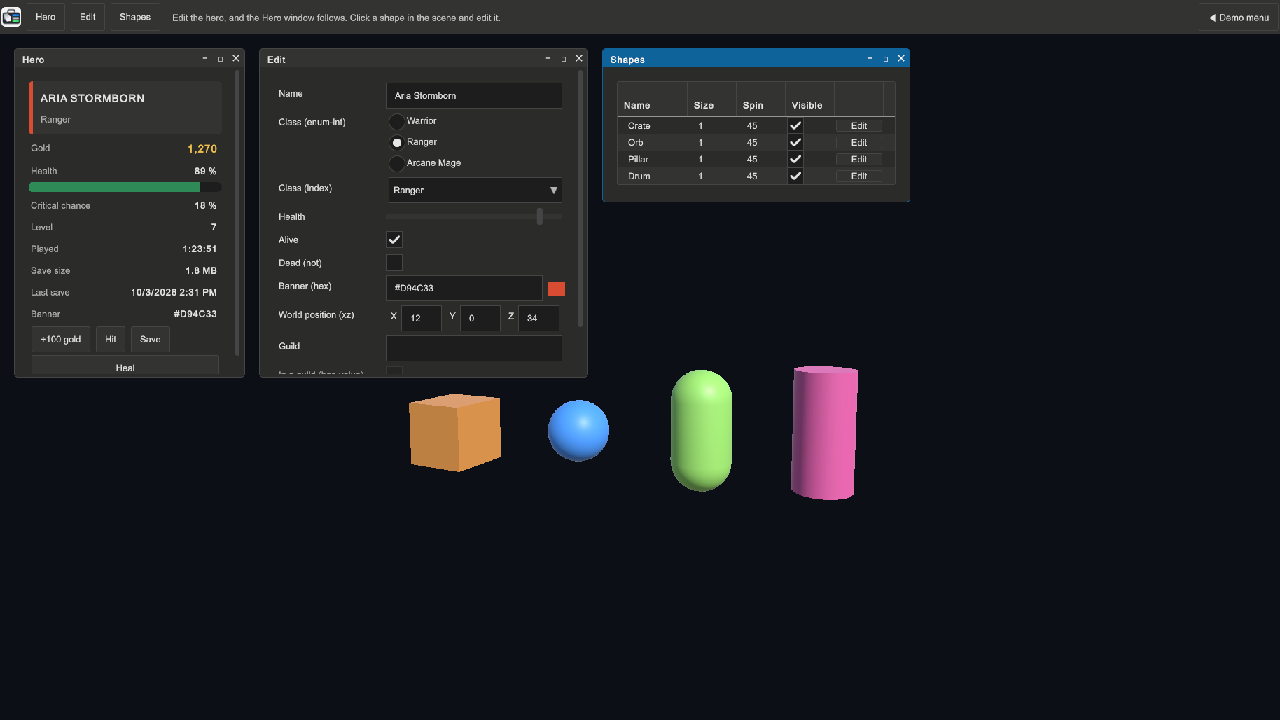
Scene: Assets/UIToolbox/Examples/Scenes/Bindings.unity. Folder: Assets/UIToolbox/Examples/Bindings.
Try it
- Look at the Hero window. The name is in upper case, the gold has thousands separators, and the played time, the save size and the last save have their own formats. The gold changes every few seconds and flashes each time.
- Click +100 gold. The gold flashes.
- Click Hit several times. The card shakes on each hit. Under 30 percent health, the
StatBarof the health pulses. - Keep hitting until the health is 0. The label FALLEN pops up, and the +100 gold, Hit and Save buttons hide. Click Heal to bring the hero back.
- Click Save. The last save time blinks, and the save size grows.
- In the Edit window, change the name, the class, the health or the banner color (in hex). The Hero window follows each change. The Dead toggle is the inverse of the Alive toggle.
- Click a shape in the 3D scene. Its editor opens in a callout with a line to the shape. Move a slider or pick a color. The shape changes at once.
- Click the other shapes. Each editor stays open until its × button, and each line follows its shape. Drag an editor by its frame to move it.
- Open the Shapes window and click Edit on a row. The editor of that shape opens, or comes to the front.
What it shows
Hero window (one-way)
The workspace has one data source: a SampleHero. Each element in the window finds it on a parent, so a binding only names the field in data-source-path. A converter group turns the value into what the control needs.
| Element | Group | Result |
|---|---|---|
| Name | tb:upper |
The name in upper case. |
| Class | tb:display-name |
The InspectorName of the enum: Mage shows as "Arcane Mage". |
| Gold, Level | tb:n0 |
Thousands separators. |
| Health, Critical chance | tb:percent-text |
A value of 0.82 shows as "82%". |
| Health bar | none | A StatBar binds its Value to the 0 to 1 health, so it needs no converter. |
| FALLEN label | tb:hidden |
Hidden while Alive is true. |
| Played | tb:duration |
Seconds as a time. |
| Save size | tb:bytes |
Bytes as KB or MB. |
| Last save | tb:datetime |
The date and the time. |
| Banner | tb:hex |
The color as #RRGGBB. |
| Action buttons | tb:visible |
Shown only while the hero is alive. |
tb:percent is for an element that has no value of its own. It turns the 0 to 1 health into the percent width of a plain element:
<ui:VisualElement class="fill">
  <Bindings>
      <ui:DataBinding
          property="style.width"
          data-source-path="Health"
          binding-mode="ToTarget"
          source-to-ui-converters="tb:percent" />
  </Bindings>
</ui:VisualElement>
The list of groups is in Data bound windows.
Animations
AnimateBinding plays a preset when a value changes. It needs no code:
flashon the gold, whenGoldchanges.shakeon the card, whenHitschanges.pulseon the health bar, withtrigger="WhileTrue", whileLowis true.popon the FALLEN label, whenAlivechanges.blinkon the last save time, whenLastSavechanges.slide-upon the card, withtrigger="Attach", when the window opens.
Edit window (two-way)
The Edit window binds the same hero with binding-mode="TwoWay". A group with ui-to-source-converters turns the control value back into the type of the field.
- Class and Class list: a
RadioButtonGroupand aDropdownFieldwithtb:enum-int. They show the same value. - Dead: a
Togglewithtb:notonAlive. - Banner: a text field with
tb:hex. The field hasis-delayed="true", so the binding writes when the user ends the edit. A swatch next to it shows the color. - Position: a
Vector3Fieldwithtb:xzover aVector2. - In a guild: a read-only
Togglewithtb:has-valueon the Guild text. It is on when the Guild field has text.
Shape editors
A click on a shape of the scene, or on Edit in the Shapes grid, opens the editor of that shape: a Callout that targets the shape in the world with TargetRenderer, draws a line to it and follows it on the screen. The controller makes one callout for each shape, the first time, and keeps it. The callout is Closable, so it stays open until its × button, and several can be open at once. A press brings one to the front. The content is ShapeEditor.uxml. The controls bind two-way to the public fields of SampleShape: a text field, a ColorPicker, three sliders and a toggle. A FormatBinding builds the heading from several fields. The shape reads its fields in Update, so an edit shows in the scene at once.
The Shapes window is a DataGrid over the same shapes. It refreshes twice a second, so it follows the edits.
How it is built
| File | Does |
|---|---|
Bindings.uxml |
The workspace and the Hero, Edit and Shapes windows. |
Resources/UIToolboxSamples/ShapeEditor.uxml |
The fields of a shape editor callout. |
Bindings.uss |
The look of the hero card, the rows, the health bar, the swatch and the width of the shape editors. |
BindingsController.cs |
Sets the data source, wires the buttons, changes the hero over time, fills the Shapes grid and opens the shape editors. |
SampleHero.cs |
The hero: a plain C# object with public fields. |
SampleShape.cs |
A shape in the scene. It reads its fields each frame. |
The controller needs one line to connect the data. Every binding in every window finds the hero on this parent:
_workspace.dataSource = Hero;
A one-way binding with a converter group and an animation looks like this:
<ui:Label name="heroGold" class="hero-gold">
  <Bindings>
    <ui:DataBinding
        property="text"
        data-source-path="Gold"
        binding-mode="ToTarget"
        source-to-ui-converters="tb:n0" />
    <tb:AnimateBinding property="anim-gold" preset="flash" path="Gold" />
  </Bindings>
</ui:Label>
A two-way binding has a group in both directions:
<ui:RadioButtonGroup
    name="editClass"
    label="Class"
    choices="Warrior,Ranger,Arcane Mage">
  <Bindings>
      <ui:DataBinding
          property="value"
          data-source-path="Class"
          binding-mode="TwoWay"
          source-to-ui-converters="tb:enum-int"
          ui-to-source-converters="tb:enum-int" />
  </Bindings>
</ui:RadioButtonGroup>
The buttons only change the hero. The bindings show the change and play the animations:
hero.Q<Button>("addGold").clicked += () => Hero.Gold += 100;
hero.Q<Button>("hit").clicked += () => Hero.Hit(0.15f);
The editor of a shape is a Callout with the shape as its data source. TargetRenderer points it at the shape, and Open shows it over the workspace:
var editor = new Callout
{
    Connector = true,
    TipSize = 48,
    Draggable = true,
    dataSource = shape,
};
_editorFields.CloneTree(editor);
editor.Closable = true;
editor.TargetRenderer(shape.GetComponent<Renderer>());
editor.Open(_workspace);
The controller finds the shape under a click with a ray from the camera. OpenWindowOnClick.IsOverUI skips a click on a window or an editor.
A computed value needs [CreateProperty], so the bindings can find it. SampleHero.Low has it:
[CreateProperty] public bool Low => Alive && Health < LOW_HEALTH;
Bindings.uss sets only the look. The banner binding sets the left border color of the card, so the USS sets only its width. The gold uses a fixed color. The other colors come from theme variables, such as --tb-color-surface-alt and --tb-color-success.
Use it in your game
- Copy a
Bindingsblock from an element and changedata-source-pathto a field of your own data. SetdataSourceon the workspace, a window or any parent. - Any plain C# object works as a data source. Use public fields for simple values. Use
[CreateProperty]on a computed property. - Use a converter group for each format, so your code stays free of text formatting.
- Write the changes to your data in C# only. The UI follows by itself.
- The shape editors show the pattern for an inspector of scene objects: a
Calloutwith a 3D target, a data source and two-way bindings. For a window in place of a callout, use a window template withShowDataorOpenWindowOnClick. - Sample-only parts: the passive gold income (
IncomeSeconds), the health that comes back slowly, the played time that counts up, and the Hit, Heal and Save methods ofSampleHero. - A
DataGriddoes not follow a field with a binding for each cell. The sample callsRefresh()twice a second.
See also
- Data bound windows, with the table of converter groups
- Animations, for
AnimateBindingand the presets - Window templates
- Callout, DataGrid and ColorPicker
- Example scenes