
Reactor
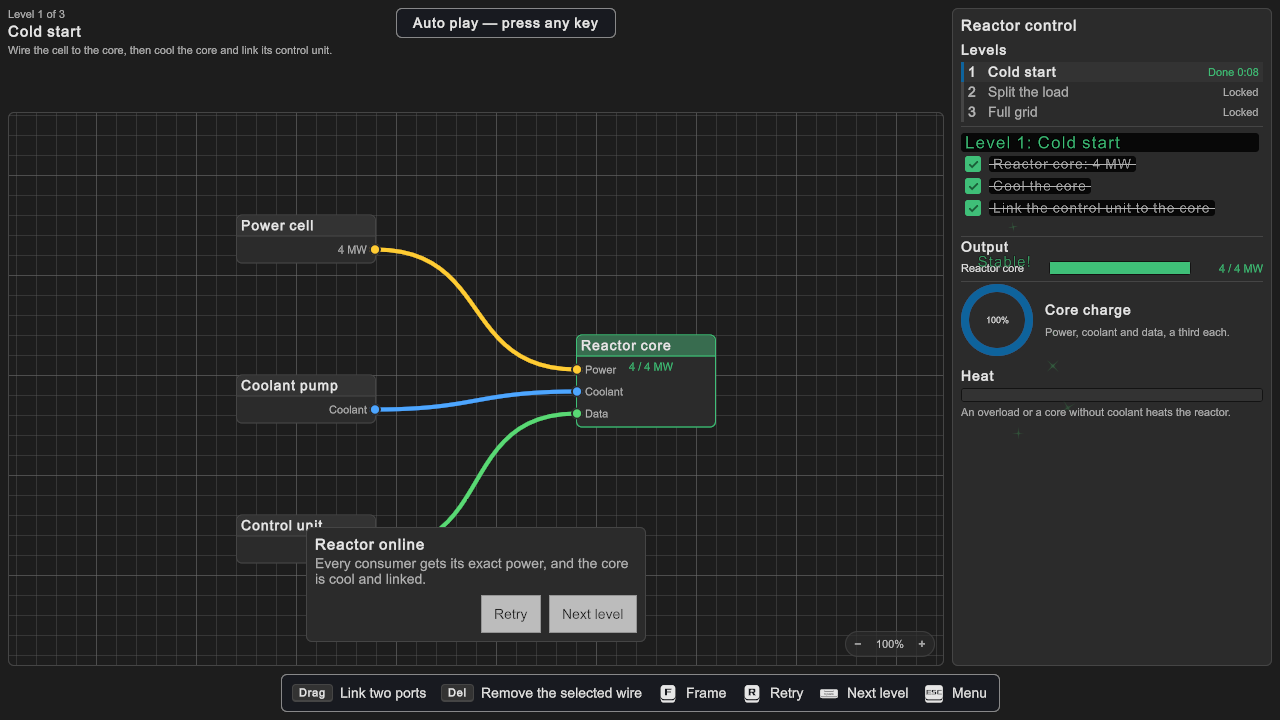
A node-wiring puzzle on a console. The player wires power cells, splitters, coolant pumps and a control unit into the reactor core and its consumers, over three levels. The screen shows a NodeGraph with typed, colored ports and wires that show the flow, a header with the level and a NotificationArea for the toasts, a side panel with the levels and their state, an ObjectiveTracker for the goals, a StatBar per consumer for its power, a ProgressRing for the core charge and a StatBar for the heat, Kbd key caps, and Cards for the end of a level, the end of the game and the menu.
Video tutorial: Reactor. All videos: Video tutorials.
Scene: Assets/UIToolbox/Examples/Scenes/Reactor.unity. Folder: Assets/UIToolbox/Examples/Reactor.
Try it
- Open the scene and press Play. Level 1, "Cold start", shows a power cell, a coolant pump, a control unit and the reactor core. The header over the grid says "Level 1 of 3", the title and the brief. The side panel lists the three levels: level 1 is "Wiring" and the others are "Locked".
- Drag from the dot of the cell's output to the Power input of the core. The wire is yellow, the core shows "4 / 4 MW" and turns green, its bar under Output fills, and the goal "Reactor core: 4 MW" completes. The core has no coolant yet, so the heat bar rises.
- Drag from the pump's output to the Power input. The graph refuses it, and a toast in the header says "Coolant cannot feed a power input." The toasts have their own slot there, so they never cover a part. Drop the wire on the Coolant input instead, then wire the control unit to the Data input.
- The core charge ring fills, the quest completes and the core runs: its header pulses green. A card says "Reactor online", and the level list marks level 1 "Done" with the time it took. Press Next level or Space.
- Level 2, "Split the load", has an 8 MW cell for two consumers that need 4 MW each. A cell output takes one wire, so wire it into the splitter, and each half of the splitter into a consumer. A wire out of a splitter with no input is gray and dashed, as no power flows through it. Wire the cell straight into the core instead: the core gets 8 MW of 4, and the core, its wire and its output bar turn red. A toast warns of the overload and the heat rises. Remove the wire and the toast leaves.
- Level 3, "Full grid", has two cells, two splitters and four consumers, and a spare pump where a cell would be. A wire from a splitter back into the splitter that feeds it closes a loop, and the graph refuses it. When the reactor runs, a card says "Grid complete" with the time of the whole game. Play again or Space starts a new game on level 1.
- Drag a wire from its input end to move it to another input, or drop it on the grid to remove it. Click a wire and press Delete to remove it too. R removes every wire of the level.
- Press Esc. The menu opens and the reactor waits. Resume goes back, Retry the level removes the wires, and Back to demo menu goes back to the menu when the demo menu opened the sample. The Auto play switch turns the demo mode on or off.
- Take your hands off the keys and the mouse. After 5 seconds a bot plays and a badge says so. It takes off the wires that are not in the solution, then links the solution one wire per second. 2 seconds after the reactor runs, the next level starts. After level 3 the end card stays 5 seconds, then a new game starts. Any key or a move of the mouse gives the control back.
- Stop and play again. Each level keeps its wiring: it saves on each change and loads when the level starts. The game also starts on the level you were on.
| Key | Gamepad | Does |
|---|---|---|
| Drag | Link two ports, or move a wire by its input end. | |
| Delete | Remove the selected wire. | |
| F | North | Frame the parts. |
| R | West | Remove every wire of the level. |
| Space | South | Go to the next level once the reactor runs. On the end card, start a new game. |
| Esc | Start | Open or close the menu. |
What it shows
The parts and the ports
Each part is a ReactorNode, a GraphNode that makes the ports of its kind. A port's Type is power, coolant or data, and its Color shows the type, so the wires that leave it have that color too:
| Part | Ports |
|---|---|
| Power cell | Out power, with its megawatts. One wire (Capacity = Single). |
| Coolant pump | Out coolant. |
| Control unit | Out data. |
| Splitter | In power, and two Out power that each give half. One wire each. |
| Reactor core | In power that needs an exact amount, In coolant, In data. |
| Shield, lights | In power that needs an exact amount. |
node.AddPort(new NodePort("out", PortDirection.Out, "4 MW", "power")
{
    Capacity = PortCapacity.Single,
    Color = new Color(1f, 0.8f, 0.2f),
});
The parts cannot be deleted (Deletable = false); their wires can.
The rules
The graph links two ports only when their types match, so a coolant output does not link to a power input. A LinkFilter refuses a wire that closes a loop:
Graph.LinkFilter = (from, to) => !reaches(to.Node, from.Node);
Graph.LinkRejected += onLinkRejected;   // the toast that says why
LinkRejected comes when the player drops a wire on a port that refuses it. The handler tells a wrong type ("Coolant cannot feed a power input."), a power output that has its wire, and a loop apart.
The flow
The flow check runs on Changed, once per edit, not per frame. It walks from the power input of each consumer back along the wires: a cell gives its amount, and a splitter gives half of what reaches its input. A consumer that gets its exact amount is met and turns green; more is an overload and turns red. The level ends when every consumer is met and the core has coolant and data.
The wires and the core
A NodeLink is a VisualElement, so a class styles it. After each flow check every wire gets one of three classes, and Reactor.uss sets the link variables for each:
| Class | The wire | USS |
|---|---|---|
reactor-wire--live |
Carries power, coolant or data. A coolant or data wire is always live. | --tb-node-link-width: 4 |
reactor-wire--dead |
A power wire with no power, such as a wire out of a splitter with no input. | --tb-node-link-dash: 6, the muted text color |
reactor-wire--over |
Into a consumer that gets more power than it needs. | --tb-node-link-width: 4, the danger color |
wire.EnableInClassList(ReactorController.WIRE_DEAD_CLASS, !live);
.reactor .reactor-wire--dead {
    --tb-node-link-dash: 6;
    --tb-node-link-color: var(--tb-color-text-muted);
}
A link repaints when its style changes, so the class is all it takes. A selected wire keeps the accent color.
A core with its exact power, coolant and data runs: it gets reactor-node--running and a green header. Each PULSE_SECONDS (0.5) a running core turns reactor-node--pulse on or off, and a USS transition fades the header between green and its normal color. The beat swaps a class, so it makes no garbage.
The HUD
| Control | Shows |
|---|---|
| Header labels | "Level 1 of 3", the title of the level and its brief. |
| Level list | A row per level with its state: "Done" with the time it took in this game, "Wiring" for the level being played, or "Locked". |
ObjectiveTracker |
The level and a goal per consumer, then "Cool the core" and "Link the control unit to the core". A goal completes when it is met. A goal that is lost again builds the quest anew, as a completed objective stays complete. |
| Output | A row per consumer: its name, a StatBar up to the power it needs, and the megawatts that reach it, such as "8 / 4 MW". A met row is green, an overloaded row red. |
ProgressRing coreCharge |
The core charge: its power, coolant and data, a third each. |
StatBar heat |
The heat. Each megawatt of overload adds 25, and a powered core with no coolant adds 40. The bar moves to the target at 30 per second. |
NotificationArea |
The refused wires and the overload, in a slot of the header, one at a time. The overload toast leaves when the overload ends, and a new level takes the toasts away. |
Card complete |
Retry and Next level when the reactor runs on level 1 or 2. |
Card end |
"Grid complete" when level 3 runs, with the time of the game when the player played every level, and Play again. |
The save
Each change saves the wiring of the level with ToJson to the PlayerPrefs key UIToolbox.Reactor.Level1, Level2 or Level3. A level loads it with LoadJson and a factory that makes each ReactorNode again from its saved id, so the nodes keep their ports and their places:
Graph.LoadJson(json, saved =>
    level.Find(saved.id) is { } part ? new ReactorNode(part) : null);
A save that does not hold the parts of the level gives way to a new grid. Next level deletes the save of the level it leaves, so a solved level starts empty next time. UIToolbox.Reactor.Current holds the level the player is on.
Auto play
With AutoPlay on, a bot plays after AutoPlayDelay seconds with no input (5 by default). Each second it takes off a wire that is not in the solution, or else links the next wire of the solution. It waits NEXT_LEVEL_SECONDS (2) on the card between two levels and END_SECONDS (5) on the end card, then goes on. Set AutoPlay to false, or turn off the switch in the menu, for a game with no demo mode.
Public members
| Member | Description |
|---|---|
Graph, Tracker, CoreCharge, Heat, Notes |
The NodeGraph, the ObjectiveTracker, the core charge ProgressRing, the heat StatBar and the NotificationArea. |
CompleteCard, EndCard, Menu |
The card at the end of a level, the card at the end of the game and the menu Card. |
Level, Current, LevelComplete, GridComplete |
The index of the level from 0, its ReactorLevel, whether the reactor runs, and whether the last level runs. |
CoreRunning |
Whether the core gets its exact power, coolant and data. |
Overload, HeatTarget |
The megawatts of overload and the heat that the bar moves to. |
LevelSeconds, LevelState(index) |
The seconds spent on the level (the clock stops once it runs), and the state the level list shows: "Done 0:12", "Wiring" or "Locked". |
LoadLevel(index) |
Start a level with its saved wiring. |
Solve() |
Link the whole solution at once. |
Retry(), Next(), PlayAgain() |
Remove the wires of the level and its save; go to the next level, or after the last level start a new game; start a new game with no saves and no times. |
WIRE_LIVE_CLASS, WIRE_DEAD_CLASS, WIRE_OVER_CLASS |
The classes of the wires. ReactorNode.RUNNING_CLASS and ReactorNode.PULSE_CLASS are the classes of the core. |
AutoPlay, AutoPlayDelay, AutoPlayActive |
Auto play on or off, the seconds without input before it starts, and whether it runs now. |
MenuVisible, ShowMenu(visible) |
Whether the menu shows; show or hide it. |
Tick(deltaTime) |
Run the heat, the clock of the level, the beat of the core and auto play for some seconds. Update calls it after it reads the input; a test calls it to step the reactor. |
SaveKey(index), DeleteSaves() |
The PlayerPrefs key of a level, and the removal of every save. |
A test uses them like this:
controller.LoadLevel(0);
graph.Link("cell", "out", "core", "power");
Assert.AreEqual(4f, ((ReactorNode)graph.FindNode("core")).Supply);
controller.Solve();
Assert.IsTrue(controller.LevelComplete);
Assert.IsTrue(controller.CoreRunning);
How it is built
| File | Does |
|---|---|
Reactor.uxml |
The console: the header with the level, the badge and the slot of the toasts, the grid with the two cards, the side panel with the levels, the goals, the outputs, the core charge and the heat, the keys and the menu. |
Reactor.uss |
Places the parts, colors a met or overloaded consumer and its output, gives each wire the look of its state and pulses a running core. Each rule starts with .reactor. |
ReactorController.cs |
Finds the parts, builds the level and output rows, checks the flow on each change, gives the wires, the core and the HUD their state, saves and loads, reads the input and runs auto play. |
ReactorLevels.cs |
The three levels (the parts, their amounts and places, and the solution as node and port ids), and ReactorNode. |
The puzzle makes no garbage per frame. The flow check, the wire classes, the texts and the save run only when the graph changes, the heat bar changes only while the heat moves, and the beat of the core swaps a class.
Use it in your game
- Make a
GraphNodesubclass per kind of part, with typed ports and aColorper type. Give each part a fixed id, so a load factory can make it again. - Run your rules on
Changed, not inUpdate, and refuse a link withLinkFilter. Tell the player why inLinkRejected. - Show the state of a wire with a class on its
NodeLinkand the--tb-node-link-color,--tb-node-link-widthand--tb-node-link-dashvariables in USS. - Give the toasts a slot of their own beside the graph, so they never cover a node.
- Save with
ToJsonand load withLoadJsonand a factory. - Sample-only parts: the levels, the flow rules, the heat and the bot.