
Driller
A mining game. The player drives a drill pod down through 100 rows of ground. The pod digs ore, sells it at the surface and buys upgrades. The scene shows how a full game HUD and its building windows fit together. It uses Gauge, AnimatedLabel, Badge, AlertStrip, DataGrid, PieChart, UnlockTree, Graph, Radar, RadialMenu, TypewriterLabel, Callout, ParticleLayer and the notifications of the workspace.
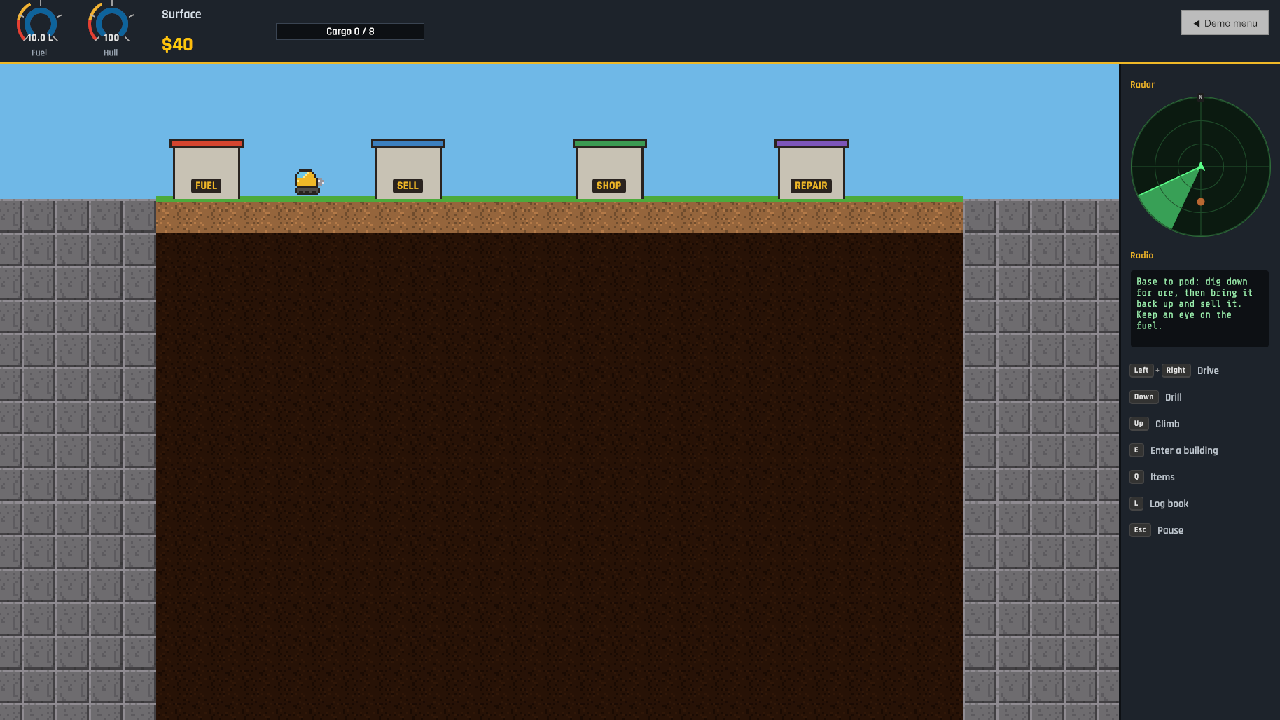
Scene: Assets/UIToolbox/Examples/Scenes/Driller.unity. Folder: Assets/UIToolbox/Examples/Driller.
Try it
- Open the scene. The pod stands on the surface with 40 cash. A tip tells you to dig for ore.
- Press the arrow keys or A, D, W and S. Left and right move the pod. Down drills into the ground. Up climbs back. A gamepad uses the left stick or the d-pad.
- Dig into copper ore. It flies to the cargo bar. Watch the cargo count and the badge go up.
- Dig deeper. The fuel gauge falls. Under 30 percent the alert strip shows "Low fuel". Under 15 percent the fuel meter flashes red.
- Return to the surface. Stand under a building and press E (Y on a gamepad). Four buildings stand on the surface: Fuel, Processor, Shop and Repair.
- In the Processor, click Sell all. Coins fly to the cash label, and the cash shows a wave.
- In the Shop, click a node of the upgrade tree. A compare panel shows the part now and after the upgrade. Click again to buy. Each part shows only its next upgrade; a buy shows the one after it.
- Dig down, past row 12. A gas pocket opens now and then. A ring fills. Press Space before it ends, or the hull takes damage.
- Press Q (X on a gamepad) to open the item wheel. Use an item you bought. While the pod carries an item, the HUD shows "Use items" with the button of the wheel, and the shop says the same under the item buttons.
- Press L (View on a gamepad) to open the log book with the depth and cash graph.
- Press Escape or Start. Escape closes the wheel or a window; with nothing open, both show the pause dialog with Resume, New game and, when the demo menu opened the scene, Back to demo menu. B on a gamepad closes the wheel or a window and does nothing when none is open. The game stops while a dialog, a gas pocket, the wheel or a window is open.
The game ends when the hull breaks, when the tank is empty under the ground, or when you dig the core crystal in the last row.
What it shows
HUD
A bar at the top, 92 px high. It has two Gauge controls (fuel and hull), a depth label with a RollingDigits gauge that rolls with the depth, a AnimatedLabel for the cash, a cargo ProgressBar with a Badge on its corner, and an AlertStrip. The cash text uses a <gradient=#ffd60a,#ff9f0a> tag, and a <wave> tag after a sale. The alert strip shows three alerts, in this order of priority: fuel, hull and a full cargo. A full cargo is a warning, and a bubble tells that more ore is lost until the pod sells.
The ground
The world element holds the tiles, the grass, the four buildings and the pod. The controller builds a pool of tile elements when the view gets its size, and moves the world with a translate, like a camera. A tile is 48 px. A tile the pod has not seen draws as dark dirt, so only the sonar shows its ore.
Sonar
The side panel has a Radar with pulse="true", pulse-duration="2500" and pulse-reveal="true". Each ore within the sonar range becomes a RadarContact with the class driller-blip--<tile>. The pulse reveals a blip when the ring passes it. Below the radar, a TypewriterLabel (characters-per-second="40") types radio lines at fixed depths. A key list closes the panel. Each row is a GamepadGlyph with auto-family, so it shows the button of the gamepad after a gamepad press and the key after a key press.
Building windows
The workspace has five closed windows. They have keyboard-shortcuts="false", so the game keys stay free.
- Fuel station: a
Gaugeand two buttons, Buy 5 L and Fill up. - Ore processor: a
DataGridwith the columns Ore, Count, Price and Value (format="$#,0"), aPieChartwithinner-radius="0.55"and Sell all. - Upgrade shop: an
UnlockTree(column-width="200",row-height="68"), item buttons with a cornerBadge, and anItemComparewith a Now and an After column. - Repair bay: a
Gaugeand a repair button. - Log book: a
Graphwith a Depth series and a Cash series. The cash uses thesecondary-axis. The graph keeps 400 points.
Overlays
Two NotificationArea controls show messages: a feed at the bottom left and events at the top center. A GlassPanel shows the gas pocket with a GamepadGlyph for the brace button and a ProgressRing. A second GlassPanel holds the item wheel, a RadialMenu with inner-radius="0.42" and cancel-text="Close". A Callout shows the tips. One ParticleLayer covers the whole screen.
How it is built
| File | Does |
|---|---|
Driller.uxml |
The HUD, the view, the workspace with five windows, the overlays and the side panel. |
Driller.uss |
The palette, the look of the HUD, the tiles, the buildings and the windows. |
DrillerController.cs |
Reads the keys, draws the world, fills the windows and fires the particles. |
DrillerGame.cs |
The rules: the ground, the moves, the fuel, the prices and the upgrades. No UI code. |
DrillerArt.cs |
Makes the 16 x 16 pixel art in code from patterns of characters. |
The game rules are plain C# in DrillerGame. The controller only reads them and calls methods. The grid is 24 columns wide and 100 rows deep. Each row is 5 meters.
| Part | Level 0 | Level 1 | Level 2 | Level 3 |
|---|---|---|---|---|
| Cost | free | 400 | 1500 | 5000 |
| Dig seconds (Drill) | 0.45 | 0.32 | 0.22 | 0.15 |
| Hull | 100 | 150 | 220 | 320 |
| Tank (L) | 10 | 16 | 25 | 40 |
| Cargo | 8 | 14 | 22 | 32 |
| Sonar (tiles) | 4 | 7 | 11 | 16 |
Ore sells for 30 (copper), 60 (iron), 120 (silver), 250 (gold), 500 (ruby) and 1000 (diamond). The core crystal is worth 20000. Fuel costs 2 per liter. A repair costs 1 per hull point.
The look
The palette is a set of USS variables. The rules start with .driller, so they win over Controls.uss. The pause menu is a MessageBox on the document root, outside .driller, so it takes the variables too:
.driller,
.tb-message-box {
    --driller-gold: #f0b828;
    --driller-ink: #0d1014;
    --driller-text: #d7e0ea;
    --driller-steel: #1d232c;
}
The scene has no image files. DrillerArt makes each texture at run time from a pattern and a palette. Point filtering keeps the pixels sharp, and a tile element stretches the texture to its size. The fonts are Rajdhani from Runtime/Resources/UIToolbox/Fonts and Share Tech Mono from Examples/Fonts.
The pool of tiles
A tile the pod has not seen gets a dark tint from USS. The controller does not need a second texture:
.driller .driller__tile--dark {
    -unity-background-image-tint-color: rgb(72, 60, 54);
}
The fuel alert
Each frame the controller sets the flash and the alert from the same fuel ratio:
var fuel = Game.Fuel / Game.FuelMax;
AttentionFlash.Set(_fuelMeter, fuel < FLASH_FUEL && !Game.Dead);
setAlert("fuel",
    fuel < FLASH_FUEL ? Severity.Error : fuel < 0.3f ? Severity.Warning
        : null,
    "Low fuel", "Go up to the FUEL station.", 3);
The USS gives the flash its color:
.driller .driller__meter.tb-attention--on {
    background-color: rgba(214, 69, 47, 0.55);
}
The upgrade tree
Every node is Secret, so a locked node shows only when the level before it is fitted: each part shows its next upgrade, and the rest appear one at a time. The game buys the part first. Then the tree unlocks the node and the controller adds sparks:
_upgrades.CanUnlock = node =>
    Game.Cash >= DrillerGame.UPGRADE_COST[parseNode(node.Id).level];
_upgrades.UnlockRequested += node =>
{
    var (part, _) = parseNode(node.Id);
    if (!Game.Upgrade(part)) return;
    _upgrades.Unlock(node.Id);
    _particles.Burst(node, sparks(new Color(0.94f, 0.72f, 0.16f), 16));
    // ...
};
The moves
The pod has no gravity. A move runs to its end over several ticks, and Tick starts the next one. A side input wins over down, and down wins over up:
var side = new Vector2Int(Math.Sign(input.x), 0);
if (side.x != 0) tryMove(side);
else if (input.y > 0) tryMove(new Vector2Int(0, 1));
else if (input.y < 0 && !OnSurface) tryMove(new Vector2Int(0, -1));
Ore is 30 percent harder than dirt, and each row adds 0.6 percent. This sets the dig time and the dig fuel:
private static float hardness(DrillerTile tile, int row) =>
    (IsOre(tile) ? 1.3f : 1f) * (1f + row * 0.006f);
Use it in your game
- Keep the split: rules in a plain class (
DrillerGame), the screen in a controller. The rules then run in tests without a UI. - Copy the HUD pattern: gauges, an alert strip and
AttentionFlashread the same state, so the warnings stay in step. - Copy the building windows. Each is a window of the workspace that the controller opens and closes. The controller treats any open window as a pause.
- Use
ParticleLayerwith aTargetfor the reward effect. The particles fly to the element, and theArrivedevent can bump it. - Use the
UnlockTreewithCanUnlockandUnlockRequestedfor any tech tree where the game owns the cost. - Replace
DrillerArtwith real textures if your game has art. - Sample-only parts: the ground generator, the prices and levels, the radio lines, the tips, the end texts and the pixel art.