
Breach
A first-person shooter over a walled compound at dusk, with a full-screen HUD. The player captures three beacons and destroys six drones that fire back. The screen shows a Crosshair, an InteractionPrompt over the ammo crates, a DamageIndicator, StatBars with pips, ProgressRings for the reload and the capture of a beacon, an AbilitySlot, a CompassBar, a round Minimap, WorldMarkerLayer markers, FloatingTextLayer damage numbers, an ObjectiveTracker, a NotificationArea, Kbd key caps and a Card for the menu, with a Slider for the sound volume. A "Get ready" countdown starts each round. In the world, the carbine fires tracers with a flash at the muzzle and a spark where the round lands, the drones fire red tracers back, and every shot, hit and blast has a sound made in code.
Video tutorial: Breach. All videos: Video tutorials.
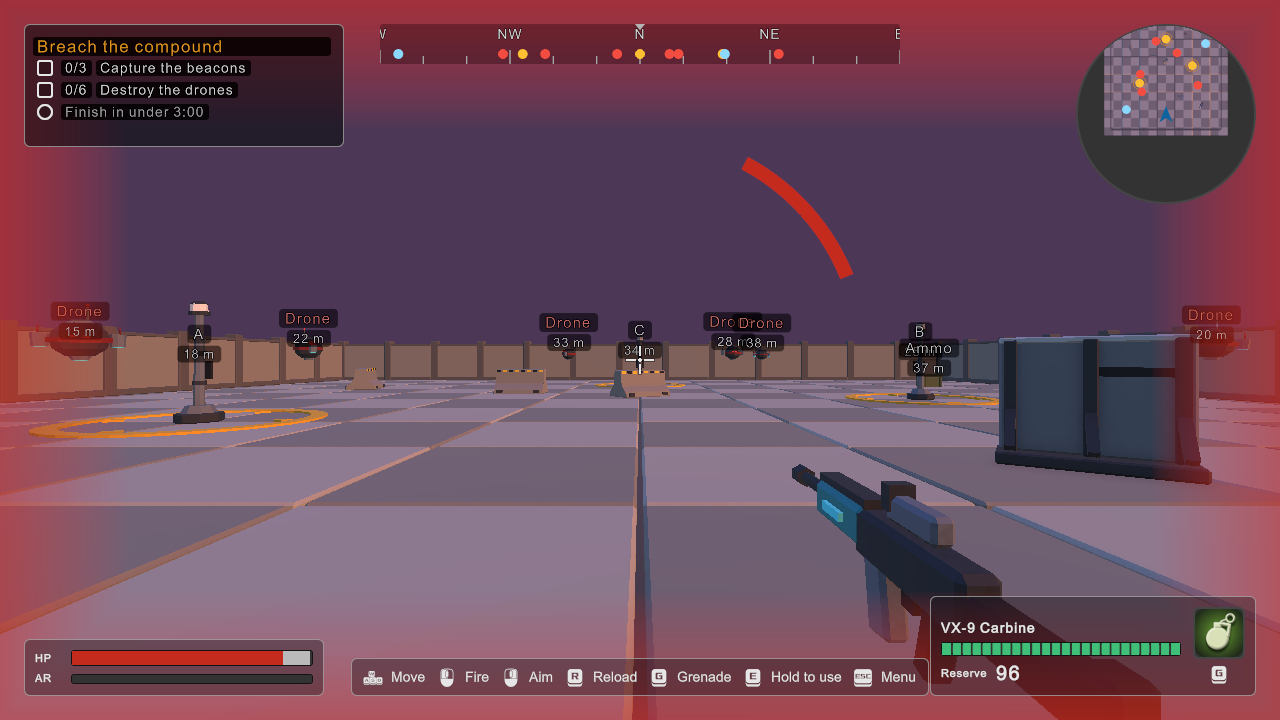
Scene: Assets/UIToolbox/Examples/Scenes/Breach.unity. Folder: Assets/UIToolbox/Examples/Breach.
Try it
- Open the scene and press Play. "Get ready" shows over the view and counts 3, 2, 1 with a beep each second, then Go! in green with a higher tone. You can look around during the countdown, but you cannot walk, fire, reload or throw, and the drones patrol without firing. Click the view to capture the mouse. The first click does not fire.
- Look with the mouse and walk with WASD. Shift sprints. The crosshair opens while you move, and more while you sprint.
- Hold the left button to fire. Each shot cracks, the carbine at the bottom right of the view kicks back, the muzzle flashes and a tracer flies to where the round lands, with a spark there. Each shot opens the crosshair a little, and the magazine bar at the bottom right loses a pip. Over a drone the crosshair turns red.
- Hit a drone. It gives a short metal sound, a number rises from the point of the hit and the hit marker shows. A shot at the head does double damage: the number shows as a critical hit and the marker as a headshot. The last shot breaks the drone apart in an orange burst, shows the kill marker, and the quest counts the drone.
- Let a drone see you. A second later it fires, and then every two seconds: its eye flashes red, a laser sounds from where it hovers, and a red tracer streaks past you. A wedge at the edge of the screen points at it and the edges flash. The armor at the bottom left takes each hit, one pip at a time, and the health takes the rest. At 0 health the round starts again, with the countdown.
- Press R to reload. The magazine clicks out, the ring around the crosshair fills, the crosshair dims and the weapon does not fire. The rounds then move from the reserve to the magazine with a second click. An empty magazine reloads on its own; with no rounds left at all, the trigger only clicks dry.
- Press G to throw a grenade where you look, at most 10 meters away. It bursts with a rumble after a short fuse and hurts each drone within 5 meters. The slot cools down for 8 seconds. Hold G (Y on a gamepad) to show the arc of the throw, and let go to throw.
- Walk to an ammo crate (the blue markers). The marker gives way to a prompt over the crate: the glyph of the key, "Take Ammo", and a ring. Hold E, or the south button of a gamepad, until the ring is full for 48 rounds and full armor. The glyph follows the device you used last. A tap does nothing, and a player with full armor and a full reserve gets no prompt.
- Stand in the ring of a beacon (A, B and C on the compass). The ring on the ground turns from amber toward green, and a panel under the crosshair names the beacon and fills a ring in 3 seconds; the ring on the marker of the beacon fills with it. Step out of the ring. The progress falls back at a steady rate, from full to empty in 6 seconds, and the ring of the panel turns red while it falls. Step back in and it rises again. When it is full the beacon is captured: three rising notes play, the panel says "Captured" in green for a moment, a toast says so, and the beacon turns green. Its marker leaves the compass and the screen; the minimap keeps it.
- Complete the quest: three beacons and six drones. The optional "Finish in under 3:00" completes too when you are fast enough. A toast says "Compound breached", and 4 seconds later a new round starts with the countdown. The radio at the bottom center, a Subtitles control, has "Command" speak on each capture, at the start of a round and when the compound is breached.
- Press Esc. The menu opens, the game waits and the mouse comes free. Resume goes back and captures the mouse again, and Restart starts the round again, and Quit goes back to the demo menu when the demo menu opened the sample. The Sound volume slider sets the volume of the sounds of the game, and the Auto play switch turns the demo mode on or off. The countdown waits while the menu shows.
- Turn on the Auto play switch in the menu, close the menu and take your hands off the keys and the mouse. After 5 seconds the player plays on its own and a badge says so. It fights the drones that see it, takes ammo when it runs low, walks to the open beacons and then to the drones that are left, with the same tracers and sounds. At the start of a round it waits for Go. Any key gives the control back.
| Key | Gamepad | Does |
|---|---|---|
| Mouse | Right stick | Look. |
| W, A, S, D | Left stick | Walk. |
| Shift | Left shoulder | Sprint. |
| Left button, F | Right trigger, right shoulder | Fire. |
| Right button (hold) | Left trigger (hold) | Aim: the view zooms and the aim sticks to a drone near the crosshair. |
| R | West | Reload. |
| G | North | Throw a grenade. |
| E (hold) | South (hold) | Take ammo and armor at a crate. |
| Esc | Start | Open or close the menu. B closes it. Back to demo menu shows when the demo menu opened the sample. |
What it shows
The compound
BreachWorld builds the compound from Unity primitives at run time: the ground, four walls, five blocks of cover, six drones, three beacons with their rings and two ammo crates. Each drone, beacon and crate has a HudTarget, so the compass, the minimap and the markers find them. The player is a CharacterController with the camera at eye height, and the camera draws on the screen under the HUD. The compound lies 2800 meters under the scene, so the camera of the scene does not see it.
A drone is a sphere with a head. BreachWorld.DroneOf tells the controller which drone a collider belongs to and whether the collider is the head.
The countdown
At the start of each round, and after a retry or a downed player, restartGame sets the countdown to CountdownSeconds (3). The panel in Breach.uxml holds two Labels, and each whole second shows the next number with a pop and a beep:
CountdownText.text = beat == 0 ? "Go!" : NUMBERS[beat];
ToolboxAnimation.Pop(CountdownText, 1.4f, 350);
Sounds.Play(beat == 0 ? Sounds.Go : Sounds.Beep);
Go! adds the breach-countdown--go class, which hides "Get ready" and turns the number green, and the panel hides 0.7 seconds later. While CountingDown is true, Tick runs only the countdown and the patrols of the drones, so the time limit, the beacons, the drone shots and auto play wait. Shoot, Reload and ThrowGrenade do nothing, and Update turns the view but does not walk. Set CountdownSeconds to 0 for a round that starts at once.
Tracers, flashes and sparks
BreachEffects builds a carbine of boxes under the camera, a flash at its muzzle with a short point light, 24 tracers and 24 sparks. The tracers and the sparks are pools: a shot takes the next one, round robin, and the oldest starts again when all fly. They have no collider and cast no shadow, so a shot never hits them.
// kick, flash, and a tracer from the muzzle to the point
Effects.FireGun(hit.point);
Effects.Spark(hit.point,
    drone >= 0 ? BreachEffects.SparkKind.Hit
        : BreachEffects.SparkKind.Wall);
The ray of a shot starts at the camera, as the crosshair is there; the tracer starts at the muzzle and ends at the hit point, so the two meet where the crosshair aims. A drone shot shows a red flash at its eye and sends a slower red tracer that passes the camera at one side and flies on, so the player sees where it came from. A destroyed drone shows a big orange burst. Effects.Tick(dt) runs first in each Tick, so a tracer shows in the frame of its shot.
The sounds
The sample ships no audio file. BreachSounds makes 11 clips at the start with SampleTones, from sine tones, noise, falling pitch and short fades, and OnDestroy destroys them, since they are not assets:
| Sound | Plays |
|---|---|
Shot |
A shot of the carbine: a crack of noise over a low thump. |
Hit |
A round that hits a drone. |
Destroyed |
A drone that breaks apart, from where it was. |
DroneShot |
A shot of a drone, from the drone. |
ReloadStart, ReloadEnd |
The magazine out and in. |
Empty |
The trigger with no rounds left. |
Grenade |
The blast of a grenade, from the blast. |
Captured |
A captured beacon: three rising notes. |
Beep, Go |
The beats of the countdown and Go!. |
The sounds of the player play flat with PlayOneShot on a source of the camera. The sounds of the world play on a pool of 8 3D sources, so a drone to the left sounds from the left and a far blast is quieter. The camera has the AudioListener. SoundVolume, or the Sound volume slider in the menu, sets Sounds.Volume, and the Master of the audio options of the game scales it again through AudioListener.volume.
The crosshair
The Crosshair shows the state of the weapon:
| Does | Code |
|---|---|
| Opens while the player moves or sprints | Crosshair.RestSpread = moving ? sprint ? 0.6f : 0.3f : 0; |
| Opens a little with each shot | Crosshair.AddSpread(0.18f); |
| Turns red over a drone | Crosshair.TargetKind = HudTargetKind.Enemy; |
| Changes near a crate | Crosshair.State = CrosshairState.Interact; |
| Dims while the weapon reloads | Crosshair.State = CrosshairState.Disabled; |
| Shows a hit, a headshot or a kill | Crosshair.ShowHit(CrosshairHit.Headshot); |
The keys fire in a cone that grows with Crosshair.Spread, so a moving player hits less.
The prompt over a crate
The InteractionPrompt in Breach.uxml has the verb, the object and the hold; the controller only says where it hangs:
<tb:InteractionPrompt
    name="prompt"
    verb="Take"
    noun="Ammo"
    hold-duration="500" />
Prompt.Camera = World.Camera;
Prompt.Completed += _ => useCrate();

// Each step of the game: over the crate within reach, or hidden
Prompt.Show(World.CrateTarget(crate));
Prompt.Hide();
Show with the same target changes nothing, so the call in each step is free. The prompt reads E and the south button of a gamepad itself, and Completed fires when the player has held the button for the half second. The marker of that crate would stand at the same point as the prompt, so its HudTarget.ShowOn loses Marker while the prompt shows. The menu and a new round hide the prompt. Auto play takes ammo from code and does not use the prompt.
The damage indicator
A drone shot calls Damage.Hit(drone, strength) with the transform of the drone, so the wedge follows the drone while it moves and the player turns. The hit is weaker while armor lasts. TakeHit(from, damage) does the same from a point, for a test or your own game.
The bars and the rings
| Control | Setting | Does |
|---|---|---|
health |
max-value="100" |
The health, with a trail on a hit. |
armor |
segments="5", max-value="5" |
The armor in pips. Each pip takes one hit. |
magazine |
segments="24", max-value="24" |
The rounds in the magazine, one pip each. |
reloadRing |
animate="false", thickness="4" |
Fills around the crosshair during a reload. |
captureRing |
animate="false", thickness="5", show-text="true" |
Fills in the capture panel under the crosshair, with the percent in the middle. |
The capture ring of each beacon on its marker is a ProgressRing made in code. The MarkerShown event of the WorldMarkerLayer adds it to the marker of the beacon, and MarkerHidden takes it off:
Markers.MarkerShown += (target, marker) =>
{
    var beacon = World.BeaconOf(target);
    if (beacon >= 0)
        marker.Q(className: WorldMarkerLayer.BODY_CLASS)
            .Add(_rings[beacon]);
};
The capture of a beacon
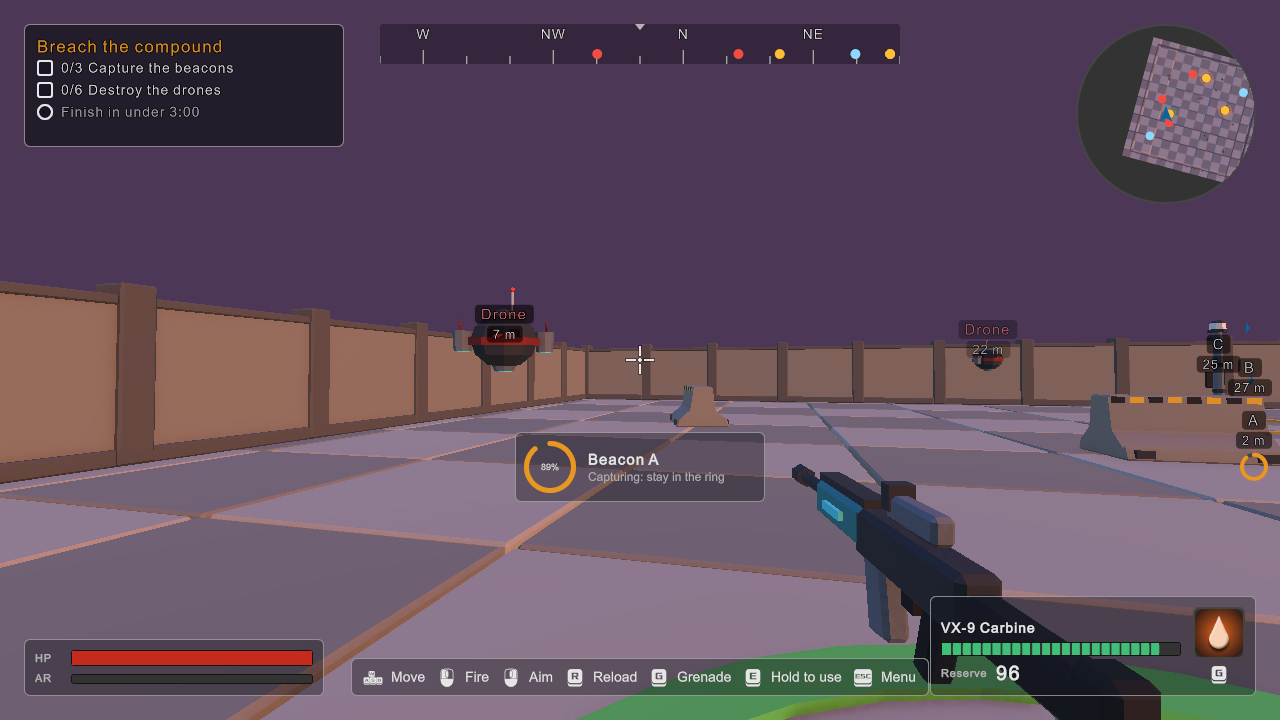
The marker of a beacon floats over its pole, so it can sit at the edge of the screen or out of view while the player stands in the ring. The capture also shows in a panel under the crosshair, where the player looks. A beacon fills while the player stands in its ring and falls back at a steady rate outside it; a full beacon is captured:
var progress = inside ? before + dt / CAPTURE_SECONDS
    : Mathf.Max(0, before - dt / RELEASE_SECONDS);
if (progress >= 1) capture(i);
CAPTURE_SECONDS is 3 and RELEASE_SECONDS is 6, so the fall is slower than the fill and never at once. Each step the progress goes to three places:
| Place | Shows |
|---|---|
The panel under the crosshair (CapturePanel) |
The name of the beacon, a ProgressRing and a line: "Capturing: stay in the ring", "Falling back: return to the ring" or "Captured". It follows the beacon that the player stands in, else the beacon with the most progress, and hides at 0. The ring is amber while it fills, red while it falls and green when the beacon is captured, which stays for CAPTURED_SECONDS. |
| The ring on the ground | World.ShowProgress(beacon, progress) tints it from amber to green. |
| The ring on the marker | The same value, while the marker shows. |
The panel changes its display, its classes and its texts only when the state or the beacon changes. The texts come from tables made at the start, so a step makes no string.
The grenade
The grenade is an AbilitySlot with an icon and a Kbd under it. G calls Grenade.Press(). The slot raises Activated, which throws the grenade, and does nothing while it cools down.
The quest and the toasts
Quest = Tracker.AddQuest("Breach the compound");
_beaconsObjective = Quest.Add("Capture the beacons", 3);
_dronesObjective = Quest.Add("Destroy the drones", 6);
_timeObjective = Quest.Add("Finish in under 3:00", 0, true);
The time objective fails after 3 minutes, and completes with the quest before then. The NotificationArea under the minimap shows at most three toasts: a captured beacon, ammo, a downed player and the end of the round.
Auto play
With AutoPlay on, the player plays on its own after AutoPlayDelay seconds with no input (5 by default). It walks straight to its goal; the character controller slides it along the cover. Set AutoPlay to false, or turn off the switch in the menu, for a game with no demo mode. AutoPlay is off by default.
Public members
| Member | Description |
|---|---|
Crosshair, Damage |
The Crosshair and the DamageIndicator. |
Prompt |
The InteractionPrompt over the ammo crate within reach. |
HealthBar, ArmorBar, MagazineBar, ReserveLabel |
The bars and the rounds in reserve. |
ReloadRing, Grenade |
The reload ProgressRing and the grenade AbilitySlot. |
CapturePanel, CaptureRing, CaptureTitle, CaptureStatus |
The capture panel under the crosshair, its ProgressRing, the name of the beacon and the line of text. |
CaptureOf(beacon) |
The capture progress of a beacon, from 0 to 1. |
CAPTURE_SECONDS, RELEASE_SECONDS, CAPTURED_SECONDS |
The seconds that fill a beacon, that empty it outside the ring, and that the panel stays after a capture. |
Compass, Minimap, Markers, DamageText |
The CompassBar, the Minimap, the WorldMarkerLayer and the FloatingTextLayer. |
Tracker, Quest, Notes, Menu |
The ObjectiveTracker, the quest, the NotificationArea and the menu Card. |
World |
The BreachWorld: the player, the camera, the drones, the beacons and the crates. |
Ammo, Reserve, Health, Armor, Reloading |
The state of the player and the weapon. |
BeaconsCaptured, DronesDestroyed |
The progress of the round. |
AutoPlay, AutoPlayDelay, AutoPlayActive |
Auto play on or off, the seconds without input before it starts, and whether it runs now. |
CountdownSeconds, CountingDown |
The seconds of the countdown at the start of a round, from 0 to 9 (3), and whether it runs now. |
CountdownPanel, CountdownText |
The countdown over the view and its number. |
Effects |
The BreachEffects: the carbine, the muzzle flash, and the pools of tracers and sparks. |
Sounds, SoundVolume |
The BreachSounds, and the volume of the sounds, from 0 to 1 (0.8). |
MenuVisible, ShowMenu(visible) |
Whether the menu shows; show or hide it. |
Shoot(ray), Reload(), ThrowGrenade() |
Fire one round along a ray, reload, and throw a grenade where the camera looks. |
TakeHit(from, damage) |
Hurt the player with a shot from a point. |
Restart() |
Start a new round, with the countdown. |
Tick(deltaTime) |
Run the game for some seconds. Update calls it after it reads the input; a test calls it to step the game. |
How it is built
| File | Does |
|---|---|
Breach.uxml |
The HUD: the layers, the compass, the quest, the minimap and the toasts, the reload ring, the crosshair and the prompt, the capture panel, the health and armor, the weapon and the grenade, the keys, the auto play badge, the countdown and the menu with its volume slider. |
Breach.uss |
Places the parts and gives the panels a glass look. Each rule starts with .breach. |
BreachController.cs |
Finds the parts, gives the controls their data, reads the input, runs the countdown, the rules and the auto play, and calls the effects and the sounds. |
BreachWorld.cs |
Builds the compound, the player and the camera with its AudioListener, tints the ring on the ground of a beacon, and tells which drone, beacon or crate a collider or a target belongs to. |
BreachEffects.cs |
Builds the carbine in view and the pools of tracers and sparks, and moves them each step. |
BreachSounds.cs |
Makes the clips, plays them flat or from a point in the world, and destroys them at the end. |
../Shared/SampleTones.cs |
Makes an AudioClip from a wave function in code: tones, noise, a falling pitch and a decay. |
The HUD root has picking-mode="Ignore", so only the menu takes the pointer.
The game makes no garbage per frame. The texts of the numbers and of the capture panel are made once at the start, and the bars, the labels and the panel change only when a count or a state changes. The tracers, the sparks and the 3D sound sources are made once and turned on and off, and the clips are made once.
Use it in your game
- Copy the HUD from
Breach.uxmland keep the names of the controls. ReplaceBreachWorldand the rules in the controller with your own game. - Set the
Cameraand thePlayerof the layers, the compass, the minimap and the damage indicator to your first-person camera and player. - Call
Crosshair.ShowHitfrom your weapon when a shot lands, andDamageIndicator.Hitwith the transform of the shooter when the player takes damage. - Give each thing the player can use a
HudTarget, set theCameraof theInteractionPrompt, andShowit over the thing that the player aims at. - Put your own parts on a marker from
MarkerShown, as the capture rings do. - Copy the capture panel for any zone that the player holds: a
ProgressRingin the HUD that fills inside the zone, falls at a steady rate outside it and stays for a moment when it is full. - Copy the countdown for any start that waits: two
Labels in the HUD, a number from a table each second, andToolboxAnimation.Popon it. - Sample-only parts: the compound, the drones and their aim, the grenade, the crates, the capture rules, the auto play, the carbine of boxes and its tracers, and the sounds made in code. Use your own models, particles and audio files in a game. The radio lines are
Radio.Show(text, "Command")calls.