
Boss intro
The title card that a game plays when a boss or a hero appears. The scene has six intros in four looks: comic, gothic, cyber and toon. Each intro flashes the screen, slides in a slab with the name, slams the name down, types the title and fades in a quote. The scene uses an AnimatedLabel for the name, a TypewriterLabel for the title and a ParticleLayer for the sparks, petals, data bits and confetti. The pictures are pixel art PNGs that a script draws, tinted with the colors of each character.
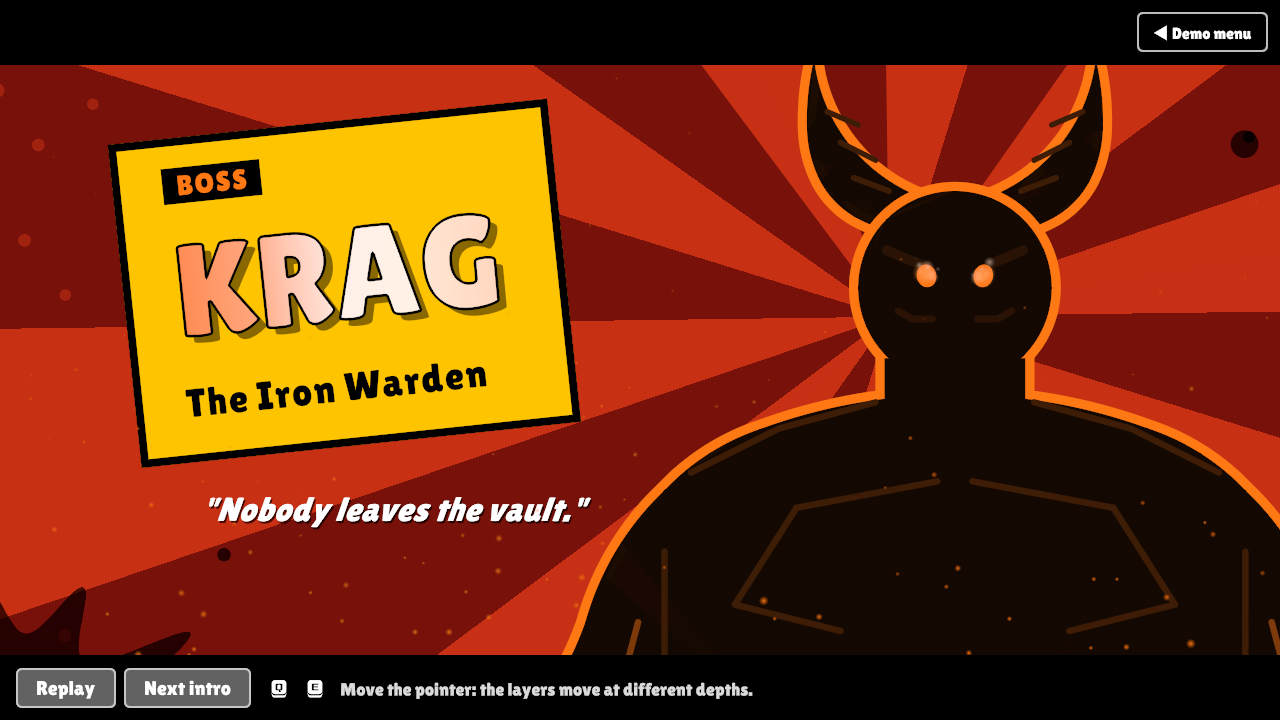
Scene: Assets/UIToolbox/Examples/Scenes/BossIntro.unity. Folder: Assets/UIToolbox/Examples/BossIntro.
Try it
- Open the scene. The first intro (KRAG, comic look) plays at once.
- Watch the steps. The screen flashes, the letterbox bars come in, the slab slides in, and the name slams down. The camera shakes and sparks fly. The title types, and the quote fades in.
- Move the pointer over the screen. The four picture layers move at different depths. The front layer moves the most. When the pointer rests or leaves the screen, the layers drift slowly.
- Click Replay to play the same intro again.
- Click Next intro to play the next of the six: KRAG, MORWEN (gothic), MOTHER STORM (comic), OVERSEER (cyber), ZED VALE (comic) and KING GLOOP (toon). After the last one, the list starts again. On a gamepad, RB plays the next intro and LB the previous one; the two shoulder glyphs by the buttons show them after a gamepad press. A on a button presses it and never leaves the scene.
- In the toon intro (KING GLOOP), move the pointer. The eyes of the slime follow it, and the slime wobbles.
- Press Escape or Start. A menu with Resume and Quit opens. B on a gamepad does not open it.
What it shows
The four looks
| Look | Intros | What the player sees |
|---|---|---|
| Comic | KRAG, MOTHER STORM, ZED VALE | A flash and letterbox bars. A tilted slab slides in from the left. The name slams down from three times its size. The camera shakes and sparks fly. |
| Gothic | MORWEN | No flash. Under a moon, the slab fades in slowly. The name fades in with wide letters that close up, in a serif font. Petals fall. |
| Cyber | OVERSEER | A scrolling neon grid. A dark panel slides in from the right. The name has a split-color shadow and shakes. Data bits rise. |
| Toon | KING GLOOP | A rounded slab drops in and bounces. The name pops up from a small size, with a rainbow wave and confetti. No letterbox bars. |
In every look, the kind label (BOSS, THREAT, HERO, or BOSS! for KING GLOOP) sits above the name. The TypewriterLabel types the title. The name gets its last text effect, and the quote fades in.
Name and title
The name is an AnimatedLabel. Its Effect changes during the intro. While the name lands, the comic and cyber looks use Shake, and the toon look uses Wave. After the hit, the name gets its last effect: Gradient from white to the color of the character, with Shimmer (comic), Pulse (cyber), or Rainbow | Wave (toon). The title is a TypewriterLabel with characters-per-second="22".
Particles
One ParticleLayer draws all the particles. A burst starts when the name lands. A constant stream comes from a strip outside the screen: embers (comic), petals from above (gothic), data bits (cyber) or bubbles (toon). Two small emitters at the eyes of the figure follow the figure layer.
Parallax
Four layers sit one over the other: rays (the back), figure, card (the text) and front. The pointer moves each layer against the pointer by its depth: 12, 34, 60 and 100 pixels at the edge of the screen.
Vector art
The pictures of each look:
| Look | Back | Figure | Front |
|---|---|---|---|
| Comic | Turning rays with halftone dots | A brute, with horns for a boss | Ink splats |
| Gothic | Twinkling stars, the moon, a castle | The countess | Flapping bats |
| Cyber | A neon floor that scrolls, scan lines | The machine | HUD corners and a blinking dot |
| Toon | Soft rays that turn slowly | A slime that wobbles, with bubbles inside | Clouds |
Tools/portraits/bossintro.mjs draws them as SVGs with smooth shapes, gradients and soft outlines, so they stay sharp at any screen size. Run node Tools/portraits/bossintro.mjs to make them again. The SVGs are in Resources/BossIntroArt and import as VectorImage assets. The animated pictures are numbered sets, such as slime-body-0 to slime-body-3. The slime has three layers in step: the body with its one outline, shading, drips and puddle, the face, and the lids that narrow the eyes over the pupils. Each slime picture marks the corners of its frame, so the importer keeps the whole frame and the layers line up. node Tools/portraits/bossintro.mjs --preview also renders each frame of the slime to a PNG.
How it is built
| File | Does |
|---|---|
BossIntro.uxml |
The stage, the four layers with their pictures, the slab with its labels, the bars, the flash and the buttons. |
BossIntro.uss |
The start and end look of each element, the transitions, the place of each picture, and one block of rules for each look. |
BossIntroController.cs |
The CHARACTERS table, the steps of the intro, the particles, the parallax, and the tint and motion of the pictures. |
BossIntroArt.cs |
The numbers of the art: the scale, the eye points of the figures and the animations. |
Resources/BossIntroArt |
The SVGs from Tools/portraits/bossintro.mjs. |
The controller never moves the slab, the name, the bars or the flash. It adds the class bi--in at the right time, and a USS transition does the motion. The name starts small and clear in USS:
.bi-name {
    font-size: 132px;
    opacity: 0;
    scale: 3 3;
    transition-property: scale, opacity;
    transition-duration: 0.18s;
    transition-timing-function: ease-in;
}

.bi-name.bi--in {
    opacity: 1;
    scale: 1 1;
}
A look class on the stage changes the fonts, the layout and the transitions. The gothic look swaps the font and makes the letters close up:
.bi-stage--gothic {
    -unity-font-definition: url("../Fonts/Cinzel.ttf");
}
.bi-stage--gothic .bi-name {
    letter-spacing: 60px;
    transition-property: letter-spacing, opacity;
    transition-duration: 1.8s;
}
.bi-stage--gothic .bi-name.bi--in {
    letter-spacing: 10px;
}
Each character is one entry in a table. The colors and texts are data:
new()
{
    Kind = "BOSS", Name = "KRAG", Title = "The Iron Warden",
    Quote = "\"Nobody leaves the vault.\"", Style = Look.Comic,
    Back = new Color32(120, 18, 10, 255),
    Ray = new Color32(200, 48, 20, 255),
    Slab = new Color32(255, 196, 0, 255),
    Accent = new Color32(255, 120, 20, 255),
    NameTo = new Color32(255, 70, 30, 255), Horns = true,
},
A coroutine times the steps. Each step adds a class or changes an effect, then waits:
_slab.AddToClassList(IN_CLASS);
yield return new WaitForSecondsRealtime(NAME_DELAY * pace);

// The name lands. The look picks the text effect while it lands.
_name.AddToClassList(IN_CLASS);
_name.Effect = look switch
{
    Look.Comic or Look.Cyber => TextEffects.Shake,
    Look.Toon => TextEffects.Wave,
    _ => TextEffects.None,
};
yield return new WaitForSecondsRealtime(SLAM_TIME * pace);
Pace(look) is 2 for the gothic look and 1 for the others, so the gothic steps take twice as long. The waits use real time.
The pointer sets a target, and Update eases the layers to it. Without the pointer, the target is a slow figure eight:
var ease = 1 - Mathf.Exp(-seconds * PARALLAX_EASE);
Parallax = Vector2.Lerp(Parallax, target, ease);
for (var i = 0; i < _layers.Length; i++)
{
    var depth = LAYERS[i].Depth;
    _layers[i].style.translate = new Translate(
        -Parallax.x * depth, -Parallax.y * depth * 0.6f);
}
Each picture is an element with a background-image in USS, or an AnimatedImage for a sheet of frames. The pictures are white and grey, and the controller tints them with the colors of the character at the start of an intro, so one picture serves every boss. The rim and the eyes of a figure take Accent, the rays, the moon and the grid take Ray, and the body and the lids of the slime take Body:
foreach (var picture in _accentTinted)
    picture.style.unityBackgroundImageTintColor = who.Accent;
_slimeBody.Tint = who.Body.a > 0 ? who.Body : who.Accent;
A look class on the stage shows the pictures of the look and hides the others:
.bi-look {
    display: none;
}
.bi-stage--toon .bi-look--toon {
    display: flex;
}
Each of the rays, figure and front layers holds an art box, bi-art, whose pictures are placed in art units. When the size of the layer changes, the controller scales the box: BossIntroArt.Scale gives 8 screen pixels for each art unit on a 1080p screen. The pictures are SVGs, so they are sharp at any scale, and the eye points and moves are in art units too.
Nothing is drawn in code, so nothing repaints. The pictures move by transform: the rays turn with rotate, the bats bob and the pupils of the slime follow the pointer, each with translate. The numbered pictures step through frames: the slime wobbles in 4 frames, the bats flap and the neon floor scrolls. Update writes a style only when its value changes:
var frame = BossIntroArt.SlimeFrame(time);
if (frame != _slimeFrame)
{
    _slimeFrame = frame;
    show(_slimeBody, _slimeBodyImages, frame);
    show(_slimeFace, _slimeFaceImages, frame);
    show(_slimeLids, _slimeLidsImages, frame);
}
var pupil = BossIntroArt.PupilOffset(Parallax, frame);
The layers and the pictures that move have the DynamicTransform usage hint, so the parallax, the shake and these moves are transforms on the GPU. Update does nothing while the stage is hidden.
The scene has its own fonts in Examples/Fonts: Lilita One for the comic and toon looks, Cinzel for the gothic look, and Share Tech Mono for the cyber look. The cyber look also uses Rajdhani, the font of the Game theme in Runtime/Resources/UIToolbox/Fonts. The colors are in the CHARACTERS table and are set as inline styles, so they win over the USS.
Use it in your game
- Add a
CharactertoCHARACTERSfor a new boss. Choose aLook, the texts and the colors. - For a new look, copy a look block in
BossIntro.uss. Change the fonts, the layout and the transitions. Add its pictures to the layers with its look class, and a case to the particle code if you want its own particles. - Put the art of your game in place of the PNGs. Draw it white to tint it with the colors of each character, or in color with no tint. The parallax and the steps work the same.
- Call
Play(index)from your game when a boss appears. UseIsPlayingto wait for the end. - To show the intro in a screen of your game, add
BossIntro.uxmlas a template instance and callAttach(root)on it, thenPlay(character). The Replay and Next intro buttons are optional, so a game screen can leave them out. - Keep the pattern: the controller adds a class, and a USS transition moves the element. This keeps the timing in one place and the motion in USS.
- Sample-only parts: the six characters, the two buttons and the hint text, and the Escape menu (it comes from the demo menu, not from the intro).