
Crypt
A dungeon crawler seen from above. The hero walks a stone hall and fights skeletons. The screen shows a full role-playing game interface: two orbs of liquid for health and mana, a potion hotbar, an experience bar, a target frame, and two windows with a paperdoll and a bag. The windows have a custom iron frame. The scene uses GlassPanel, ParticleLayer, NotificationArea, a window template, InventoryGrids for the bag and the gear, and an ItemCompare.
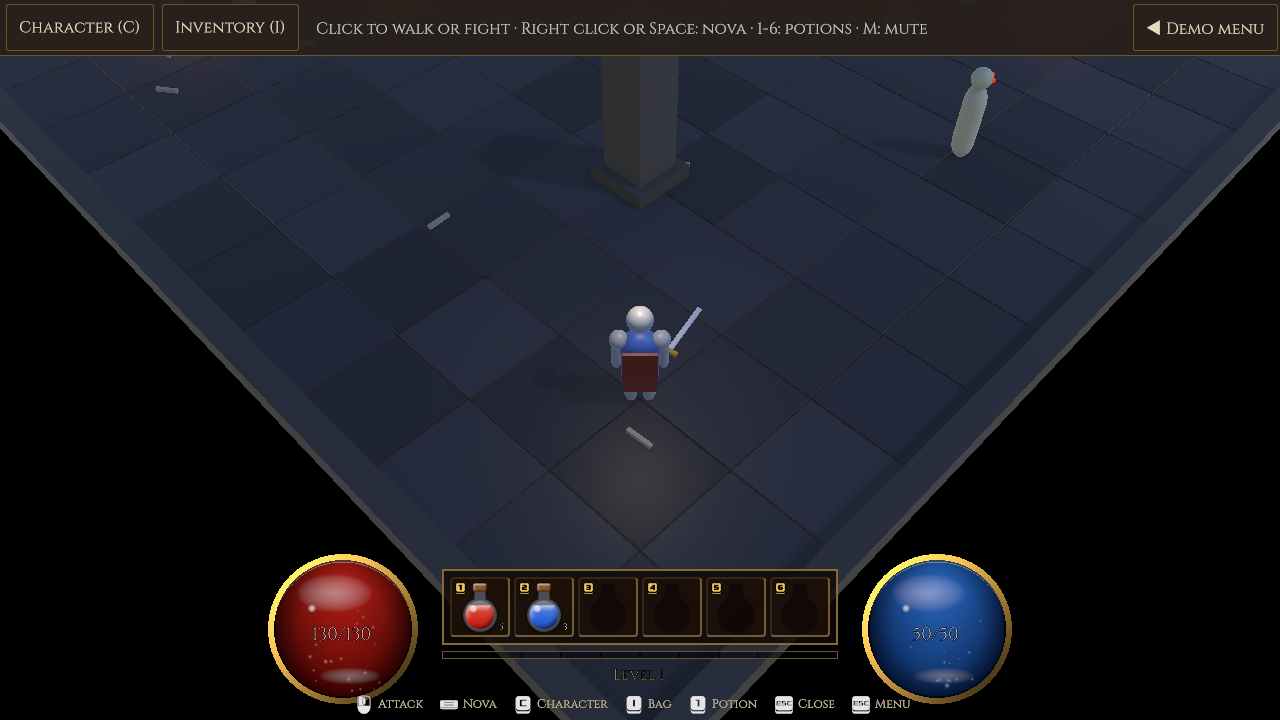
Scene: Assets/UIToolbox/Examples/Scenes/Crypt.unity. Folder: Assets/UIToolbox/Examples/Crypt.
Try it
- Open the scene. The hero stands in the hall, and the Character and Inventory windows are closed. Press C and I, or use the toolbar, to open them.
- Click the floor. The hero walks there. Hold the button down, and the hero follows the pointer.
- Click a skeleton. The hero walks up and fights it. The target frame shows its name and health.
- Press the right mouse button or Space. The hero casts a nova. It costs 20 mana, hurts each skeleton within 4.5 units and pushes it back. With too little mana, a warning shows.
- Kill a skeleton. A notification shows the gold and sometimes a health potion. The skeleton gives experience.
- Press 1 or 2. The hero drinks the health or the mana potion of the hotbar. The slot flashes and a sweep shows the 1.5 second cooldown. You can also click a hotbar slot.
- Gain a level. A banner opens at the top middle with a medallion and gold sparks. You get two points to spend.
- Press C to open the Character window. Click + next to Strength, Vitality or Intellect. The health, mana and damage change at once.
- Press I to open the Inventory window. Drag a potion from the bag to a hotbar slot. Drag it off the bar to put it back in the bag.
- Move the pointer over an item. A card shows its name, kind, description and value. For gear in the bag, the card also compares the gear with the worn piece.
- Drag a piece of gear onto a slot of the paperdoll. A wrong slot shows a warning, such as "The Head slot does not take the ...".
- Double click a potion to drink it. Double click gear to put it on or take it off.
- Double click the Hunter Bow in the bag. The hero holds a bow now, and the Damage line of the Character window shows the damage of an arrow. Click a skeleton. The hero stops up to 9 units from it and shoots an arrow every 0.8 seconds. The arrow flies from the bow to the skeleton, and the skeleton loses health when the arrow lands. Put the Short Sword on again, and a click on a skeleton is a sword hit that lands at once.
- Listen while you play. An item that you pick up or put down, a drink, a piece of gear that you put on, a hit on a skeleton, the gold of a kill and a refused move each play a short sound. Press M to mute the sounds, and again to hear them.
- With a gamepad: the left stick walks, A fights, X casts a nova, Y opens and closes the Character window, Select (Back) opens and closes the Inventory window, and B closes the active window. In a window, the d-pad moves between the slots and the + buttons, and A drinks a potion, puts on a piece of gear or raises a stat. Start asks to leave. The game takes Y and Select from the workspace (
freeGamepadButtonsremoves their bindings from a copy of the input actions), so Y does not maximize the window. - Press Escape. A menu with Resume and Quit opens, and the game stops. The back button is at the end of the toolbar.
The toolbar has the buttons Character (C) and Inventory (I). Its hint reads "Click to walk or fight, Right click or Space: nova, 1-6: potions, M: mute".
What it shows
The world
CryptWorld builds the hall from Unity primitives at run time: the floor, the walls, the hero and six skeletons. The hero is a knight in steel with a blue tabard and a red cape, like the figure on the paperdoll. The first skeleton is a Bone Captain. It is bigger, has 90 health instead of 40, and gives 60 experience instead of 20. A skeleton that sees the hero walks up and hits him. A dead skeleton rises again after 10 seconds. A dead hero rises again after 2 seconds.
With a bow in the weapon slot (CryptHero.HasBow, an item whose name ends with Bow), a click on a skeleton makes the hero shoot instead of swing. The hero shoots from up to 9 units (CryptWorld.BOW_RANGE) when no pillar or tomb stands on the line (CryptWorld.CanShoot). Out of reach, the hero walks closer, as with a sword. An arrow is a small shaft that flies at 16 units each second and follows its skeleton. The damage is fixed at the shot and applies when the arrow lands. A skeleton that dies while an arrow flies is not hit again, so it counts once. The world makes four arrows once and reuses them. The bow reaches farther than the sight of a skeleton (7 units), so the first arrows hit a skeleton that has not seen the hero. Every other weapon keeps the melee hit.
The camera draws into a RenderTexture. The controller sets this texture as the background image of the sample root. The UI sits over the world, and the glass of the orbs blurs it.
Orbs
CryptOrb is a custom element of this sample. It has four layers, back to front:
- A
GlassPanelthat frosts the world behind the orb (Blur8, dark tint). - The liquid. It draws two waves with a gradient from
bright-colorat the surface todeep-colorat the bottom. - A box with a
ParticleLayer. Bubbles rise in the liquid and stop at the surface. An empty orb has none. - The glass: the shade at the edge, the highlights and a gold rim.
The level follows Value with an easing. The health orb is red (#E0281E to #160000) and the mana orb is blue (#3482F0 to #020628).
Hotbar, experience and target
The hotbar is a Hotbar with six slots on the keys 1 to 6. Each slot shows its potion and the size of the stack as charges. A drink starts a 1.5 second cooldown on the slot. An empty slot shows a dark potion. A bar under the hotbar shows the experience, and a label shows the level. The target frame shows the name and the health of the skeleton that the hero fights. It hides when there is no target. The controller reads the hero each frame for these values, because health and mana regenerate all the time.
A potion also starts a regeneration. A health potion gives vigor and a mana potion gives focus; for ten seconds the hero regenerates faster. A StatusEffectBar at the top left of the screen shows each one with its seconds left. CryptController.drink applies the effect, and showEffects removes it when the hero has no seconds left, as after a death.
A drag from the hotbar carries the inventory slot of the potion. A drag from a bag grid carries an InventoryDrag with the index of the slot in the model and the count, so a Shift drag puts half a stack on the bar.
_hotbar.DragData = i =>
{
    if (Hero.Hotbar[i].Item == null) return null;
    // The Hotbar reads the data when a drag starts: the potion leaves
    // its slot
    play(_pickUpSound);
    return Hero.Hotbar[i];
};
_hotbar.CanDropExternal = (data, i) => data switch
{
    InventorySlot from => Hero.Inventory.CanMove(from, Hero.Hotbar[i]),
    InventoryDrag drag =>
        Hero.Inventory.CanMove(_model.SlotAt(drag.Index), Hero.Hotbar[i],
            drag.Count),
    _ => false,
};
_hotbar.ExternalDropped += (data, i) =>
{
    if (data is InventoryDrag drag)
        drop(_model.SlotAt(drag.Index), Hero.Hotbar[i], drag.Count);
    else drop((InventorySlot)data, Hero.Hotbar[i], 0);
};
_hotbar.SlotActivated += (_, i) => drink(i);
Character window
A paperdoll with four gear slots around a figure: head and body at the left, weapon and trinket at the right. The figure is a painted knight, Art/crypt-hero.png, drawn by Tools/skins/crypt.mjs with the window art. Under it, three stat rows (Strength, Vitality, Intellect) each have a + button. A label shows the points to spend. Another shows the derived values: health, mana, damage and nova damage.
| Stat | Effect |
|---|---|
| Vitality | Maximum health: 40 plus 10 for each point. |
| Intellect | Maximum mana: 20 plus 10 for each point. Nova damage: 10 plus 3 for each point. |
| Strength | Damage of a sword swing: 4 plus 2 for each point. |
| Agility | Damage of an arrow, when the weapon is a bow: 4 plus 2 for each point. The window has no + for it. Gear adds to it, like the Hunter Bow (5) and the Leather Armor (2). |
Worn gear adds to the stats, so gear changes the health, the mana and the damage. The Damage line follows the weapon: the strength with a sword, and the agility with a bow.
Inventory window
The bag is a leather pack drawn with plain elements: shoulder straps, a flap with a buckle, side pockets and a front pocket. The bag slots are an InventoryGrid of 6 by 4 slots in the pack. The front pocket shows the gold. A hint reads "Double click: drink or put on. Drag a potion to the hotbar."
Item card
The card is a HoverCard that the controller attaches to every slot with AttachTo. It replaces a tooltip. It shows the name in the color of the rarity, the kind, the description and the value. For gear in the bag, it adds a line such as "Against the worn ...", and an ItemCompare with the title "Worn" for the worn piece and "This" for the gear under the pointer. The card opens beside the slot under the pointer, or beside the slot that has the keyboard or gamepad focus, and flips to the side with room. A press closes it, so it does not cover a drag.
Level up
The banner is a NotificationBubble in a NotificationArea at TopCenter. It has a medallion with the level, the title "Level up" and the points to spend. A ParticleLayer bursts a flash and gold sparks from it. Sparkles and a halo rise until the banner leaves after 4.5 seconds.
How it is built
| File | Does |
|---|---|
Crypt.uxml |
The workspace with the two windows, the HUD, the banner and the particle layer. |
Crypt.uss |
The palette, the Cinzel font, the window frame, the paperdoll, the pack, the HUD and the banner. |
CryptController.cs |
Makes the grids of the bag and the gear and the stat rows, reads keys and clicks, fills the HUD, shows the card and the banner, and plays the sounds. |
CryptHero.cs |
The game state: health, mana, level, experience, stats, the hotbar and the inventory. It has no UI code. |
CryptWorld.cs |
The 3D hall, the hero, the skeletons, the arrows, the camera and the fight. |
CryptOrb.cs |
The orb element. |
Art/crypt-panel.png, crypt-scroll.png, crypt-close.png |
The images of the window frame. |
Resources/UIToolboxSamples/CryptWindow.uxml |
The window template. |
The Character and Inventory windows come from the same template. Both windows have resizable="false", so the frame art keeps its shape:
<tb:Window
    id="character"
    title="Character"
    template-uri="UIToolboxSamples/CryptWindow"
    resizable="false"
    width="436"
    height="490"
    x="40"
    y="70"
    initial-window-state="closed"
    enable-scrolling="false">
The look of the windows
The template only names the parts. It keeps the names that the Window needs (titleBar, titleLabel, closeButton) and adds crypt-window classes:
<tb:TitleBar name="titleBar" class="tb-title-bar crypt-window__bar">
  <ui:Label
      text="Window Title"
      name="titleLabel"
      class="tb-title-label crypt-window__title" />
  <ui:Button
      name="closeButton"
      class="tb-window-button tb-close-button crypt-window__close" />
</tb:TitleBar>
Crypt.uss gives the frame a 9-slice image. The art is twice the size of the screen, so the slice scale is 0.5. The brass claws stick out past the iron. A window in front has full light, and the others have a gray tint:
.crypt .crypt-window {
    background-image: url("Art/crypt-panel.png");
    -unity-slice-left: 68;
    -unity-slice-right: 68;
    -unity-slice-top: 68;
    -unity-slice-bottom: 68;
    -unity-slice-scale: 0.5px;
    -unity-background-image-tint-color: #a8a098;
}
.crypt .crypt-window.tb-focused {
    -unity-background-image-tint-color: #ffffff;
}
The title is a scroll image. Only the left and right edges are sliced, so the rolls keep their shape and the parchment stretches with the title. The close button hangs outside the top right corner (right: -40px; top: -42px). The windows still snap to the edges, but .crypt .tb-snap-indicator is display: none, so no preview shows.
The palette sets the theme variables on .crypt .tb-workspace and on .tb-message-box. The Escape menu sits outside the workspace, so it needs its own selector:
.crypt .tb-workspace,
.tb-message-box {
    --tb-color-surface: rgba(18, 14, 12, 0.92);
    --tb-color-border: #6b5428;
    --tb-color-text: #e8dcc0;
    --tb-color-accent: #c9a24a;
    /* ... */
}
The font is Cinzel from Examples/Fonts. The + buttons use the plain font, because the plus of Cinzel looks like a dash at that size. The slots of the paperdoll and the pack have no images: they are elements with borders and radii.
Slots and drag and drop
The bag and each gear slot of the paperdoll are an InventoryGrid on one SampleInventoryModel of the hero's inventory, the model of the Inventory example. The grids drag, stack, split and swap the items with the rules of the inventory, and InventoryController.Fill draws the pictures. makeGrid makes each grid:
var grid = new InventoryGrid
{
    Columns = columns,
    Rows = rows,
    FirstIndex = first,
    SlotSize = 64
};
// The item card takes the place of the tooltip, so the slots show only
// the picture
grid.SlotBound += (slot, index) =>
{
    InventoryController.Fill(slot, _model.SlotAt(index)?.Item,
        tooltip: false);
    // The grid binds the drag ghost when a drag starts: the item leaves
    // its slot
    if (slot.ClassListContains(InventoryGrid.GHOST_CLASS))
        play(_pickUpSound);
};
// A double click drinks a potion, or puts on or takes off a piece of
// gear
grid.SlotActivated += index =>
{
    var slot = _model.SlotAt(index);
    if (Hero.Drink(slot)) play(_drinkSound);
    else if (Hero.Inventory.Use(slot)) play(_equipSound);
};
grid.MoveRequested += _ => play(_putDownSound);
grid.MoveDenied += move =>
    warn(_model.SlotAt(move.From), _model.SlotAt(move.To));
// A potion from the hotbar lands on a bag or gear slot with the same
// move
grid.CanDropExternal = (data, i) => data is InventorySlot from
    && Hero.Inventory.CanMove(from, _model.SlotAt(i));
grid.ExternalDropped += (data, i) =>
    drop((InventorySlot)data, _model.SlotAt(i), 0);
grid.Model = _model;
The bag is makeGrid(bag.Q("bagSlots"), _model.BagFirst, SampleInventory.COLUMNS, SampleInventory.ROWS), and each gear slot is makeGrid(content.Q(holders[i]), i, 1, 1). When the inventory refuses a move, warn shows a toast:
var name = from?.Item?.Name;
var why = to != null && to.IsEquipment
    && !Hero.Hotbar.Contains(to)
        ? $"The {to.Accepts} slot does not take the {name}."
            : $"The {name} does not fit there.";
_workspace.Notifications.Show(why, Severity.Warning, TOAST_MS);
Events and frames
The hero has two kinds of change. A move, a drink or a raised stat fires Changed. The grids show their slots again themselves, and show() refills the hotbar and the stats. Health, mana and experience change each frame, so Update calls showHud, which reads them. The experience bar is a StatBar. The controller sets its MaxValue and its value, and the bar draws the fill:
Hero.Inventory.Changed += show;
Hero.Character.Changed += show;
// ...
_healthOrb.Value = Hero.Health / Hero.MaxHealth;
_xpBar.MaxValue = Hero.ExperienceToLevel;
_xpBar.SetValue(Hero.Experience, trail: false);
The level up banner
The controller makes a NotificationBubble, adds the class crypt-levelup, and puts a trim and a medallion before the title. The particles need the position of the bubble, so they start on the first layout. The null check makes the effect start only once:
bubble.RegisterCallback<GeometryChangedEvent>(_ =>
{
    if (sparkles != null) return;
    _sparks.Burst(bubble, LEVEL_UP_FLASH);
    _sparks.Burst(medallion, LEVEL_UP_BURST);
    sparkles =
        _sparks.Emit(bubble, LEVEL_UP_SPARKLES, SPARKLES_PER_SECOND);
    halo = _sparks.Emit(medallion, LEVEL_UP_HALO, HALO_PER_SECOND);
});
Sounds
The sample ships no audio file. makeSounds makes seven short clips at the start with SampleTones: a pick up, a put down, a gulp, a metal clink for gear, coins, a hit and a low refusal tone. OnDestroy destroys them, because a clip made in code is not an asset.
| Sound | Plays when |
|---|---|
| Pick up | A drag starts from the bag, a gear slot or the hotbar. |
| Put down | A move of a grid (MoveRequested), a drop between the hotbar and a grid, or a potion dragged off the bar. |
| Drink, equip | A potion is drunk, or a double click puts gear on or takes it off. |
| Coins | A skeleton dies and drops its gold. The hall has no chests, so the loot of a kill takes their place. |
| Hit | CryptWorld.Hit: a sword swing, an arrow that lands or the nova hits a skeleton. |
| Refusal | The inventory refuses a move, with the warning toast. |
Each sound plays through ToolboxAudio.Play. The Interface volume of the audio options and the Master volume scale it, and the same clip plays once in a frame, so a nova that hits four skeletons plays one hit. Muted, which the M key toggles, stops them all:
private void play(AudioClip clip)
{
    if (!Muted) ToolboxAudio.Play(clip);
}
Clicks in the world
The HUD sets picking-mode to Ignore on all its elements, so clicks reach the world. Only the hotbar slots take clicks. A click on a window is for the UI:
var overUI = OpenWindowOnClick.IsOverUI(_workspace, position);
if (right && !overUI) Nova();
if (pressed && overUI) return;
The key code has three versions: the Input System package, the legacy Input Manager, or none. The project settings choose one at compile time. The Hotbar reads the keys 1 to 6 itself. The controller sets ListenKeys to false while the game pauses.
Use it in your game
- Use a Hotbar for a bar of items or skills. Set DragData and CanDropExternal to connect it to your inventory.
- Keep game data in a class with no UI code, like
CryptHero. Listen to itsChangedevents for slots and stats. Read fast values such as health inUpdate. - Replace
CryptWorldwith your own game scene. The HUD needs only a health value, a mana value and the inventory slots. - Copy the window template for your own frame. Keep the part names
titleBar,titleLabelandcloseButton, and set the images in USS with a 9-slice. - Copy
CryptOrbfor a health or mana globe. Setbright-coloranddeep-colorin UXML, and setValueeach frame. - Use an
InventoryGridfor the bag and a grid of one slot for each gear slot, all on one model, so items drag between them. TheItemComparecard works for any gear. - Set the theme variables in your own palette, so the stock controls follow.
- Sample-only parts: the six skeletons and their fight, the bow and its arrows, the drop chance (40 percent for a potion), the gold amounts, the stat formulas and the starting items.
See also
- InventoryGrid and the Inventory example, for the slots and the drag and drop
- Custom chrome templates and Window templates
- GlassPanel and ParticleLayer
- Notifications
- Example scenes