
Quest board
A notice board is a village screen where the player picks up quests. This example is a cork board in a wood frame with parchment notes in four columns. The columns are list drop targets (DragSource and DropTarget). A ParticleLayer raises dust at each drop and flies the gold of a turned in quest to the purse. A note shows the danger as a read only Rating and the giver as a UserAvatar. The ticket of a quest is a Dialog. The scene has no workspace.
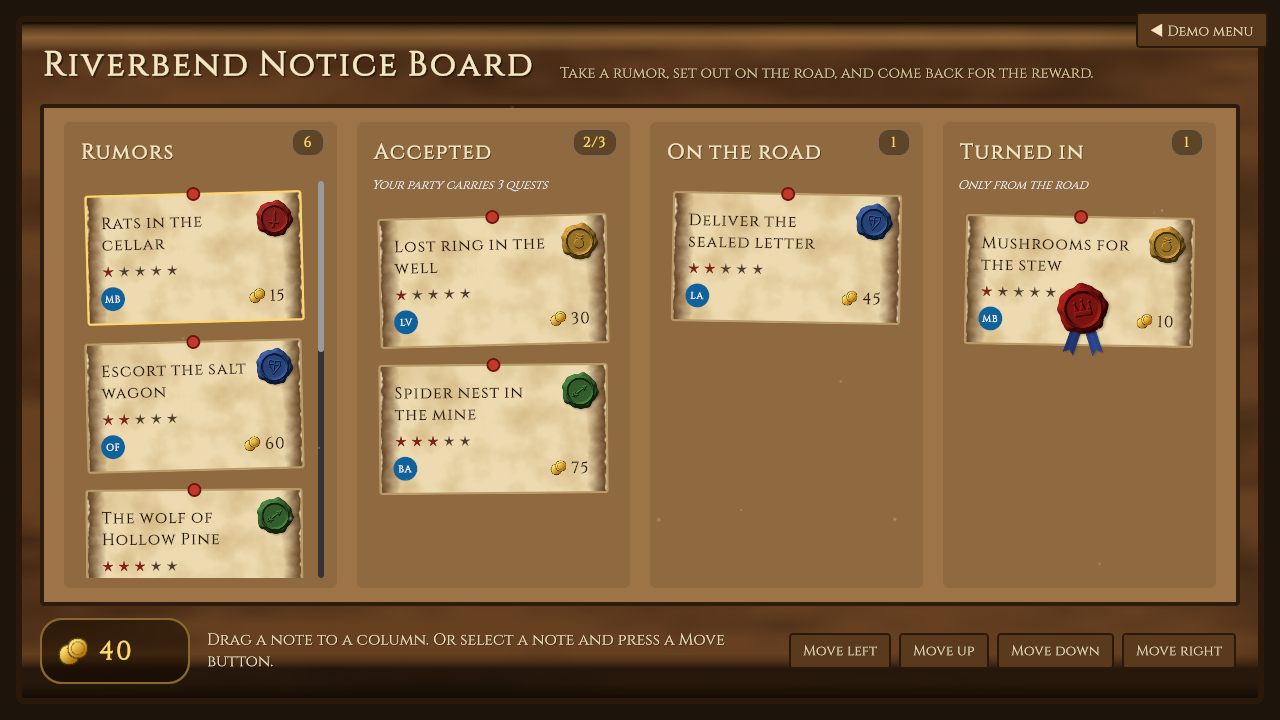
Scene: Assets/UIToolbox/Examples/Scenes/QuestBoard.unity. Folder: Assets/UIToolbox/Examples/QuestBoard.
Try it
- Open the scene. Six notes hang in Rumors, one in Accepted, one On the road and one sealed in Turned in. The purse shows 40 gold.
- Drag "Rats in the cellar" over Accepted. A gold line shows the place of the drop. Release. The note pins there and dust puffs up.
- Fill Accepted with three quests (the count shows
3/3), then drag a fourth over it. The column turns red and the drop does nothing. - Drag a note from Rumors to Turned in. The column turns red. Turned in takes a note only from On the road.
- Drag "Deliver the sealed letter" from On the road to Turned in. The note gets a large wax seal on a ribbon, and gold coins fly to the purse. The purse counts up as each coin arrives.
- Click a note without a drag. A ticket opens with the details of the quest. Its action button (Accept, Set out or Turn in) moves the quest on. Close or Escape closes the ticket.
- Without a pointer, press Tab or move the stick to select a note. Press Move left, Move up, Move down or Move right. Press Enter on the note to open its ticket.
When you open the scene from the demo menu, Escape opens a menu with Resume and Quit.
What it shows
Columns
Each of the four columns is a vertical ScrollView that has a DropTarget. The column shows a title and the count of its notes in a Badge. Accepted shows n/3 and a hint that the party carries 3 quests. Turned in shows the hint "Only from the road". During a drag, the column under the pointer gets the hover class (gold edge) or the denied class (red edge).
Notes
A note is a tilted piece of parchment with a pin. It shows the wax seal of its kind, the title, the danger, the giver and the reward. There are four kinds: Hunt (an arrow, green), Slay (a sword, red), Escort (a shield, blue) and Fetch (a pouch, yellow). One image for each kind has the crest, and the USS tints it. The danger is a Rating with Max = 5 and ReadOnly = true. The giver is a UserAvatar with the initials of the name.
Rules
The rules of the board are in one function, canTake. A column takes a quest from its own column. Accepted takes a quest from another column only below the limit of three. Turned in takes a quest only from On the road. A turned in note is sealed and no longer moves.
Purse and coins
A turn in adds the reward to Gold at once. The coins fly from the note to the purse (ParticleSettings.Target), and the purse counts up as each coin arrives (ParticleLayer.Arrived). A reward sends one coin for each 5 gold, from 1 to 24 coins. The purse grows for a moment at each coin. Dust motes drift over the board all the time.
Ticket
A click without a drag, or Enter on a selected note, opens a Dialog styled like the board. It shows the title, the kind seal and the column (a Badge whose tone follows the column), the giver, the danger, the reward (a ResourceCounter with the coin of the purse), the description, the objectives and a log line. A done objective has a check mark. The action button uses the same rules as a drop. A refusal shows in the ticket, and the ticket stays open.
Sounds
The board plays sounds through the WorkspaceAudio of the scene: paper when a note comes off the board, pin when it lands, error for a refused move, confirm for the seal, and coin for the coins that reach the purse. The coin sound plays at most once every 45 ms. See Sounds and window events.
How it is built
| File | Does |
|---|---|
QuestBoard.uxml |
Declares the frame, the empty board, the purse, the status line, the Move buttons and the particle layer. |
QuestBoard.uss |
The wood, the cork, the parchment notes, the wax seals, the ribbon and the ticket. |
QuestBoardController.cs |
Builds the columns and the notes, holds the rules, runs drops, moves, the turn in, the coins and the ticket. |
Art/ |
The wax seals (seal-hunt.png, seal-slay.png, seal-escort.png, seal-fetch.png, seal-done.png) and ribbon.png. |
The UXML has no columns. The code adds one column for each title in COLUMNS. The particle layer comes last, so the dust and the coins draw over the board.
<ui:VisualElement name="board" class="qb-board" />
<!-- ... -->
<!-- The layer is last, so the dust and the coins draw over the board.
     It ignores the pointer -->
<tb:ParticleLayer name="particles" />
Each column is a ScrollView with a DropTarget. The first function is called with the index of the drop. The second one is the canDrop filter.
var list = new ScrollView(ScrollViewMode.Vertical);
list.AddToClassList("qb-column__notes");
list.horizontalScrollerVisibility = ScrollerVisibility.Hidden;
// A list target gives the index of the drop: the place of the insert
// line
list.AddManipulator(
    new DropTarget((data, at) => put((Quest)data, index, at), data =>
        canTake(index, data)));
The rules are short.
if (data is not Quest quest || quest.Sealed) return false;
var from = ColumnOf(quest);
if (column == from) return true;
if (column == ACCEPTED)
    return _lists[ACCEPTED].childCount < ACCEPTED_LIMIT;
if (column == TURNED_IN) return from == ROAD;
return true;
Each note is a drag source. The data of a drag is the Quest object, and the ghost is a copy of the note.
Source = new DragSource(() => this, () => Build(this));
Element.AddManipulator(Source);
The Move buttons call DropTarget.Drop on the target column, so they follow the same rules as a drag. This is the way for the keyboard and the gamepad.
if (!(DropTarget.At(_lists[to])?.Drop(quest, at) ?? false))
{
    _status.text = refusal(to);
    ToolboxAudio.Play(_root, ToolboxSoundSet.ERROR);
    return false;
}
TurnIn sends the coins. The coin of the purse is the image of the particles, and Target makes them fly to the purse.
_particles.Burst(quest.Element, new ParticleSettings
{
    Count = coins,
        Texture = _purseCoin.resolvedStyle.backgroundImage.texture,
            Size = new Vector2(18, 24),
    Speed = new Vector2(150, 320), Spread = 120, Drag = 2,
        Spin = new Vector2(-200, 200), EndColor = Color.white,
    TargetDelay = new Vector2(0.25f, 0.5f),
        TargetTime = new Vector2(0.5f, 0.8f), Target = _purse,
});
Each arrival adds an equal part of the gold that the purse does not show yet, so the last coin brings the purse to Gold.
private void arrived(VisualElement target)
{
    if (target != _purse || _coinsInFlight == 0) return;
    ShownGold += Mathf.CeilToInt(
        (Gold - ShownGold) / (float)_coinsInFlight);
    _coinsInFlight--;
    showGold();
    // ...
}
The look has its own palette and the Cinzel font. The wax seals are one image for each crest. The USS gives the wax its color with a tint:
.qb-note__seal--slay {
    background-image: url("Art/seal-slay.png");
    -unity-background-image-tint-color: #b8302a;
}
The wood and the parchment images come from the Kingdom example (Kingdom/Art). The ticket sets the palette and the font again on .qb-ticket, because a dialog sits outside the .qb root. The hover, denied and insert-line states of the drop use the classes tb-drop-target--hover, tb-drop-target--denied and tb-drop-insert.
Use it in your game
- Replace the
QUESTSarray with the quests of your quest system or your save. Each entry has a title, a giver, a kind, a reward, a danger, a column, a description, objectives and a log line. - Change
COLUMNSand put your own rules intocanTake. CallTurnIn(quest)from your quest system when the player hands in a quest. - Change
ACCEPTED_LIMITfor a larger party. - Add a kind to the
Kindenum, add its seal image and a.qb-note__seal--<kind>rule. - The gold (
START_GOLD), the coins and the notes are sample data. TheWorkspaceAudiosound set of the scene needs the soundspaper,pin,coinandconfirm. The example sets have them. - Keep the Move buttons, or another way to call
MoveandDropTarget.Drop, so the board works with a keyboard and a gamepad. - The sealed note of a turned in quest keeps its place and has no drag source.