
Jigsaw
Jigsaw is a small puzzle game made from two shaped InventoryGrid controls. It fills the screen like a mini-game: a wood table, a felt board and tray, a bar with the score at the top and the picture of the puzzle on the lid of the box. A landscape is cut into twelve pieces of three to five cells, like the pieces of a falling-block game. They lie scattered in the tray. The player moves them to the board and turns them until each one is in its own spot.
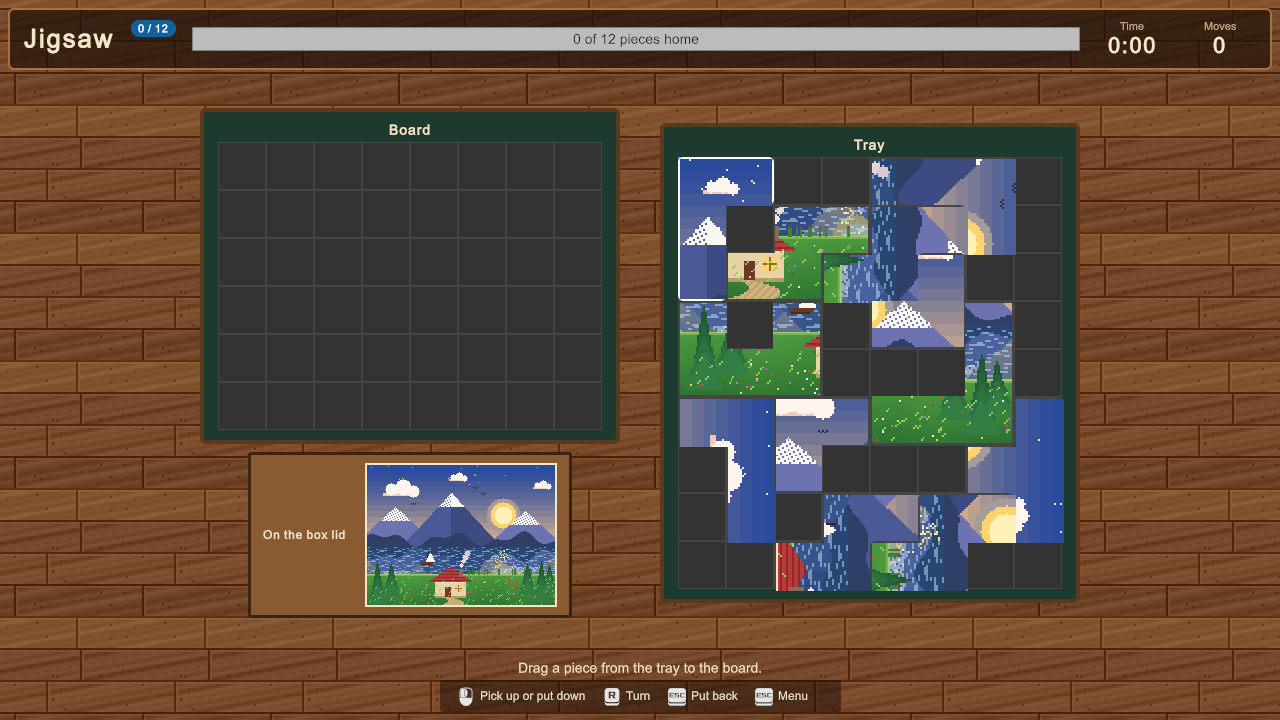
Scene: Assets/UIToolbox/Examples/Scenes/Jigsaw.unity. Folder: Assets/UIToolbox/Examples/Jigsaw.
Try it
- Open the scene. The tray holds twelve loose pieces. The board is empty, the badge shows
0 / 12and the clock waits at0:00. - Drag a piece to the board. It goes wherever its shape fits, also in the wrong spot. The clock starts with the first move and the move counter goes up. The badge does not count a piece in the wrong spot.
- While you hold a piece, press R or the right mouse button. The piece turns a quarter turn, and so does its picture.
- Look at the picture on the box lid under the board and put a piece in its own spot, upright. Its border turns green and the badge and the bar count it. Use the arrow buttons on the box lid to cycle between five pictures.
- With a gamepad or the keyboard, press A on a piece, move with the d-pad and press A again to put it down. B or Escape puts it back.
- Press Escape (or Start) with no piece in your hand. The pause menu stops the clock. Resume goes on, Play again scatters the pieces again, and Quit (when you came from the demo menu) goes back to the menu. The d-pad only moves between the buttons.
- Put all twelve pieces home. A banner shows Puzzle solved with your time and moves. Play again scatters the pieces again.
What it shows
One model, two grids
The board and the tray are InventoryGrid controls with Shaped on. They show one ListInventoryModel. The board shows the first 48 slots (8 x 6 cells). The tray has FirstIndex 48 and shows the next 72. A shaped grid has one slot for each cell, and an item sits in the slot of its first covered cell. So a drag from the tray to the board is a move from one slot of the model to another, and the grid checks that the shape fits.
The pieces
JigsawPuzzle holds a map of the board with one letter for each piece. It turns each letter into an ItemShape (the X and . rows) and a home slot. The pieces are not all alike in size and shape, but a few have the same shape. The grid lets either of them go in either spot. The picture tells them apart, and so does the check below.
The picture of a piece
All pieces share the one landscape Texture2D. Each ItemStack sets IconOrigin to the top left cell of its shape on the board, and the shaped InventoryGrid draws each covered cell from its slice of the shared picture and turns the slice with the piece.
Home
The board grid sets IsTarget to JigsawPuzzle.IsHomeSlot, which checks whether a piece sits in its home slot with a turn of 0. The grid marks a matching slot with tb-inventory-grid__slot--target and SlotBound adds jig-home. JigsawPuzzle.Scatter wraps its Set(index, item, turns) calls in BeginUpdate and EndUpdate so the grids refresh once per scatter.
Progress and win
A Badge shows the count and a ProgressBar shows the same count in the bar at the top. Next to them, a clock and a move counter keep the score. The clock text changes only when the shown second changes, so the game makes no garbage each frame. At twelve, the clock stops and a Card banner shows the time and the moves with a Play again button. A PromptBar at the bottom lists the keys and the buttons of the pad.
The table
The look is USS and one script-made picture. Tools/jigsaw/wood.mjs draws wood.png, a tile of planks, and the controller sets it as the repeating background of the table. The board and the tray lie on felt plates, and the picture sits in a lid frame under the board. Nothing is downloaded.
How it is built
| File | Does |
|---|---|
Jigsaw.uxml |
Declares the score bar, the two grids, the box lid, the key hints, the win banner and the pause menu. |
Jigsaw.uss |
The wood and felt look, the score bar, the lid, the banner, the green border of a home piece and the layout. |
JigsawPuzzle.cs |
The rules with no UI: the map of the pieces, the home slots, the count and the scatter. |
JigsawController.cs |
Cuts the picture, fills the model, checks the pieces and runs the clock and the moves, shows the progress and the win, and opens the pause menu. |
The two grids share one model.
var model = new ListInventoryModel(48 + 72);
board.Model = model;
tray.Model = model;
A piece is an item with a shape and its cell origin in the shared picture.
var piece = new ItemStack("Piece 1", picture)
{
    Shape = new ItemShape("XX", "X."),
    IconOrigin = jigsawPiece.Origin,
    Data = jigsawPiece,
};
model.Set(trayIndex, piece, turns);
The check of a spot is a read of the model.
bool home = model.ItemAt(slot) is ItemStack
    { Data: JigsawPiece p } && p.HomeIndex == slot
    && (model.TurnsAt(slot) & 3) == 0;
Use it in your game
- Change the map in
JigsawPuzzlefor other pieces. Each letter must be one connected group of cells. - Replace or add pictures of 192 x 144 pixels (24 pixels for each cell) and keep Read/Write on. Five pictures are included: landscape, hero face, king face, meadow, and night.
Tools/jigsaw/gen-pictures.mjsgenerates pictures from Platformer assets. - Make the tray larger for a harder start, or put pieces in it before the player sees them.
- Count a piece as home in any turn for a puzzle with no rotation.
- Make the board a different size. A piece may hang over the edge of the picture only if the grid has room for it.