
Parley
Parley is a cut scene in the style of a role-playing game. Borin Stone, a knight, meets Grub the Cave Troll on a stone bridge at dusk, and Grub wants a toll. Borin can talk, pay, bluff or fight his way across. Black bars slide in, the speaker shows large on their side, and the listener steps back into the dusk. A DialogueBox types each line, and the choices show on a ChoiceWheel or, after a press of the Wheel / List switch, in the ChoiceMenu of the box. The temper of the troll is a StatBar. When he swings, a ProgressRing runs out, and a strike before it ends changes the story. A talk takes two to four minutes and ends in one of three ways: Crossed, Paid or Fought.
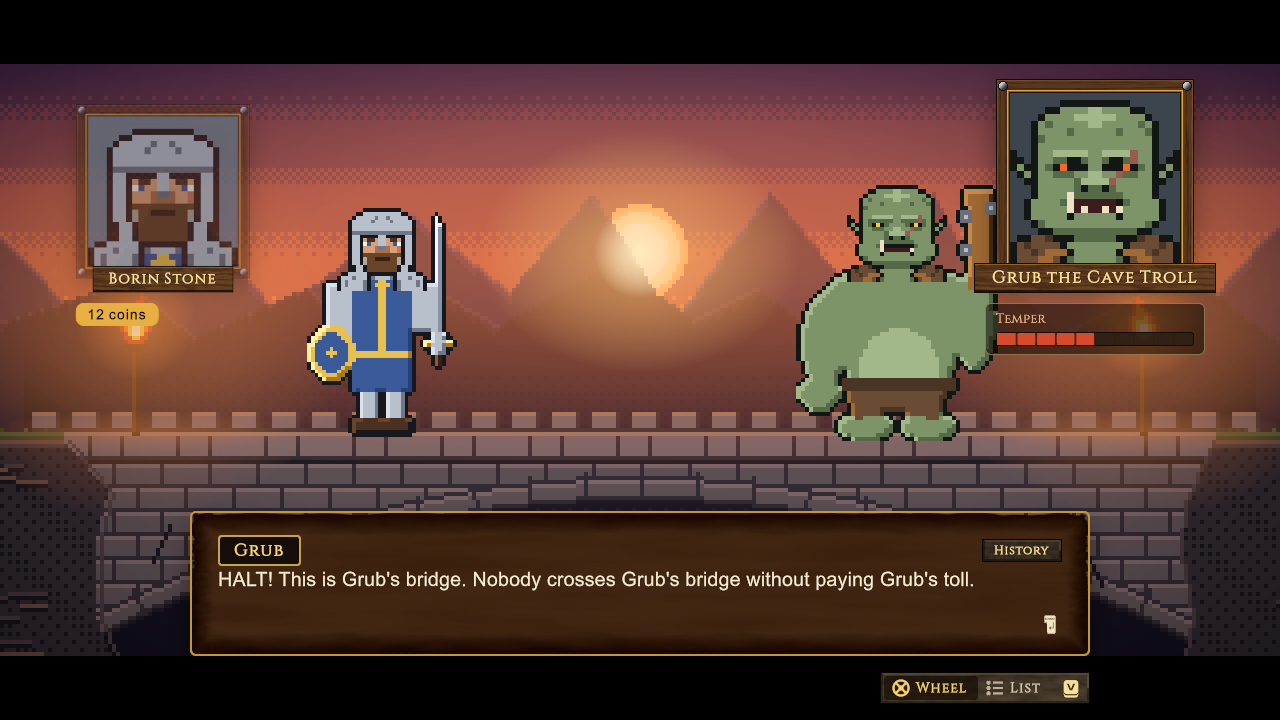
Scene: Assets/UIToolbox/Examples/Scenes/Parley.unity. Folder: Assets/UIToolbox/Examples/Parley.
Try it
- Open the scene. The bars slide in, and Grub shouts "HALT!". His face is angry, and his mouth moves while the line types. A click, Enter or the gamepad South button shows the whole line, then goes on.
- After three lines the choices show on the wheel around Borin. Point the mouse or the left stick at a choice: it lights up, and the line under the wheel shows what Borin will say. Each choice has the color and the icon of its tone: Friendly, Investigate, Deceive, Hostile or Leave.
- Click the switch at the bottom right, or press V or the gamepad North button. The same choices move to a numbered list in the box, with the focus on the first one. Press it again to go back to the wheel. The switch works at any time, also in the middle of a choice.
- Press 1 to 5 to pick in either view. Borin says the whole line, and Grub answers. The temper bar moves, and the change rises from it: red for more anger, green for less.
- Pick "Out of my way.". Grub swings his club: a red ring with E (or X on a gamepad) runs out in three seconds, over "Strike first!". Press E in time, and Borin wins the fight. Wait, and Grub swats Borin: his portrait plays its hurt clip and shakes, and the talk goes on.
- The middle choices show what is left. "Pay 20 coins." is locked while Borin has 12; its tooltip on the wheel, and its line in the list, say why. Calm Grub first, and "Haggle." brings the toll down to 12. A toast says the new toll.
- At the end the bars slide out, a banner names the end, and a card tells the story with a Play again button. Press South, Enter or click it to start again.
- Look at the hint bar in the toolbar. It names the buttons of the device in use: gamepad buttons after the gamepad, keys after the keyboard.
- The Show me button in the demo header starts a tour of the stage.
What it shows
The stage
ParleyBackdrop shows the gorge as one pixel picture, Resources/ParleyArt/gorge.png (480 x 270, drawn by node Tools/skins/parley.mjs): the sky at dusk with its stars and its sun, the cliffs, the bridge with its arch and its rail, and two torch posts. It shows each pixel as at least 4 x 4 screen pixels, at the whole zoom that covers the screen, with the deck at 60% of the height. The flame of each torch is an AnimatedImage that loops the three frames of torch-flame.png; the sun and the torch light are soft glows, the torch light flickers, and the edges are dark. The mist is a ParticleLayer. The workspace has background-opacity="0", so the gorge shows. The two bars are plain elements with translate; the class parley-bar--in moves them in, and a transition slides them.
Borin is an AnimatedImage with the clips idle and hurt. Grub is an AnimatedImage too, with a clip for each mood and a talk clip, and a TalkingPortrait plays them while the box types his lines. Each actor stands in a carved frame with a name plate. The speaker has full light; the class parley-actor--listening dims, shrinks and lowers the other one.
The wheel and the list
The box shows the choices. With DialogueBox.Wheel set, Ask shows them on the wheel; with it null, they show in the ChoiceMenu of the box. The switch only sets the property, and the box moves the choices that show to the other view, with the focus:
public void SetListMode(bool list)
{
    ListMode = list;
    Box.Wheel = list ? null : Wheel;
    Box.Focus();
}
Both views raise the same Chosen of the box, so a pick in either one plays the same way. Each choice is a ChoiceItem with a short label, a tone, and a reason when it is locked:
new ChoiceItem("Pay 20 coins.")
{
    Tone = ChoiceTone.Neutral,
    Locked = Coins < Toll,
    Detail = "Needs 20 coins",
};
The wheel shows the reason in the tooltip of the choice; the list shows it under the label. The whole line of the highlighted choice comes from HighlightChanged of the wheel, and the line under the wheel shows it.
Each frame the controller points the wheel with the left stick. Point has a dead zone, so a stick at rest keeps the highlight of the mouse:
if (Box.IsChoosing && !ListMode)
    Wheel.Point(SampleInput.PadMove());
The interrupt
When the line of a swing has typed (LineFinished), the ring starts at 1 and runs down to 0 in INTERRUPT_SECONDS. E or the gamepad West button calls StrikeFirst. The story picks the branch:
Parley.Strike(first);
if (!first) borin.PlayOnce("hurt", "idle");
The call throbs: a class scales it up and down four times a second.
The temper, the purse and the end
StatBar.SetValue(temper, true) animates the bar, and a FloatingTextLayer shows the change. The purse is a Badge. A new toll shows in a toast of the workspace. The end shows a banner of the NotificationArea with ShowBanner, then a parchment card with a Separator, the name of the end in an AnimatedLabel with <wave>, and Play again with a GamepadGlyph.
The story
SampleParley is plain C#: the lines of a beat, the choices, the temper, the coins and the toll. Choose(index) and Strike(first) go to the next beat. The controller only shows it, so a test can play the whole talk without the screen.
How it is built
| File | Does |
|---|---|
Parley.uxml |
Declares the stage: the bars, the two actors, the wheel, the line under it, the switch, the box, the interrupt, the end card, the banner and the tour. |
Parley.uss |
Sets the palette and the Cinzel font, places the actors and the wheel, gives the box its parchment frame and the list its rows, and styles the switch, the interrupt and the end card. |
ParleyBackdrop.cs |
Shows the picture of the gorge, plays the torch flames, draws the sun and the torch light, and runs the mist. |
Resources/ParleyArt/*.png |
The gorge and the three frames of a torch flame, drawn by node Tools/skins/parley.mjs, with point filtering and no compression. |
ParleyController.cs |
Plays the talk in the box, moves the spotlight, the temper, the coins and the faces, switches the view, runs the interrupt and shows the end. |
SampleParley.cs |
The story: the lines, the choices, the temper, the coins, the toll and the three ends. |
Use it in your game
- Replace
SampleParleywith your story, or feed the box from anIDialogueSource. - Keep the switch: set
DialogueBox.Wheelto your wheel or to null. Players who prefer a list get one at any time. - Give each
ChoiceItemaToneand anIcon, so the player sees the kind of answer at a glance. - Change
INTERRUPT_SECONDSfor a longer or shorter window, or start aChoiceWheeltimer for a timed choice. - The names, the faces, the gorge and the toll are sample data.