
Gathering
Gathering is a resource game screen where the player collects wood, stone and food, and the game tells every pickup. This example shows the notifications of a game with two NotificationArea elements: a pickup feed with an icon and a count, and an events area for done objectives, a lucky find and a full backpack. A quest card at the top left is an ObjectiveTracker that checks off each objective. Each field node has a ProgressRing that shows its regrow. The scene has no workspace.
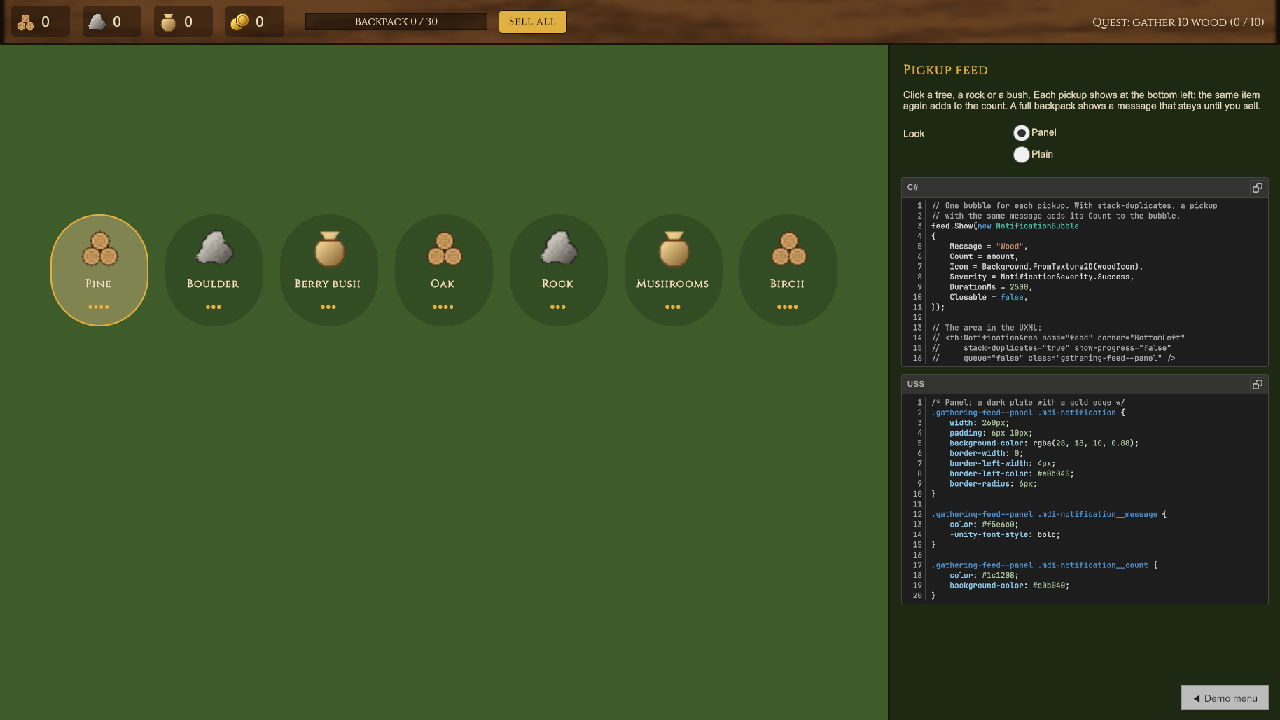
Scene: Assets/UIToolbox/Examples/Scenes/Gathering.unity. Folder: Assets/UIToolbox/Examples/Gathering.
Try it
- Open the scene. The first node, "Pine", has the focus.
- Click a tree, a rock or a bush (or press Enter on the focused node). A bubble shows at the bottom left, for example "Wood x2". The counter in the HUD rolls up, and the amount pops under the number.
- Click the same node again. The new pickup adds to the same bubble ("Wood x5") and its timer starts again.
- Take all charges from a node. Its dots are empty, the icon fades and a ring fills while the node regrows.
- Look at the quest card at the top left: "Stock the camp" asks for 10 wood, 8 stone and 6 food, each with a count. Gather 10 wood. The wood objective gets a check mark and stays on the card, and an "Objective complete" bubble shows at the top. Do the other two in any order. The last one completes the quest and shows a "Quest complete" bubble.
- Hit the "Rock" many times. About one hit in six also gives 1 gold and shows a "Lucky find" bubble.
- Fill the backpack to 30. "Backpack full" shows at the top and stays. Click its Sell all action or the Sell all button in the HUD, or press Y (the North button) on a gamepad. The hint bar at the bottom names the buttons of the device in use. The till rings, gold coins fly from the backpack bar to the gold counter, and the gold grows with a tick as each coin lands. The bubble goes.
- Opened from the demo menu, the scene has a ◀ Demo menu button at the right end of the HUD. Escape opens the pause menu, which also goes back.
- Change Look in the side panel from Panel to Plain. The feed loses its plate and shows only the icon and the text. The code blocks follow the look.
What it shows
Pickup feed
A NotificationArea at the bottom left with max-visible="6", queue="false", stack-duplicates="true" and show-progress="false". Each pickup is one NotificationBubble with an Icon, a Description (the resource name) and a Count. The message is the same for equal pickups, so they stack into one bubble. With queue="false", a fast run of pickups drops the oldest bubble and a new pickup never waits.
Events area
A second NotificationArea at the top center (max-visible="4"). It shows four kinds of events: "Objective complete", "Quest complete", "Lucky find" and "Backpack full". The first three last 4 seconds. The coin of "Lucky find" spins: its bubble has an IconAnimation, the spin clip of a coin sheet. The area has a left padding as wide as the quest card, so its bubbles center in the room beside the card. The "Backpack full" bubble has DurationMs = 0, so it stays until its Sell all action or the HUD button turns the items into gold. Only one such bubble shows at a time.
Field and HUD
The field has seven nodes: Pine, Boulder, Berry bush, Oak, Rock, Mushrooms and Birch. A node has 3 or 4 charges and regrows in 5 to 8 seconds. The HUD shows a ResourceCounter for each resource (each harvest pops its amount under the number), a ProgressBar for the backpack (30 items) and the Sell all button. Gold does not count for the backpack. A sale sends the gold as coins with ResourceCounter.Collect: they fly on a ParticleLayer over the HUD, from the backpack bar to the gold icon, and the gold counter grows in shares as they land. The HUD and the quest card use the plain font of the theme, so the numbers and the objectives are easy to read. The game font is for the node names, the headings and the bubbles.
Quest card
A Card with no title holds an ObjectiveTracker with hide-completed="false". It has one quest, "Stock the camp", with one objective for each resource. A done objective keeps its check mark and its struck text, so the card shows what is done and what is left. The objectives count the total gathered, so a sale does not undo one. The tracker raises ObjectiveCompleted and QuestCompleted, and the controller shows them as event bubbles.
Two looks
The side panel switches the feed between Panel (a dark plate with a gold edge) and Plain (the icon and the text). The look is one class on the area. The USS rules below that class restyle every bubble. Two CodeBlock controls show the C# of a pickup and the USS of the look.
How it is built
| File | Does |
|---|---|
Gathering.uxml |
Declares the HUD, the quest card, the two notification areas, the empty field, the look picker and the code blocks. |
Gathering.uss |
The look of the field, the HUD, the quest card, the event bubbles and the two feed looks. |
GatheringController.cs |
Builds the counters, the quest and the nodes, counts the backpack and the objectives, and sends the bubbles. |
The two areas fill the field, so the bubbles stay off the side panel.
<tb:NotificationArea
    name="events"
    corner="TopCenter"
    max-visible="4"
    show-progress="false"
    class="gathering-events" />
<tb:NotificationArea
    name="feed"
    corner="BottomLeft"
    max-visible="6"
    queue="false"
    stack-duplicates="true"
    show-progress="false"
    class="gathering-feed gathering-feed--panel" />
A pickup is one bubble. The message is the name of the resource, so equal pickups stack and Count adds up.
_feed.Show(new NotificationBubble
{
    Description = resource.ToString(),
    Count = amount,
    Icon = Background.FromTexture2D(IconOf(resource)),
    Severity = Severity.Success,
    DurationMs = PICKUP_DURATION_MS,
    Closable = false,
});
The full backpack has no duration and an action. Show returns the bubble, so the code keeps it and SellAll can dismiss it.
_fullBubble = _events.Show(new NotificationBubble
{
    Title = "Backpack full",
    Description = $"{CAPACITY} of {CAPACITY}. Sell to gather more.",
    Icon = Background.FromTexture2D(goldIcon),
    Severity = Severity.Warning,
    DurationMs = 0,
});
_fullBubble.AddAction("Sell all", SellAll);
A node is a button with an icon, a name, the charges as dots and a ProgressRing. The parts ignore the pointer, so a click on them reaches the button.
node.Ring = new ProgressRing
{
    pickingMode = PickingMode.Ignore,
    Animate = false
};
node.Ring.AddToClassList("gathering__node-ring");
image.Add(node.Ring);
Update fills the ring of each empty node and gives the charges back when the ring is full.
node.Regrow += Time.deltaTime;
node.Ring.Value = node.Regrow / node.RegrowSeconds;
if (node.Regrow < node.RegrowSeconds) continue;
node.Charges = node.MaxCharges;
The quest has one objective for each resource. Each pickup sets the counts; Progress stops at the target, and a count that reaches it completes the objective.
_quest = _tracker.AddQuest(QUEST_TITLE);
for (var i = 0; i < GOALS.Length; i++)
{
    var (resource, amount) = GOALS[i];
    var text = "Gather " + resource.ToString().ToLowerInvariant();
    _goals[i] = _quest.Add(text, amount);
}
_tracker.ObjectiveCompleted += objectiveDone;
_tracker.QuestCompleted += questDone;
A sale empties the backpack and sends the gold to its counter as coins. The coins are discs that fly to the icon of the counter, one for each item up to 15, and the counter adds a share of the gold as each one lands. The layer raises Arrived for each coin, so a coin can play a tick.
var gold = items * GOLD_PER_ITEM;
_gold.Collect(_coinLayer, _backpack, gold,
    ParticleSettings.Coins(_gold.IconElement,
        Math.Min(items, MAX_COINS)));
ToolboxAudio.Play(_saleSound);
The look of the feed is a class on the area. The radio buttons call SetLook.
_feed.EnableInClassList(PANEL_CLASS, look == FeedLook.Panel);
_feed.EnableInClassList(PLAIN_CLASS, look == FeedLook.Plain);
The plain look from the USS removes the plate:
.gathering-feed--plain .tb-notification {
    width: auto;
    padding: 0;
    background-color: rgba(0, 0, 0, 0);
    border-width: 0;
}
The scene has its own palette for the HUD, the field, the quest card and the bubbles. The quest card sets the theme tokens of the tracker (--tb-color-text, --tb-color-warning, --tb-objective-done-color and others) to the palette. The event bubbles have a parchment look with a red title and a gold "Sell all" button, set on .gathering-events.
Use it in your game
- Put a
NotificationAreain your UXML and callShowwith aNotificationBubble. A bubble withDurationMs = 0stays until code or the player closes it. - Use
stack-duplicatesfor repeated pickups andqueue="false"when a new pickup must show at once. - Change the look with USS rules under a class on the area. The class names of the parts are
tb-notification,tb-notification__messageandtb-notification__count. - Give the four icons (wood, stone, food, gold) in the Inspector of the controller.
SetIconssets them from code. - The nodes, the objectives (10 wood, 8 stone, 6 food),
CAPACITY, the gold chance of the Rock and the sale price (GOLD_PER_ITEM) are sample data. Replace them with your game rules. - For coins that fly to a counter, put a
ParticleLayerover the HUD and callResourceCounter.Collectwith the element the coins come from. Without settings, the coins are gold sparks. - The backpack and the nodes are plain C# in the controller. The toolkit parts are the
Showcalls and theObjectiveTracker. - For a quest card that keeps the done steps, set
hide-completed="false"on the tracker. With the default, a done step shows its check for a moment, then fades out. - In a game with a workspace, a workspace has its own
NotificationArea, created on first use.