
Platformer
A side-scrolling platformer, "Slime Kingdom: The Stolen Crown", built only with toolbox controls. The Slime King steals the crown of the King. The hero runs through four day and night levels, stomps slimes, collects coins and fights the Slime King. The hearts are a StatBar, and the lives and the coins are two ResourceCounter controls. The menus use Card, Badge, Dialog and EmptyState. The art plays through AnimatedImage.
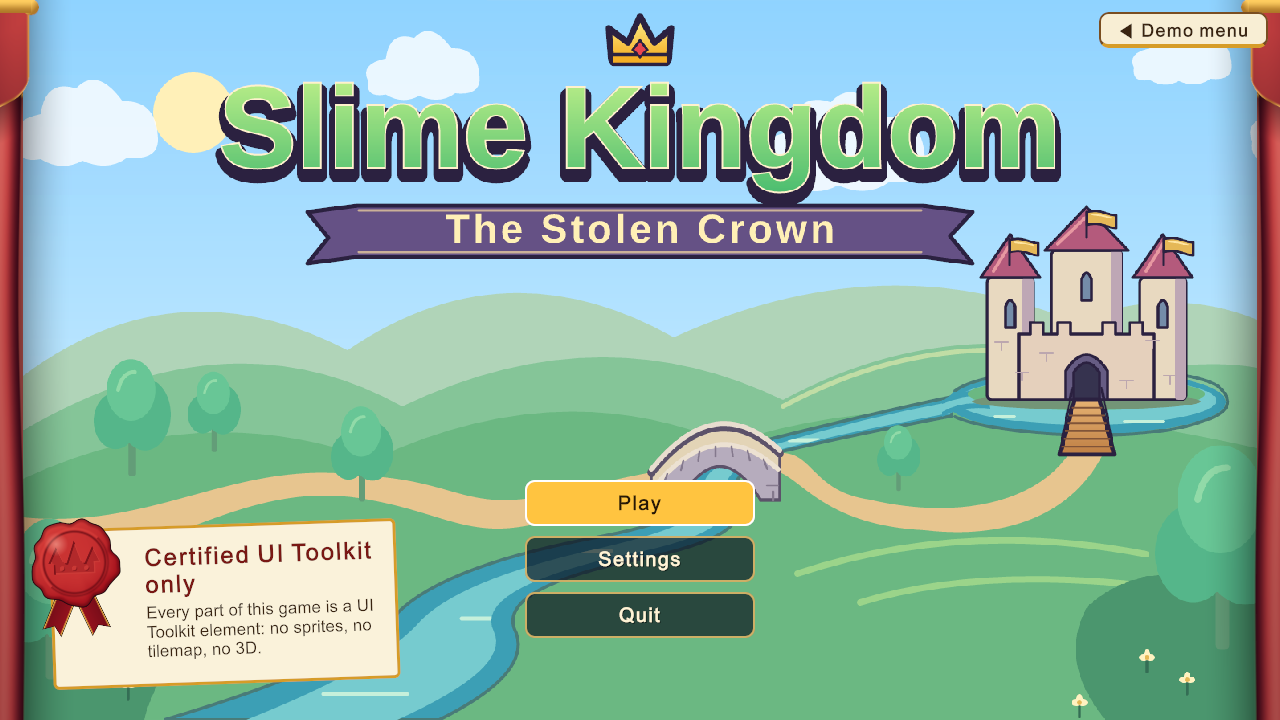
The scene also uses a DialogueBox and Subtitles for the story, a Credits roll, a ParticleLayer for the effects, an AnimatedLabel for the titles, and a NavigableTabView with an AudioSettingsPanel, a GraphicsSettingsPanel and an InputSettingsPanel for the settings.
Every part of the game is a UI Toolkit element: no sprites, no tilemap, no 3D. The scene has a
UIDocument, a camera and anAudioListener, and nothing else draws the game.
Scene: Assets/UIToolbox/Examples/Scenes/Platformer.unity. Folder: Assets/UIToolbox/Examples/Platformer.
Try it
- Open the scene and press Play. The main menu shows the title "Slime Kingdom" over the castle. Press Play.
- On the first run, the intro plays in the throne room. A narrator tells the story in
Subtitles, and the King and the hero talk in aDialogueBox. Press Next for each step, or Skip to leave it. The intro plays only once. - The level select shows a
Cardfor each level over the river valley of the title. 1. Meadow Run is open. The other levels show a Locked badge until you win the level before them. A won level shows its best stars. Press Play. A 3-2-1-Go countdown starts the level. - Run with A and D (or the arrow keys), and jump with Space, W or Up. Hold the key to jump higher. Press S or Down on a board to drop through it. On a gamepad, use the stick or the d-pad, and the south button to jump.
- Jump on a slime to stomp it. Touch it from the side and it lunges at you: you lose a half heart. Walk past a checkpoint flag to set the place where you come back. Collect coins: every 20 coins give back one heart, and a hero with full health gets an extra life instead. A heart pickup gives back one heart too, and stays on the map while the hero has all of them.
- A fall in a gap costs one heart and puts the hero back on safe ground. Lose all hearts to lose a life. The hero comes back at the last checkpoint. With no life left, the Splat! screen offers Try again.
- Press Escape (Start on a gamepad) to pause. The pause screen has Resume, Settings, Level select and Main menu, and Back to demo menu when the demo menu opened the game. Start or B closes it again. In the settings, the volume sliders change the sound while you drag them.
- Reach the flag at the end of the level. The tally counts your coins and gives up to three stars: one for the finish, two for 70% of the coins, three for every coin with no heart lost. Press Next level, or Retry to try for more stars.
- Each level adds one idea. Meadow Run has rolling hills, Windy Hills has flying slimes and islands of boards, and the night levels Dusk Climb and Castle Approach add red spitters that spit blobs at you, blue dash slimes that wind up and dash at you, towers to climb and a moat of spikes. At the end of level 4 the castle door is the goal: the hero raises his hand, walks into the open door and fades in the doorway, then the tally opens.
- Before level 5, a boss intro shows a Fight button. Stomp the Slime King only while he is winded and the crown lies at his side. Three stomps defeat him. Wait on a chandelier and he freaks out, then stomps the ground and shakes you off it.
- The crown flies off and lands. The ending plays, the credits roll, and the game returns to the main menu.
- On the level select, Start over opens a
Dialog. It clears the won levels, the lives and the intro flag.
What it shows
The screens
| Screen | Controls |
|---|---|
| Main menu | AnimatedLabel title, three buttons, and a Card with a red wax seal: "Certified UI Toolkit only". Quit asks first (Resume or Quit), in a MessageBox with the parchment look of the game. |
| Intro | Subtitles for the narrator, DialogueBox for the speakers, AnimatedImage actors, Next and Skip. |
| Level select | One Card per level file, with Badge controls (Boss, Cleared, Locked), and a Start over Dialog. |
| Level card, boss intro | The name and the subtitle of the level, which slides away as the level starts. A level with a boss: key shows the boss intro and a Fight button. |
| HUD | StatBar hearts with half hearts, ResourceCounter for lives and coins, the level label (Level 3 of 5), and a StatBar for the boss. A lost heart pops out of the row, a gained heart drops into it and the bar fills when it has landed, and a FloatingTextLayer lets Checkpoint! rise from the flag and fade. |
| Pause | Buttons for Resume, Settings, Level select and Main menu, and Back to demo menu when the demo menu opened the game. Start opens and closes it; B closes it. |
| Win and lose | A tally with the coins, the stars and Retry, and an EmptyState for the lost game. The coins count in ink and turn gold when every coin is found; a missing star shows as a dim outline. |
| Settings | NavigableTabView with Graphics, Audio, Controls and Accessibility tabs, on a card of one fixed size; a taller page scrolls. The Controls tab remaps the keys. Reduce motion turns off the screen shake and the flashing. |
| Ending | DialogueBox and ParticleLayer effects, then the Credits roll: The End over the title logo, then a label and a value on each row. A click on the last line does what Continue does. |
Escape or the gamepad cancel button goes back one step from any screen: a dialog closes first, then the screen goes back toward the main menu. Escape on the main menu does nothing.
The rules
The hero has 3 hearts, counted in half hearts. A slime takes a half heart. Spikes and a fall take a whole heart. After a hit the hero is safe for 1.5 seconds; the screen shakes a little and the hero blinks. The hero starts with 3 lives and keeps at most 9. A stomp on a slime bounces the hero up, with a 50 ms hit-stop and a burst of stars. Stomps in a row without a landing squish higher and higher.
Slimes and the boss turn to the hero by one rule: no turn while the hero is nearly above them, and a short wait between two turns, so they do not jitter. The yellow slime dives at a hero below it: it shakes and squashes, swoops down along a curve, and flies back to its path. It rests between dives. Every attack winds up for at least 250 ms, and every enemy but the boss shows the same telegraph as it winds up: it shakes and squashes, and a red lightning bolt flashes over its head. A stomp from above defeats a slime in every state, during its attack too.
The jump has a variable height, coyote time (a jump still works for 0.1 seconds after you walk off an edge) and a jump buffer (a press 0.1 seconds before you land still jumps). The movement runs in fixed steps, so it does not depend on the frame rate. The hero stretches as it jumps, squashes as it lands and kicks up dust on a landing and on a sharp turn.
The boss
The Slime King wakes when the hero comes near. He walks, winds up and slams the ground. The slam hurts a hero on the ground within 3.2 tiles of him: during the wind-up a red ring on the floor marks that reach, and when he slams a gold ring runs out to it. After the slam he is winded, and the crown lies at his side. A stomp now hurts him. In the last part of the winded time he shows that he is about to get up. A stomp while he wears the crown hurts the hero. Three good stomps defeat him. The flag opens after the crown lands, and the hero walks through his body to the crown.
A hero that waits on a chandelier, out of his reach, makes him freak out with fast frantic hops. Then he rears up and trembles, and stomps the ground: a shock wave and dust run out along the floor, the screen shakes, the chandeliers swing, and the hero falls off the board. The shake does no harm.
Progress
The game saves the won levels, the best stars of each level, the lives, the coins toward the next life and the intro flag in PlayerPrefs. Level n opens when level n-1 is won. A save from the first version, with three levels, still loads: a game won to the end stays won.
Add a level
Every text file in a Resources folder named Levels is a level. The level select sorts the files by name (Level2 comes before Level10) and shows a Card for each one. Add Level6.txt to Assets/UIToolbox/Examples/Platformer/Resources/Levels and it appears with no code change.
A file has a header of key: value lines, an optional legend: section and a map: section. Lines that start with // are comments.
// Level 6: a short run.
name: Tiny Hill
subtitle: Climb up and reach the flag.
theme: dusk
music: dusk
sign.hello: Welcome!

legend:
? = sign hello

map:
..............
.S..?.......G.
##############
The header keys are:
| Key | Meaning |
|---|---|
name |
The name on the card. The default is the file name. |
subtitle |
The line under the name. |
theme |
meadow, dusk, night or castle. The default is meadow. Night adds fireflies. |
music |
The track of the level: meadow or dusk. A level with a boss plays boss. The menus play title, the story story and the ending and the credits ending. The Music slider and the mute of the settings set the volume, a track fades into the next, the pause halves it and the stingers at the goal and at game over duck it. |
boss |
The id of the boss. A level with this key is the boss arena and shows the boss intro. |
sign.<id> |
The text of a sign. |
bird |
The id of a sign that a bird sits on. It flies off when the hero comes near. |
The map has one line per row, and the first row is the top. A map is at most 400 columns wide and 40 rows high. These characters need no legend line:
| Character | Meaning |
|---|---|
. or space |
Empty. |
# |
Ground. |
= |
Platform: the hero jumps through it from below and drops through it with Down. |
^ |
Spikes. |
S |
Start. A level has exactly one. |
G |
Goal flag. A level needs at least one. |
C |
Checkpoint. |
o |
Coin. |
w |
Walking slime. When you are close ahead of it on its floor it winds up and lunges. |
f |
Flying slime. |
d |
Blue dash slime. It patrols; when you are ahead of it on its floor within 6 tiles it winds up, dashes about 5 tiles and brakes. A stomp from above defeats it in every state. |
r |
Red spitter. It faces you like the other slimes, and spits a blob in an arc. |
K |
Boss. |
+ |
Heart pickup. |
A legend line is c = kind. It gives any character one of these kinds: empty, ground, platform, spikes, sign <id>, checkpoint, goal, door, start, coin, walker, flyer, dasher, spitter, boss and health. A door ends the level like a goal and draws as the castle door. A sign line needs an id, and the header needs a sign.<id> line for it.
An unknown key, theme, kind or map character is an error with the file name and the line number. The loader writes the error to the console and skips the file, so the other levels still load. A goal or a checkpoint must stand on ground or a platform.
How it is built
| File | Does |
|---|---|
Platformer.uxml |
The stage: the view and the HUD go in it. |
Platformer.uss |
The layout of the layers, the tiles and the hero, and the pfs- classes of the screens. |
PlatformerController.cs |
Loads the levels, starts a level, reads the keys and runs a frame. |
PlatformerGame.cs |
The movement rules of the hero. No UI code. |
PlatformerCollision.cs |
Box against tile collision. |
PlatformerWorld.cs |
The slimes, the boss, the coins, the checkpoints and every touch between them. |
PlatformerHealth.cs |
The half hearts and the lives. |
PlatformerLevel.cs, PlatformerLevels.cs |
The level file parser, the checks, and the search of the Levels folder. |
PlatformerView.cs, PlatformerStageView.cs |
Draw the tiles, the actors and the layers as elements. |
PlatformerActorLayer.cs, PlatformerEffects.cs |
The actors and the particle bursts. |
PlatformerCamera.cs |
The camera that follows the hero. |
PlatformerHud.cs |
The hearts, the lives, the coins and the boss bar. |
PlatformerScreens.cs, PlatformerScreens.Story.cs |
The menus, the settings, the intro, the ending and the credits. |
PlatformerProgress.cs |
The saved progress and the flow between the screens. |
PlatformerControls.cs |
The keys, with the Input System actions that the Controls tab remaps. |
PlatformerArt.cs, Resources/PlatformerArt |
Load the sprite sheets and the manifest. |
Resources/Levels/*.txt |
The five levels. |
Resources/PlatformerExtra |
The night windows of the throne room, made by Tools/generators/gen_platformer_night.mjs, the King's portrait and the curtain. |
The rules
PlatformerGame is plain C# with no UI types, so tests run it without a screen. The controller gives it the input of the frame:
var game = new PlatformerGame(level);
game.Update(Time.deltaTime, new PlatformerInput
{
    Move = 1f,
    JumpPressed = true,
    JumpHeld = true,
});
The world is elements
The view moves elements, and the camera moves the layers. No SpriteRenderer or Tilemap is in the scene. The parallax layers, the tiles, the slimes and the coins are VisualElement children of the stage. The art comes from PNG sheets that AnimatedImage plays.
The keys
With the Input System package, the Controls tab of the settings remaps the first keyboard key and the first gamepad control of each action. Without the package, the fixed keys of SampleInput apply.
Use it in your game
- Use
PlatformerLevel.Parseto read your own text maps, andPlatformerGameas a start for a movement model. - Keep the rules in plain classes, and let one controller draw them. Tests then run the rules without a screen.
- Build a level select from your own data with a
Cardand aBadgefor each item. - Sample-only parts: the five levels, the story, the art and the texts.