

 Card duel
A card battle in the style of a trading card game. You play against a rival, Hexer. Each side has a deck of 24 cards, 20 life and mana that grows by one gem each turn. Creatures fight on the board, spells deal damage or heal, and many cards have a trigger that sets off more steps. The board plays the steps one at a time, so the player can follow a chain. Each card is a Card with a Badge for the cost. The scene also uses a HoverCard for the large card, DragSource and DropTarget for the hand, StatBar for the life, FloatingTextLayer for the damage numbers, ParticleLayer for the sparks, an AnimatedLabel for the name of a spell, a NotificationArea for the turn banner, ToolTips and a MessageBox at the end.
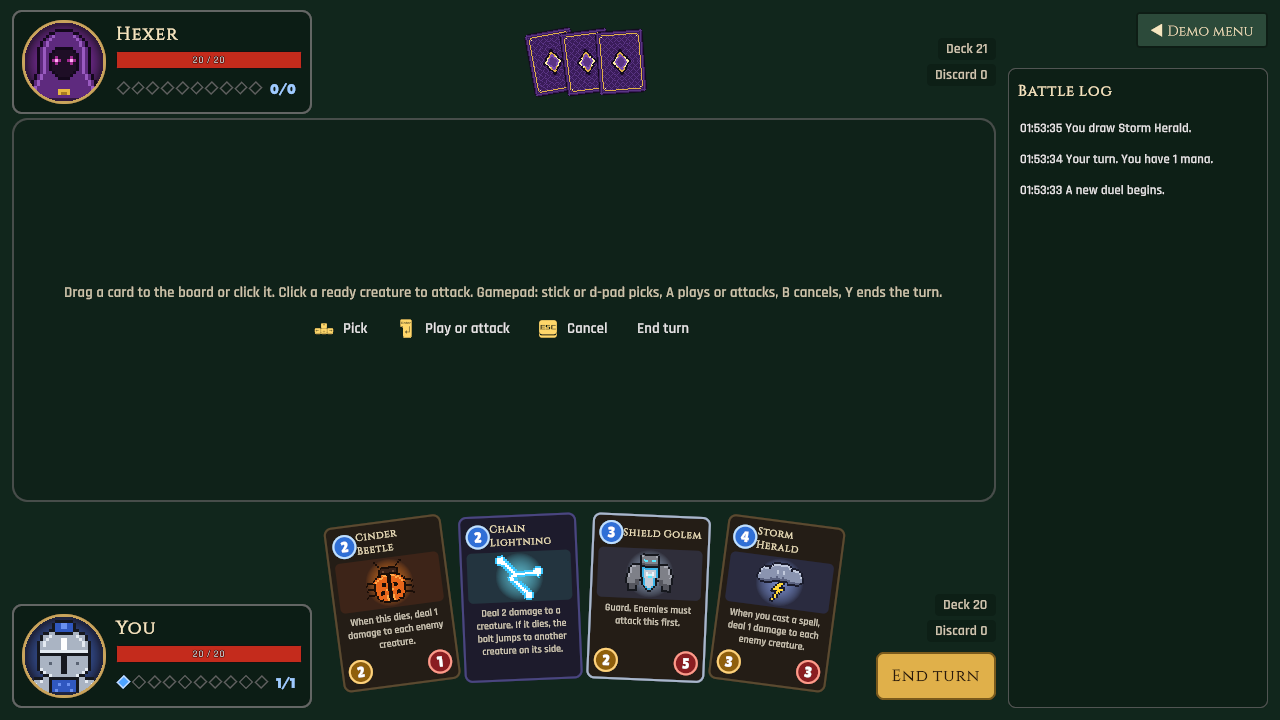
Scene: Assets/UIToolbox/Examples/Scenes/CardDuel.unity. Folder: Assets/UIToolbox/Examples/CardDuel.
Try it
- Open the scene. A banner says "Your turn". You start with three cards, draw a fourth, and have one mana gem. The cards that you can play have a green edge.
- Rest the pointer on a card. A large copy opens above it, with a badge for each keyword. Move the pointer onto the large card and rest it on a badge to read what the keyword does.
- Drag a creature from the hand to the board, or click it. The card flies to the left of the board and lands in your row. A card with an "enters" effect sends its sparks next.
- Drag Jolt or Fireball. A gold line follows the pointer from the card, and the targets glow. Drop the card on a creature or a hero. A click on the spell starts the same aim; then click a target. Click the table to cancel.
- Click a creature of yours with a gold edge. It can attack. Click an enemy creature or Hexer. The creature lunges, and both creatures deal their attack to each other. A creature cannot attack in the turn that it enters.
- Play Shield Golem. It has Guard: Hexer must attack it first. When Hexer has a Guard, a click on another target of an attack says "Attack the Guard first".
- Click End turn. When you can do nothing more, the button blinks. Hexer thinks for a moment before each move, plays the most expensive card they can pay for, then attacks.
- Watch a chain. Play Arcane Scholar, then a spell: the spell runs, and the Scholar draws a card. A Spark Wisp that dies hits the rival hero for 2. Chain Lightning that kills a creature jumps to another creature on its side.
- Read the battle log on the right. Each step has a line, the newest at the top: yours in blue, the rival's in pink, and the start of each turn in gold.
- Bring Hexer to 0 life. Confetti flies, and a message offers Play again. Press Escape or Start at any time for the pause menu.
- Use a gamepad. After a gamepad press, a strip under the hint shows the buttons: the d-pad or the left stick picks a card or a target, A plays the card or attacks, B cancels, and Y ends the turn. The pick has a gold border and an arrow above it. A never leaves the duel.
What it shows
The cards
| Card | Cost | Kind | Attack / Health | Effect | Copies |
|---|---|---|---|---|---|
| Ember Imp | 1 | Creature | 1 / 1 | When this enters, deal 1 damage to a random enemy creature. | 3 |
| Spark Wisp | 1 | Creature | 1 / 1 | When this dies, deal 2 damage to the enemy hero. | 3 |
| Jolt | 1 | Spell | Deal 1 damage to a creature or a hero. | 2 | |
| Mend | 1 | Spell | Restore 4 life to your hero. | 1 | |
| Arcane Scholar | 2 | Creature | 1 / 3 | When you cast a spell, draw a card. | 2 |
| Cinder Beetle | 2 | Creature | 2 / 1 | When this dies, deal 1 damage to each enemy creature. | 2 |
| Chain Lightning | 2 | Spell | Deal 2 damage to a creature. If it dies, the bolt jumps to another creature on its side. | 2 | |
| Shield Golem | 3 | Creature | 2 / 5 | Guard. Enemies must attack this first. | 2 |
| Fireball | 3 | Spell | Deal 4 damage to a creature or a hero. | 2 | |
| Pyre Keeper | 3 | Creature | 2 / 3 | At the start of your turn, deal 1 damage to a random enemy. | 2 |
| Storm Herald | 4 | Creature | 3 / 3 | When you cast a spell, deal 1 damage to each enemy creature. | 2 |
| Ash Drake | 6 | Creature | 5 / 5 | When this enters, deal 2 damage to each enemy creature. | 1 |
Each side has a board of six creatures at most and a hand of eight cards at most. A card drawn into a full hand burns. A draw from an empty deck deals damage to the hero: 1, then 2, then 3.
A card
A card is a Card with a set of classes. The title shows the name, and the Action slot of the header holds the cost in a Badge. The content holds the picture and the rules text. The footer holds the attack and the health. The same card has four sizes, one class each: in the hand, on the board (no rules text), large under the pointer, and in flight. A hurt creature shows its health with a bright red ring.
The steps
Every play, attack, trigger, draw and death is one step of the game. The board plays one step at a time. A step starts with a line in the log, a flash on its source and sparks to its targets. Half a step later, the numbers rise, the hit cards shake, and the board shows the new state. A creature that dies fades out, and its "when this dies" effect comes from the place where it stood.
The aim and the drag
A spell with a target asks for one. A gold curve with an arrow head goes from the card to the pointer, and each valid target glows. The same line shows for an attack. While a card is dragged, the board takes the drop of a creature or a spell with no target, and a target takes the drop of a spell that needs one.
How it is built
| File | Does |
|---|---|
CardDuel.uxml |
The table: the bars of the two heroes, the board with two rows, the hand, the battle log, the HoverCard and the layers for the effects. |
CardDuel.uss |
The felt, the heroes, the gems, the card sizes and states, the fan of the hand and the transitions. |
CardDuelController.cs |
Makes the cards, takes the clicks and the drags, plays the steps with their effects and sounds, and moves the rival. |
CardDuelGame.cs |
The rules: the cards, the decks, mana, the queue of steps, the triggers, Guard and the moves of the rival. No UI code. |
CardDuelArt.cs |
DuelArt shows the pixel pictures of the cards, the portraits and the card backs from Resources/CardDuelArt. |
The pictures
The pictures are PNG files in CardDuel/Resources/CardDuelArt. Tools/portraits/duel.mjs draws them in the style of the hero portraits: rows of letters, mirrored, with one palette per picture. cards.png has a 24 x 24 frame for each card, knight.png and hexer.png are the two portraits, and card-back.png is 48 x 64. The textures use point filtering and load once. A card cuts its frame from the sheet as a Sprite, once for each card.
DuelArt shows a picture at the largest whole multiple of its size that fits the element, for example 2x on a card in the hand and 5x on the large card, so each pixel of the art has the same size. A glow of the accent color of the card sits behind it:
var scale = Mathf.Max(1, Mathf.FloorToInt(
    Mathf.Min(rect.width / width, rect.height / height)));
The rules
The rules are plain C# in CardDuelGame, so tests run them without a screen. A play, an attack or the end of a turn only adds a step to a queue. Step runs the next one and returns what happened:
var step = Game.Step();
// step.Kind, step.Text, step.Source and step.Hits
// tell the board what to show
A step can add steps of its own. A spell adds its effect and the "when you cast a spell" triggers of the creatures of its caster. The creatures that a step kills die first, then the steps that it added run, before the older steps. So with an Arcane Scholar on your board, a Fireball on an enemy Spark Wisp plays in this order: the play, the 4 damage, the death of the Wisp, its 2 damage to your hero, and then the draw of the Scholar.
The rival
RivalAct makes one move. Hexer plays the most expensive card they can pay for: a heal only when they are hurt, and damage at the weakest enemy creature, or else at the hero. With no card to play, a ready creature attacks the weakest target. A creature that would die without a kill attacks the hero instead. The controller waits a moment before each move, so the player sees each one:
if (!Game.RivalAct()) Game.EndTurn();
The timer of the steps
Update counts down one timer. A step starts, the timer runs to its hits, the hits land, and the timer runs to the next step. With nothing left, the board waits for the player, or the rival thinks. The timer uses game time, so the Escape menu stops the duel. StepSeconds sets the pace.
The hand
A card of the hand has a DragSource. The data of the drag is the card, or null when the card cannot be played now, so a drag of a card that costs too much plays the refusal sound. The board, each hero and each creature have a DropTarget that asks the rules if the card can go there. A press and a release with no drag is a click. A creature that is dropped on the board stays at the drop point as a card in flight, and settles into its slot when the step lands. A creature that is played with a click, and each spell, flies to the left edge of the board.
The controller sets the fan: the overlap, the turn and the dip of each card. The USS raises the card under the pointer:
.cd-hand-slot:hover {
    scale: 1.12 1.12;
}

.cd-hand-slot:hover > .cd-card.tb-card {
    top: -24px;
}
The ghost of a drag sits in a layer at the top of the document, outside .cd, so the card rules start with .cd-card or .cd-hand-slot.
The large card
One HoverCard serves every card. The controller attaches it to each card and fills it when the pointer enters a card. The USS clears the box of the callout, so only the large card and its keyword badges show:
.cd-zoom.tb-callout {
    padding: 0;
    background-color: rgba(0, 0, 0, 0);
    border-width: 0;
}
Sounds
The sounds come from SampleTones, so the sample ships no audio file. They play through ToolboxAudio.Play, which plays a clip once in a frame, so a spell that hits four creatures plays one hit.
Use it in your game
- Keep the split: the rules in a plain class with a queue of steps, the board in a controller that shows one step at a time. Tests can run a whole turn with
RunAll. - Add a card to
CARDS: a name, a cost, the stats, a trigger and an effect. A new effect is one case in the effect step. - Replace the PNG files with your card art, or
DuelArtwith your own element. ACardtakes any content. - Use a
HoverCardwithAttachTofor any list of things that need a large view. - Use
DragSourcewith data that is null when the drag is not allowed, and aDropTargetthat asks the rules. - Sample-only parts: the twelve cards, the rival, the pictures, the sounds and the texts.