
Firefight
Firefight is an arcade cover shooter that you can play. Enemies of the red squad come in waves in a night city. They rise from cover, warn before they fire, and fire back. You aim, fire, and duck behind your own cover. Over the arena sits a shooter HUD:
- a crosshair that opens with each round and shows a hit, headshot or kill marker
- damage numbers over the enemies
- arcs that point toward the enemy who hit you, and red ticks on the side of an enemy that is about to fire
- compact health and armor bars at the bottom left, the magazine and the reserve at the bottom right
- a kill feed, a rolling score and a combo
- wave banners, and a big health bar for the commander of the last wave
The match bar at the top is a toolbar. Its buttons open the Loadout, Scores, Vitals, Weapon and Radar windows, which all start closed. Behind the title screen, the match plays itself.
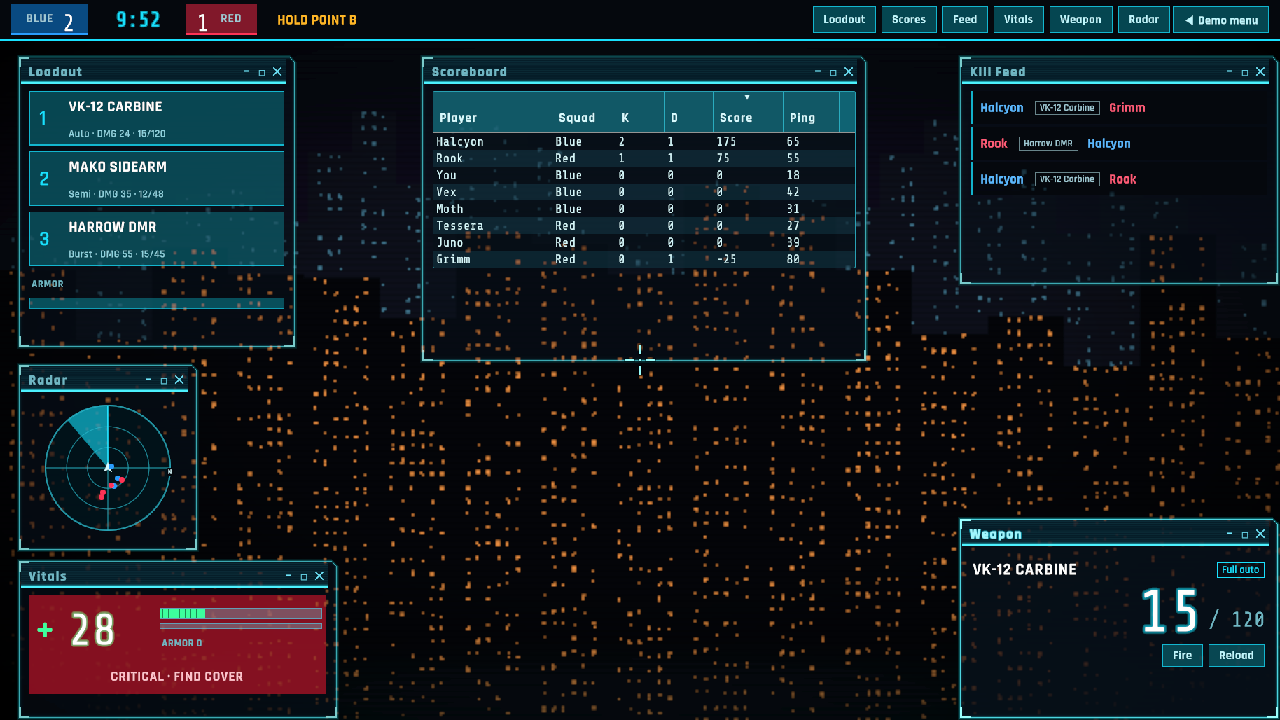
Scene: Assets/UIToolbox/Examples/Scenes/Firefight.unity. Folder: Assets/UIToolbox/Examples/Firefight.
Try it
- Open the scene and press Play. The title screen shows FIREFIGHT, three difficulties and your best score. Behind it, a bot plays the match and uses cover.
- Pick Easy, Normal or Hard. A click on the arena or the A button starts at Normal. The difficulty sets how long an enemy warns before it fires, how often it hits and how hard.
- A banner shows "WAVE 1" and the number of hostiles. Enemies rise from the covers of the near and far rows. The far row is smaller and sits behind the near one.
- Aim with the mouse, WASD, the arrow keys or the left stick. The crosshair turns red over an enemy. Click, or press Space or the right trigger, to fire.
- The carbine fires while you hold the button.
- The sidearm fires once per click.
- The DMR fires a burst of three rounds.
- Hit an enemy. Its damage rises over it, and the crosshair shows a hit marker. A headshot does twice the damage, and its number is bigger and shakes.
- Take an enemy down. The game stops for 40 ms, "+100" rises from the crosshair, a line joins the kill feed and your score rolls up. Each kill raises the combo, up to x4, and the next kill scores more. A miss or a hit on you resets it.
- Watch an enemy before it fires: its rifle glints red, a red tick shows on its side of the screen and a beep sounds. Hold the right mouse button, Shift or the left trigger to duck behind your cover. A shot on a player in cover hits the cover. You cannot fire from cover.
- Clear the wave. "WAVE CLEAR" shows, then the next wave comes. Six waves make a run.
- Heavy, from wave 3: three times the health and a burst of three rounds. The first headshot knocks its helmet off and counts as a body hit.
- Runner, from wave 2: low health. It sprints from cover to cover and fires on the run.
- Sniper, waves 3 to 5: it sits on a tower on the right. Its red laser tracks you for 1.5 seconds, then its shot does heavy damage. A hit on the sniper cancels the shot.
- Commander, wave 6: a big health bar shows at the top. At half health, the commander calls in two riflemen.
- A kill can drop an ammo box or a med kit in front of the cover. Shoot it to collect it: "+AMMO" adds two magazines, "+HEALTH" adds 35 health. A pickup keeps the combo.
- Watch the corners. The health and armor bars at the bottom left flash on each hit. The magazine bar at the bottom right turns red under a quarter, and "R RELOAD" shows under the crosshair. Press R or X to reload.
- Press 1, 2 or 3 for a weapon, or Q, the mouse wheel or Y for the next one.
- Press Escape or Start. The pause menu with Resume, Restart and Quit opens, and the game stops. B closes it. When the demo menu opened the sample, Quit reads Back to demo menu and goes back to the menu.
- At 0 health, or after the last wave, the end card shows the score, the waves, the accuracy, the headshots and the best combo. A new best score says so. Retry plays again at the same difficulty. Quit goes back to the title.
The PromptBar at the bottom shows the controls of the device that you used last.
Input
| Action | Mouse and keys | Gamepad |
|---|---|---|
| Aim | Mouse, WASD or the arrow keys | Left stick |
| Fire | Left button or Space | Right trigger |
| Cover | Right button or Shift (hold) | Left trigger (hold) |
| Reload | R | X (West) |
| Next weapon | Mouse wheel or Q | Y (North) |
| Weapon 1 to 3 | 1, 2, 3 | |
| Pause menu | Escape | Start |
| Back | Escape | B (East) |
What it shows
The arena
FirefightArena builds the scene in layers: the city and two light beams, towers with neon and the perch of the sniper, a floor grid to the horizon, the far and near rows of cover, a parapet, a vignette and the weapon in your hands. The layers move against the aim at different speeds, so the scene has depth. The far row is scaled down and sits behind the near row. A frame only moves the layers with style transforms.
The pictures are pixel art in Resources/FirefightArt, and Firefight.uss puts them on the layers as background images. Each art pixel shows as 2 x 2 pixels, and point filtering keeps the edges sharp. A sheet holds its frames side by side, and a USS class picks one with background-position-x. The state classes of a soldier show it idle, aiming, flinching or down. Each kind of enemy has its own sheet with the same four frames, and a class on the spot picks the sheet.
.firefight-spot--heavy .firefight-figure {
    background-image: url("Resources/FirefightArt/heavy.png");
    background-size: 600px 420px;
}
Tools/skins/firefight.mjs draws the art: the rifleman, the heavy with and without its helmet, the runner, the sniper, the commander, the perch, the props, the cover, the weapons, the towers, the floor, the parapet and the muzzle flashes. Run node Tools/skins/firefight.mjs after a change.
An enemy is a figure behind a cover with a name plate and a small health bar. Trace finds what a round hits: a pickup, the cover, the head, the body or nothing. AimPoint gives the middle of each part, which the tests and the bot use. Sparks and dust come from a ParticleLayer.
Waves, cover and the combo
FirefightController runs the waves. Each wave has a number of enemies, and a new one rises soon after another goes down, so the arena is never empty for long. An enemy that is about to fire calls telegraph: a red glint on its rifle and a tick of a second DamageIndicator. When the warning runs out, the shot checks the cover first.
var sniper = enemy.Kind == FirefightEnemyKind.Sniper;
if (_cover >= 0.5f
    || (!sniper && Random.value >= ACCURACY[difficulty])) return;
var damage = sniper ? SNIPER_DAMAGE : Random.Range(6f, 11f);
TakeHit(Mathf.RoundToInt(damage * DAMAGE_SCALE[difficulty]),
    angleOf(enemy), enemy.Player);
A kill scores 100 times the combo, twice that for a headshot, and raises the combo.
var points = 100 * Combo * (headshot ? 2 : 1);
Score += points;
Combo = Mathf.Min(MAX_COMBO, Combo + 1);
The best score is kept in PlayerPrefs under BestScoreKey. The title screen and the end card show it.
Crosshair
A Crosshair sits in a point that the controller moves to the aim. Each round calls AddSpread, and the round lands within the open crosshair. A hit calls ShowHit with Hit, Headshot or Kill, and the HitShown event plays the hit sound of the sound set. TargetKind is Enemy while the aim is on an enemy, so Firefight.uss turns the lines red.
Damage numbers
A FloatingTextLayer over the screen. A body hit shows the damage as a Damage number over the enemy, and a headshot as a Critical one. Your kills raise "+100" or "Headshot!" from the crosshair, and a pickup raises "+AMMO" or "+HEALTH".
Hits on the player
A DamageIndicator shows an arc toward each shooter. TakeHit takes the angle: 0 is ahead, 90 is to the right. A second one flashes a thin red edge for 0.4 seconds, so the middle of the view stays clear. The health and armor bars are StatBars. Each has an AnimateBinding on Hits that plays the custom hurt preset, a short red flash.
The corners
The compact HUD sits in the bottom corners with a fixed width, so it stays small on a wide screen. The health and the ammo bind to the match like the windows do.
<ui:Label name="hudAmmo" text="30"
    class="ammo-count hud-corner__value">
  <Bindings>
    <ui:DataBinding property="text" data-source-path="Ammo"
        binding-mode="ToTarget" source-to-ui-converters="tb:n0" />
    <tb:AnimateBinding property="anim-low" preset="low-ammo"
        trigger="WhileTrue" path="LowAmmo" />
  </Bindings>
</ui:Label>
Kill feed and banners
The kill feed is a NotificationArea at the top right with max-visible="5". It shows your kills and those of the blue squad. Each kill is a NotificationBubble with the KillFeed preset. Its message is rich text: the two names in the colors of their squads and the weapon small between them. A line where you are the killer or the victim gets the class feed--you. A second NotificationArea at the top middle shows the wave banners.
Score and ammo
A ResourceCounter in the match bar binds its Value to YourScore. It rolls up to the new score, and the gain waits next to it. A StatBar shows the magazine as a part of a full one and turns red at a quarter. The reload prompt under the crosshair binds its visibility to ReloadHint.
Windows
The match bar shows the squad scores, the wave, the hostiles left, your score and the combo, then the window buttons. All the windows start closed.
- Loadout: the three weapons, each with a
Kbdkey cap. - Scoreboard: a DataGrid sorted by score. The name of the leader is a gold
AnimatedLabelthat shines when the lead changes. - Radar: a Radar with one blip for each other player.
- Vitals: the health and the armor. The panel shakes on each hit and glows red at 30 health or less.
- Weapon: the weapon card, the magazine and the reload bar, with Fire and Reload buttons.
How it is built
| File | Does |
|---|---|
FirefightController.cs |
Reads the input, moves the aim, fires, runs the waves, the enemies, the title, the end card and the pause menu, and fills the HUD. |
FirefightArena.cs |
Builds the arena and the enemies, draws the light, traces the rounds, shows the laser and shakes the view. |
Resources/FirefightArt/*.png |
The pixel art of the arena, from Tools/skins/firefight.mjs. Their import keeps the pixels sharp (point filtering, no compression). |
SampleFirefight.cs |
The data: weapons, players, the match, the score and the combo. A plain C# object. |
Firefight.uxml |
The arena, the match bar, five windows, the HUD and the overlays, with all the bindings. |
Firefight.uss |
The look, the HUD colors and the custom presets critical, low-ammo and hurt. |
FirefightSounds.asset |
The sound set of the windows and the hit sound. |
The root gets one data source, so each binding path in the UXML starts at the match.
var root = GetComponent<UIDocument>().rootVisualElement;
root.Q(className: "firefight").dataSource = Match;
_arena = root.Q<FirefightArena>("arena");
_crosshair = root.Q<Crosshair>("crosshair");
_callouts = root.Q<FloatingTextLayer>("callouts");
A round lands within the open crosshair. The arena tells what it hits.
var point = Aim + Random.insideUnitCircle
    * (_crosshair.CurrentGap * 0.5f);
_crosshair.AddSpread(SHOT_SPREAD);
_arena.Fire(SHAKE[index]);
var hit = _arena.Trace(point, out var enemy);
_arena.Impact(point, hit);
A hit shows its number over the enemy and its marker on the crosshair. A helmet takes the first headshot.
if (head && enemy.HasHelmet)
{
    enemy.KnockHelmet();
    head = false;
}
var damage = head ? weapon.Damage * 2 : weapon.Damage;
var down = enemy.Damage(damage);
_callouts.Show(enemy.Mark, number(damage),
    head ? FloatingTextKind.Critical : FloatingTextKind.Damage);
Each kill is a bubble of the kill feed. In the example, the size and color tags of the weapon are in the message too.
var line = new NotificationBubble
{
    Preset = NotificationPreset.KillFeed,
    Description = $"{tag(killer)}   {weapon}   {tag(victim)}",
    DurationMs = FEED_MS
};
var you = killer == Match.You || victim == Match.You;
line.EnableInClassList(FEED_YOU_CLASS, you);
_killFeed.Show(line);
Sounds
The sounds are made in code with SampleTones, so the example has no audio files. A shot is a crack of noise over a falling tone. Cover, the warning before an enemy shot, the start of a wave and a cleared wave each have their own sound.
_reload = sound("Firefight reload", 0.2f,
    t => tick(t, 0, 1800) + tick(t, 0.11f, 2400));
_telegraph = sound("Firefight telegraph", 0.16f,
    t => beep(t, 0, 1860) + beep(t, 0.08f, 1860));
Input
The mouse aims, fires and takes cover through pointer events on the workspace. The arena and the HUD let the pointer through. The number keys, R and Q come as key events to the panel. Space, Shift, WASD and the gamepad are read each frame with SampleInput. While a run plays, the arrow keys and Space do not move the focus. The window buttons take no focus, so Space stays the trigger. The title, the end card and the pause menu take the focus, so a gamepad moves between their buttons.
The look
Firefight.uss starts its rules with .firefight, so they win over the stock styles. The palette sets the theme tokens of the workspace, the HUD and the dialogs. The crosshair takes its colors from variables of the control.
.firefight .tb-crosshair {
    --tb-crosshair-color: #99ffff;
    --tb-crosshair-kill-color: var(--firefight-red);
    --tb-crosshair-headshot-color: var(--firefight-amber);
}
.firefight .tb-crosshair.tb-hud--enemy {
    --tb-crosshair-color: #ff5c77;
}
Performance
A frame allocates no memory, also during a running wave with the player in cover. The arena and the reticle move with style transforms. The pictures are textures, a new frame of a soldier or a weapon is a USS class, and the damage numbers come from the pool of the FloatingTextLayer. Tests step the match and check that each frame allocates nothing.
Use it in your game
- Put your own data class in place of
SampleFirefight, and keep the binding paths in the UXML that your class has. - Call
TakeHit(damage, angle, attacker)when your game hurts the player, with the angle of the attacker from the view. - Call
Report(killer, weapon, victim, headshot)for each kill. It adds a line to the kill feed and refreshes the scoreboard. - Call
StartRun(difficulty)to start a run from your own menu, andShowTitle()to go back. - Turn off
AutoPlayin the Inspector to stop the bot behind the title.KillSecondssets the mean time between two kills of the blue squad. - Replace
FirefightArenawith your 3D scene. Keep the HUD: the crosshair, the arcs, the numbers and the feed work over any background. - Copy
Firefight.ussto start a new look. Change the palette variables, the fonts and the art.