
Heist
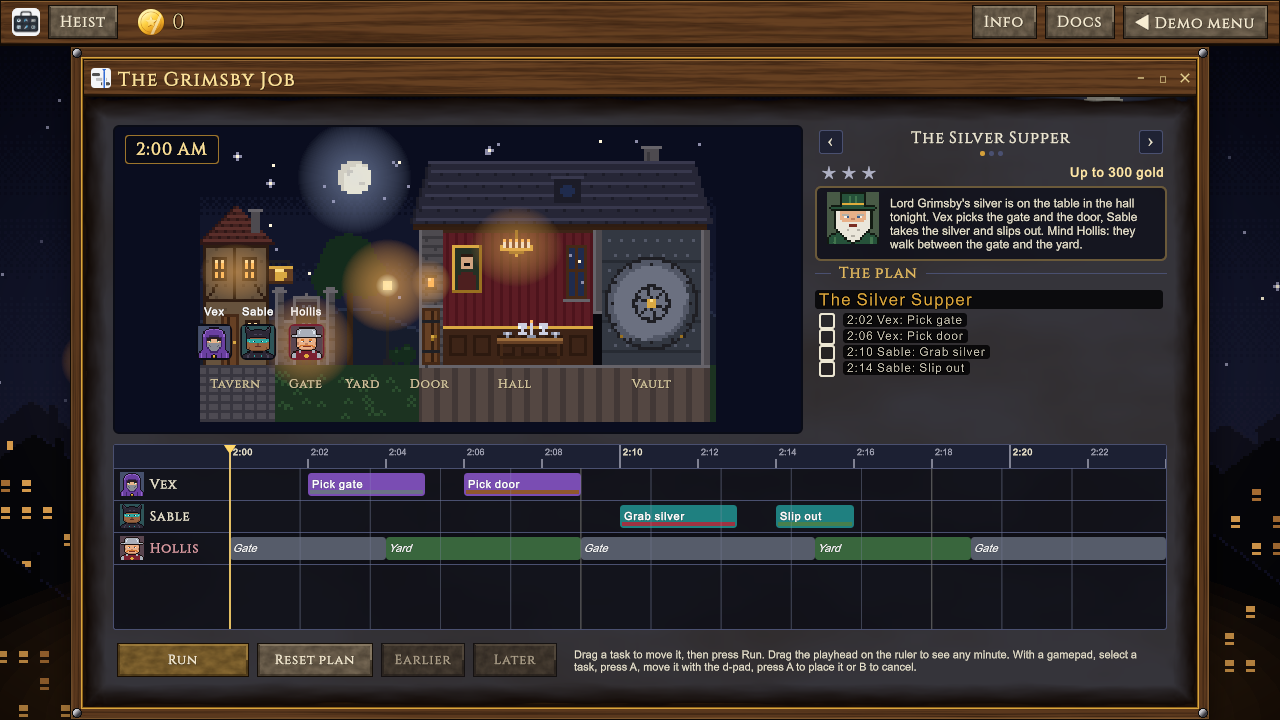
A heist planned on a Timeline. A crew of three thieves breaks into Grimsby Manor: Vex the lockpick, Sable the cat burglar and Bram the brawler. Each task of the crew is a bar on the track of its crew member, and the two guards, Hollis and Maud, walk on their own tracks. Drag the bars to time the plan, then press Run: the playhead plays the night, and the map shows it. A guard who sees a crew member at work ends the night. A plan that works earns stars for speed, and gold.
The scene also uses an OptionSelector for the job, Rating stars, an ObjectiveTracker for the steps of the plan, a Card for the result, a UserAvatar and a TypewriterLabel for the guildmaster, a ResourceCounter for the gold, a ParticleLayer for the coins and the confetti, a FloatingTextLayer for the cheers, and a Separator.
Scene: Assets/UIToolbox/Examples/Scenes/Heist.unity. Folder: Assets/UIToolbox/Examples/Heist.
Try it
- Open the scene. The first job, The Silver Supper, is on the screen. Quill, the guildmaster, reads the briefing on the right. The map shows the manor at 2:00 AM: the street, the gate, the yard, the front door, the hall and the vault.
- Press Run before you change anything. The playhead moves, the clock over the map counts the minutes, and the crew walks. At 2:02 AM Hollis spots Vex at the gate: the two light up red, the map shakes, an alarm rings, and a card says "Spotted!". Quill tells you what to move.
- Click the Pick gate bar. The walks of the guards at the gate get a gold edge: those are the guards who could see it. Drag the bar to start at 2:04, after Hollis leaves the gate. The bar moves a minute at a time with a soft tick.
- Drag Pick door to start at 2:05, before the gate is open. The bar gets a red edge: it needs the gate. The same red edge shows when two bars of one crew member overlap. Drag it to 2:07, when the gate is open. Then drag Slip out to 2:13, before Hollis comes back to the yard.
- Select a bar and press Earlier or Later to move it one minute. Reset plan puts every bar back.
- Drag the playhead on the ruler. The map shows that minute: who is where, which doors are open, where the guards look.
- Press Run again. Each task that ends ticks off its step in The plan, and a cheer rises over the crew member. The loot sparkles. When the crew is out, confetti flies, the card shows the stars, and coins fly to the gold in the toolbar.
- Press Next job. The Strongbox adds Bram: his brawl at the tavern makes every guard look away while it runs. The Crown of Grimsby adds a lamp: once Sable douses it, the dark yard hides the crew from Hollis.
- Press Space on the timeline to run, and Stop to stop a run.
- Use a gamepad. The d-pad moves between the buttons and the plan, and the right stick scrolls the window. On the timeline, A selects the task under the playhead, A again picks it up, the d-pad moves it by a minute, A places it and B puts it back. Start opens the menu.
What it shows
The jobs
| Job | Crew | Guards | Three stars by | Reward |
|---|---|---|---|---|
| The Silver Supper | Vex, Sable | Hollis walks between the gate and the yard. | 2:15 AM | 300 gold |
| The Strongbox | Vex, Sable, Bram | Hollis walks between the yard and the gate; Maud stays at the front door. | 2:19 AM | 600 gold |
| The Crown of Grimsby | Vex, Sable, Bram | Hollis stays in the yard after 2:12; Maud walks between the hall and the front door. | 2:25 AM | 1000 gold |
A plan that works earns three stars by the time in the table, two stars a little later, and one star after that. The gold of a job is its reward times the stars, out of three. A better plan earns only the gold that it adds to the best plan so far.
What ends the night
- Spotted: a guard at the place of a task sees it in any minute that it runs, unless a brawl runs, or a lamp at that place is out.
- Locked out: a task starts before the task it needs ends, such as the door before the gate.
- Too much at once: a task starts while the same crew member is still at another task.
The timeline marks the last two with a red edge before a run. The guards are the part that the player finds out on the map.
The timeline as a plan
Each crew member and each guard has a track, with a portrait in the header. A crew bar has the color of its crew member and a stripe in the color of its place. A guard bar has the name and the color of its place, so the player reads a guard track as a walk. The ruler shows clock times through TimeFormatter and TickFormatter.
The run
The rules know the result at the start of a run. The playhead then plays it out: each new minute ticks off the steps that end, plays the sounds of the steps that start, and moves the map. The run stops at the minute that the crew gets out, or just after the minute that a task fails, so the player sees it go wrong.
How it is built
| File | Does |
|---|---|
Heist.uxml |
The window: the map with the clock and the result card, the side column with the job and the plan, the timeline and the buttons. |
Heist.uss |
The night palette, the tokens on the map, the doors, the dark and the brawl, the guard tracks and the marks on the bars. |
HeistController.cs |
Builds the tracks of a job, moves the bars, runs the plan and plays its effects and sounds. |
HeistGame.cs |
The rules: the jobs, the tasks, the walks of the guards, the result of a plan, the stars and the tips. No UI code. |
HeistMap.cs |
Shows the pixel art of the manor at a whole zoom, and the crew, the guards, the doors and the lamp at any minute. |
HeistBackdrop.cs |
The town at night behind the window, a pixel art picture that covers the screen. |
Resources/HeistArt/*.png |
The manor, the town, the doors, the glass case, the loot, the furniture and the dust of a brawl, pixel art that Tools/skins/heist.mjs draws. |
Resources/UIToolboxSamples/Portraits/heist-*.png |
The faces of the crew, the guards and Quill, pixel portraits that Tools/portraits/heroes.mjs draws. |
The rules
The rules are plain C# in HeistJob, so tests run them without a screen. Evaluate returns the first thing that goes wrong, or the minute the crew gets out:
var outcome = job.Evaluate();
if (outcome.Success)
    Debug.Log($"Out at {HeistJob.Clock(outcome.Finish)}");
else
    Debug.Log(job.Explain(outcome));
The map asks the same class where each crew member and guard is at any time, with CrewPlace and GuardStay, so the map and the rules always agree.
The timeline
The controller turns off the zoom and the item edits of the timeline. It keeps the scrub of the ruler and the Space key, and it shows clock times:
Timeline.EditItems = false;
Timeline.ZoomPan = false;
Timeline.TimeFormatter = clock;
Timeline.TickFormatter = tick;
Timeline.PlayheadMoved += playheadMoved;
Timeline.PlayingChanged += playingChanged;
clock and tick return strings from an array made once, so the ruler makes no garbage.
Moving a bar
Each crew bar has its own pointer handlers, so a guard bar never moves and a crew bar keeps its length. A move goes in whole minutes, from the time under the pointer at the press:
var start = Mathf.RoundToInt(
    _dragStart + Timeline.TimeAt(evt.position) - _dragFrom);
if (start != Job.Tasks[_drag].Start && MoveTask(_drag, start))
    play(_tick);
A press on an empty lane would start a range selection. A trickle-down handler on the timeline clears the selection instead.
Playing the night
PlayheadMoved drives the run. The handler shows the map, then runs the events of each minute that the playhead passed, so a fast run skips nothing:
Map.Show(time);
if (!_running) return;
var upTo = Mathf.FloorToInt(Mathf.Min(time, _stopAt));
while (_lastMinute < upTo) minuteEvents(++_lastMinute);
if (time >= _stopAt) endRun();
HeistMap.Show writes a style or a class only when it changes, and the clock label takes a cached string, so a run makes no garbage each frame.
The pixel art
The manor is manor.png, 172 x 95 pixels, and the town is town.png,
480 x 270. The PNG files have point filtering, and the map shows the
manor at the largest whole zoom that fits the stage, so each pixel stays
square and sharp:
var zoom = PixelZoom.Fit(size, ART, CROP_X, CROP_Y);
placePixels(_scene, left, top, ART.x * zoom, ART.y * zoom);
placeArt(_gate, 32, 56, 7, 20);
The parts, the names and the tokens are children of the scene, so they sit on the pixels of the picture. The image of a door, the glass case and the dust of a brawl holds two frames side by side. The USS shows the right half while a part is open:
.heist .heist-map__gate {
    background-image: url("Resources/HeistArt/gate.png");
    background-size: 200% 100%;
    background-position-x: left;
}

.heist .heist-map__prop--open {
    background-position-x: right;
}
The glow of the moon, the windows, the chandelier and the lanterns stays
a mesh over the picture. Run node Tools/skins/heist.mjs to draw the
PNG files again.
The marks on the bars
A class on a bar sets its edge. The USS keeps the edge on hover too:
.heist .heist-timeline .heist-item--clash,
.heist .heist-timeline .heist-item--clash:hover {
    border-color: #ff4a3a;
}
Sounds
The sounds come from SampleTones, so the sample ships no audio file: the pick of a lock, a task done, the loot, the brawl, the alarm, the fanfare and the tick of a moved bar.
Use it in your game
- Use a
Timelineas a plan editor: one track for each actor, and your own pointer handlers on the items that the player can move. - Keep the rules in a plain class that knows the state at any time, and let
PlayheadMovedshow it. A scrub and a run then show the same thing. - Set
TimeFormatterandTickFormatterfor game time, such as a clock, turns or days. - Add a job to
HeistJob.All: the tasks with their places and lengths, the walks of the guards and the star times. - Sample-only parts: the three jobs, the manor, the portraits, the sounds and the texts.