
Kingdom
Kingdom is the screen of a medieval strategy game: a resource bar, a company of knights, a build menu, a chronicle, a map and a sound panel. It uses the stock windows and toolbar of the toolkit, dressed in carved wood, parchment and the Cinzel font. All the windows show one plain C# object through data binding. The animation presets and the sounds of the scene are its own.
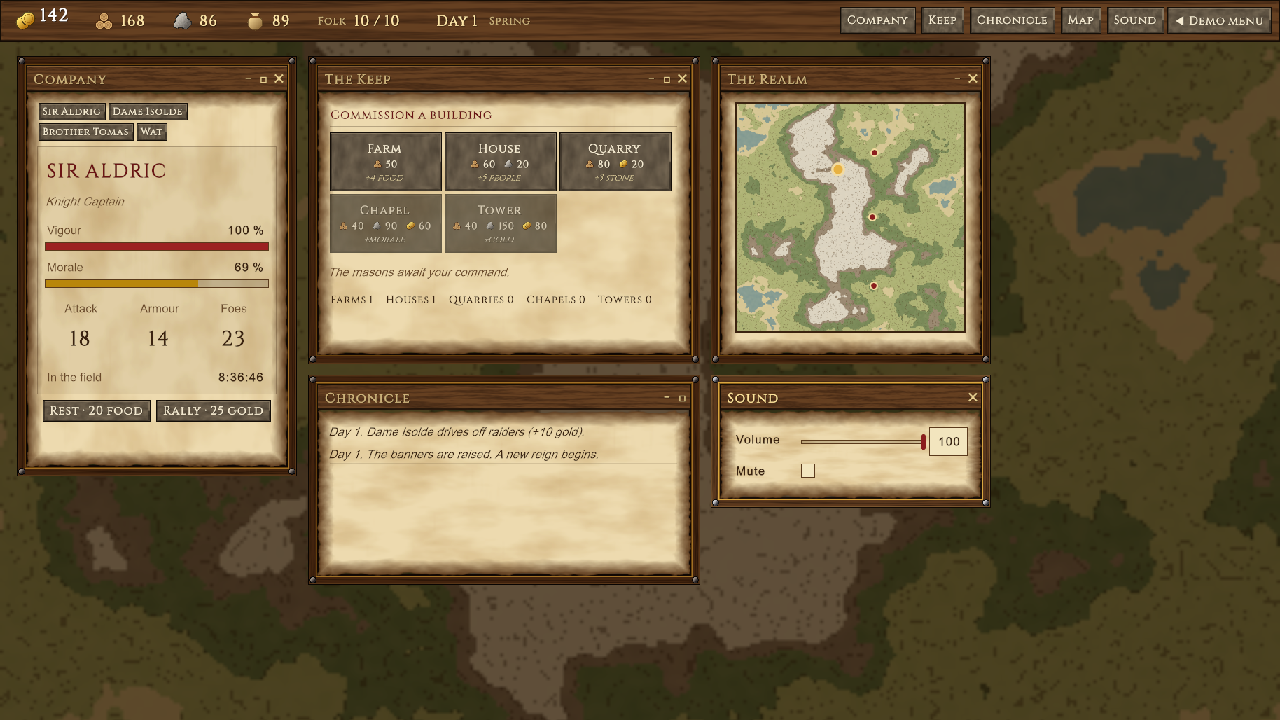
Scene: Assets/UIToolbox/Examples/Scenes/Kingdom.unity. Folder: Assets/UIToolbox/Examples/Kingdom.
Try it
- Open the scene. The five windows are open, and the economy runs: the numbers in the resource bar change every 2 seconds.
- Click a knight name at the top of the Company window. The card shows that knight, and the marker of the knight on the map beats.
- Click Rest (20 food) or Rally (25 gold). The cost leaves the resource bar, the vigor or the morale of the knight goes up, and a line slides into the Chronicle.
- In The Keep, click a building. The wood, stone and gold leave the bar, and a progress bar shows the construction. One building goes up at a time, and a button is disabled while you cannot pay for it.
- Wait for the building to finish. A notification shows for 3 seconds, and the chronicle tells it.
- Click near a marker on the map. The nearest knight becomes the selected knight, so you do not need to hit the small dot.
- Let the food fall under 25. The food counter glows red until you build farms.
- Move the Volume slider in the Sound window, or tick Mute. The sound of the whole scene follows.
- Press Escape or Start. A "Paused" dialog offers Resume and "Quit". The demo menu adds this dialog; it is not part of the example.
- Use a gamepad. The d-pad moves between the controls and, past the edge of a window, to the nearest window. B closes the focused window, View goes to the toolbar, and the right stick scrolls the window.
What it shows
Resource bar
The toolbar (WorkspaceToolbar) is the resource bar. It shows gold, wood, stone and food with an icon each, then the folk (Population / PopulationCap), the day and the season. Window buttons for Company, Keep, Chronicle, Map and Sound sit at the right end (WorkspaceToolbarButton).
Gold, wood, stone and food are each a ResourceCounter whose Value has a DataBinding. Each change shows as a delta under its counter (delta-side="Bottom"): the income of a turn rises into the amount, which then counts up and flashes green, and a cost drops out below it while the amount counts down and flashes red, and Kingdom.uss gives each counter its icon. The folk, the day and the season are labels with a DataBinding and a tb: converter. The gold counter also has an AnimateBinding with the custom coin preset and sound="coin", so the gold jumps and a coin sounds on each change. The food counter plays the custom starving preset while Starving is true.
Company window
Four buttons, one for each knight, sit above a knight card. The card has data-source-path="Selected", so a new selection moves every binding on it with no code. It shows:
- The name in capitals (
tb:upper) and the rank (tb:display-name, soManAtArmsreads "Man-at-Arms"). - Vigor and morale as a percent (
tb:percent-text) and as aStatBar. TheValueof the bar binds to the value, and itsmax-valueis 1. The health bar pulses whileWoundedis true. - Attack, armor and foes in large numbers. The foes count bounces when it goes up.
- The time in the field (
tb:duration).
A command row below the card holds Rest and Rally.
The Keep
The build buttons come from code. Each button shows the name, a cost row with an icon and an amount per resource, and the effect. The construction line and its bar show while IsBuilding is true (tb:visible). The idle line "The masons await your command." shows while it is false (tb:hidden). Five counters (Farms, Houses, Quarries, Chapels, Towers) use FormatBinding.
Chronicle
A ScrollView of text lines. Each new line goes to the top and plays the slide-left preset. The window keeps 30 lines. It has show-close-button="false", so the record of the reign stays on the table.
Map
The map is a plain element with the image of the realm. Each knight has a red dot. The left and top of the dot bind to MapX and MapY with tb:percent. The marker of the selected knight plays the custom marker preset while Selected is true. The window has show-max-button="false" and resizable="false", because the map has one size.
Sound window
A SliderInt and a Toggle set the master volume and the mute through AudioOptions. The window has only a close button (show-min-button="false", show-max-button="false", resizable="false") and enable-scrolling="false".
How it is built
| File | Does |
|---|---|
KingdomController.cs |
Sets the data source, makes the build buttons, runs the economy and the patrols, writes the chronicle, sets the sound. |
SampleKingdom.cs |
The data: resources, buildings, knights, and the rules of the economy. A plain C# object. |
Kingdom.uxml |
The workspace, the toolbar and the five windows, with all the bindings. |
Kingdom.uss |
The look and the three custom presets. |
KingdomSounds.asset |
The sound set: soft plucks and chimes, and a custom coin sound. |
Art/ |
The 9-slice frame, the wood plank, the parchment, the map and the resource icons. |
The workspace gets one data source. Each window inherits it, so the bindings in the UXML find the kingdom.
_workspace = GetComponent<UIDocument>().rootVisualElement
    .Q<Workspace>("kingdomWorkspace");
// Each window inherits the data source of the workspace, so the bindings
// in the UXML find the kingdom
_workspace.dataSource = Kingdom;
A computed property needs [CreateProperty], so that a binding or an animation trigger can read it.
[CreateProperty] public int PopulationCap => 5 + Houses * 5;
[CreateProperty] public bool Starving => Food < 25;
[CreateProperty] public bool IsBuilding => Building != null;
[CreateProperty] public Season Season => (Season)((Day - 1) / 4 % 4);
The gold counter binds its Value to Gold, and a preset plays on each change. The food counter plays a preset while a value is true.
<tb:ResourceCounter
    name="gold"
    class="resource res--gold"
    format-string="{0:N0}"
    delta-side="Bottom">
  <Bindings>
    <ui:DataBinding
        property="Value"
        data-source-path="Gold"
        binding-mode="ToTarget" />
    <tb:AnimateBinding
        property="anim-gold"
        preset="coin"
        sound="coin"
        path="Gold" />
  </Bindings>
</tb:ResourceCounter>
<!-- ... -->
<tb:ResourceCounter
    name="foodResource"
    class="resource res--food"
    format-string="{0:N0}"
    delta-side="Bottom">
  <Bindings>
    <ui:DataBinding
        property="Value"
        data-source-path="Food"
        binding-mode="ToTarget" />
    <tb:AnimateBinding
        property="anim-starving"
        preset="starving"
        trigger="WhileTrue"
        path="Starving" />
  </Bindings>
</tb:ResourceCounter>
A bar is a StatBar. Its Value binds to a value from 0 to 1, so its max-value is 1.
<tb:StatBar
    name="healthBar"
    class="bar bar--health"
    max-value="1"
    low-threshold="0">
  <Bindings>
      <ui:DataBinding
          property="Value"
          data-source-path="Health"
          binding-mode="ToTarget" />
  </Bindings>
</tb:StatBar>
The controller turns a click on the map into a place from 0 to 1, and selects the knight within MARKER_REACH of it.
public SampleKnight KnightNear(Vector2 place) => Kingdom.Knights
    .Select(knight =>
        (knight, distance: Vector2.Distance(place,
            new Vector2(knight.MapX, knight.MapY))))
    .Where(near => near.distance <= MARKER_REACH)
    .OrderBy(near => near.distance)
    .Select(near => near.knight)
    .FirstOrDefault();
The look
Kingdom.uss starts every rule with .kingdom, so it wins over the stock styles and applies to this scene only. It sets the theme tokens first, so the stock controls follow the palette: parchment surfaces, a dark wood background and an ember accent.
.kingdom .tb-workspace,
.tb-message-box {
    --tb-color-background: #2a1d12;
    --tb-color-surface: #e9d8ae;
    /* ... */
    --tb-size-title-bar: 38px;
}
The .tb-message-box selector is there because dialogs live at the top of the document, outside the workspace. The window frame is a 9-slice image, so the corners keep their size. The title bar is a wood plank, and the content lies on parchment. See Restyle the chrome with images.
.kingdom .tb-window {
    background-image: url("Art/frame.png");
    -unity-slice-left: 16;
    /* ... */
    padding: 13px;
}
The three custom presets are USS blocks marked for the Animation Editor. The coin preset has two steps, and each step has its own timing.
.tb-anim-coin {
    --tb-anim-steps: 2;
    transition-property: translate, scale;
    transition-duration: 220ms;
    transition-timing-function: ease-out;
}
.kingdom .res--gold.tb-anim-coin--1 {
    translate: 0 -8px;
    scale: 1.2 1.2;
    transition-duration: 70ms;
}
Use it in your game
- Copy the pattern: put a plain C# object in
Workspace.dataSource, bind each label and bar in UXML, and change only the data in code. - Replace
SampleKingdomwith your own game state. Keep the public fields or properties that the bindings name. Add[CreateProperty]to each computed property. - Copy
Kingdom.ussto start a new look. Change the tokens, the art inArt/and the font. Kingdom.uxmlnames a button and a marker for the first four knights only (Knights[0]toKnights[3]). A knight after them rides the map without a button and a marker. Add UXML for each extra knight.- The turn (2 s) and the day (20 s) are the
TurnSecondsandDaySecondsfields of the controller. - The patrol, the dice roll for raiders and the economy numbers are sample-only. The Escape dialog and the back button come from the demo menu.
- The controller restores the audio options in
OnDestroy, so the next scene keeps its own sound. Keep that if your screen changes the master volume.