
Outpost
A third-person game over a small outpost, with every HUD control of the toolbox on the screen. A controls panel at the start lists the keys, a hint and a prompt over a target name the key to press, and each objective says how to do it. The player walks in a palisade yard, fights three raiders, opens a supply chest, finds a lost scout and lights a beacon. The screen shows four StatBars and a slim one over each raider, a UnitFrame for the target, an ObjectiveTracker, a Hotbar of four abilities, a CompassBar, a Minimap with a fog of war, a WorldMarkerLayer, a FloatingTextLayer, an InteractionLayer and a NotificationArea.
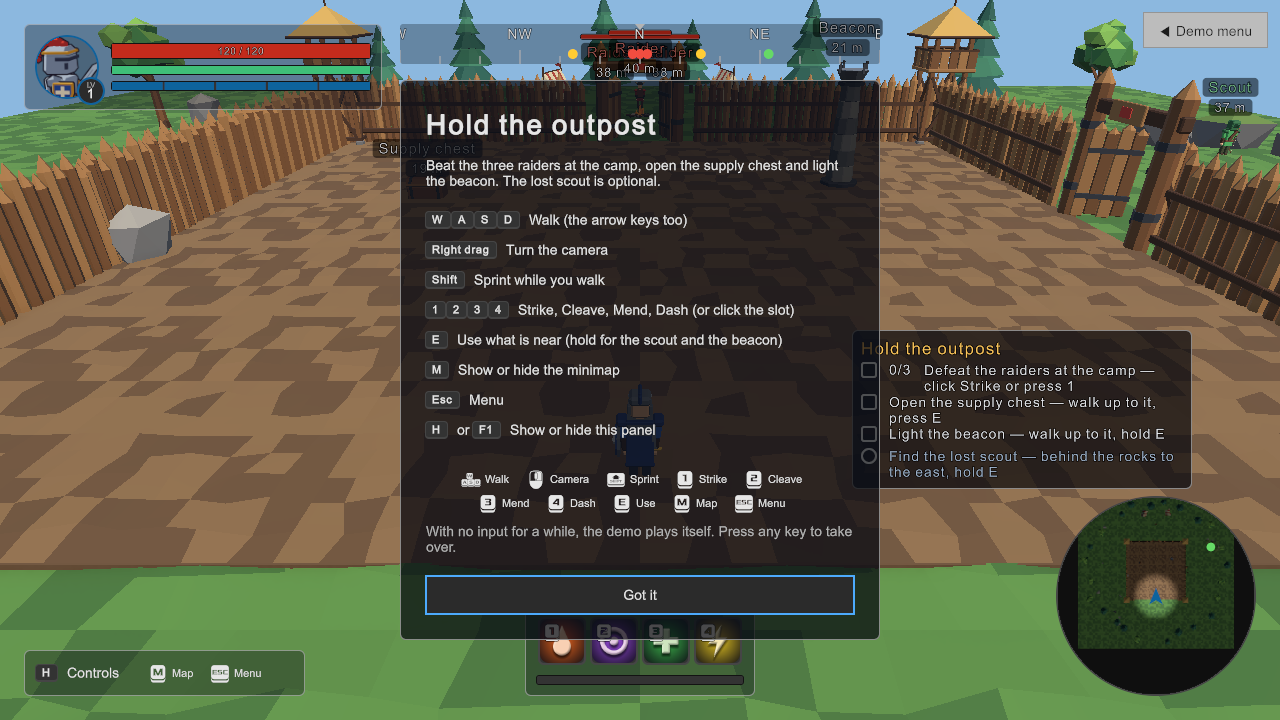
Scene: Assets/UIToolbox/Examples/Scenes/Outpost.unity. Folder: Assets/UIToolbox/Examples/Outpost.
Try it
- Open the scene. The controls panel shows the goal and the keys. Press Got it, or H or F1, to close it. H or F1 brings it back, and the hint at the bottom left reminds you of the keys.
- Press W, A, S and D, or the arrow keys. The player walks.
- Hold Shift while you walk. The player sprints and the stamina bar drains. It refills 1 second after you stop.
- Walk to a raider at the camp in the north. A slim health bar shows over each raider, and the frame of the target shows its name and its health. Press 1 (Strike), or click the slot, when it is within 3 meters. A number floats over the raider, and its bar drops with a trail.
- Press 2 (Cleave). It hits each raider within 4 meters, and 1 hit in 4 is a critical hit.
- Press 3 (Mend) to heal 30 health for 2 pips of mana. While you hold the key 3, or hold the pointer on the slot, a ghost fill on the health bar shows the heal.
- Press 4 (Dash). The player jumps 6 meters ahead for 30 stamina.
- Let a raider hit you. The health bar shows a trail at the lost part, and the trail drains after a moment.
- Defeat a raider. The objective count goes up and the experience bar fills. At 100 experience, you gain a level, the mana refills and a toast shows.
- Walk to the supply chest. A hint dot shows on it from 10 meters. Within 3 meters, a prompt with the key E and "Open Chest" shows. Press E. The objective completes, a toast shows, and the completed line fades out of the tracker. At the beacon ("Light Beacon") and at the scout behind the rocks at the east ("Help Scout"), hold E until the ring fills.
- Press M to hide the minimap, and again to show it.
- Press Esc. The menu opens and the game waits. Its switch turns auto play off, Controls opens the panel again and Start again restarts the game.
- Complete the quest. A banner bubble (
ShowBannerpreset) shows in the middle of the screen with a Play again button. - Take your hands off the keys. After 20 seconds the badge "Auto play — press any key" shows, and the player plays on its own: it fights the raiders, opens the chest, finds the scout and lights the beacon. Then the banner "Outpost held" shows, and after 4 seconds the game starts again. Any key or mouse button gives the control back.
| Key | Does |
|---|---|
| W A S D, the arrow keys | Walk. |
| Shift | Sprint while you walk. |
| 1, 2, 3, 4 | Strike, Cleave, Mend, Dash. The hotbar slots take a click too. |
| E | Open the chest within 3 meters. Hold it to help the scout or to light the beacon. |
| M | Show or hide the minimap. |
| Esc | Open or close the menu. When the controls panel shows, Esc closes it first. |
| H, F1 | Show or hide the controls panel. |
What it shows
The world
OutpostController builds the outpost from Unity primitives at run time. The yard is 30 meters wide, with a palisade and a tower at each corner. The chest and the beacon stand in the yard. Three raiders wait in a camp with two tents and a fire. The scout hides behind three rocks. Trees stand around the edge. The yard has a gate in the middle of three sides. The west side is closed.
The outpost lies 800 meters under the scene, so the camera of the scene does not see it. The outpost has its own camera, which draws on the screen. The walls of the palisade are see-through (40 percent opacity), so a wall between the camera and the player never hides the player. A Strike swings the sword of the player, and the lid of the chest swings open in 0.6 seconds.
The bars
| Bar | Setting | Does |
|---|---|---|
health |
max-value="120", show-text="true", class tb-stat-bar--health |
The health of the player. A hit leaves a trail. Mend shows a preview. |
stamina |
class tb-stat-bar--stamina |
Sprint and Dash use it. It refills after a pause. |
mana |
segments="5", max-value="5" |
Five pips. Mend uses two. One pip returns every 8 seconds. |
experience |
segments="10", class tb-stat-bar--xp |
The experience of the level, in ten pips. A level costs 100, a raider gives 40. |
The controller sets only values. The bars draw the trail, the pips and the preview:
// a hit: the trail drains
Health.SetValue(Health.Value - damage);
Health.PreviewValue = preview
    ? Mathf.Min(Health.MaxValue, Health.Value + MEND_HEAL) : -1;
// a level up: no trail
Experience.SetValue(xp, false);
The target frame
The frame under the compass is a UnitFrame with mirrored="true" and show-resource="false": the portrait with the first letter of the name, the name and a health bar that fills from the right. It shows while the player has a raider as the target, which is the raider that the player last hit, or the nearest within 6 meters. The controller sets the name and the health. A health of 0 sets the dead state by itself, so the frame fades as the raider falls:
_targetFrame.DisplayName = raider.DisplayLabel;
_targetFrame.SetHealth(health, false);    // a new target: no trail
_targetFrame.Health = health;             // a hit: the trail drains
The quest
The tracker is at the right. It has the panel class (tb-objective-tracker--panel), so its light text sits on a dark panel that reads over the bright sky and the sand. When the completed quest leaves, the tracker has no quest and its panel does not show; Play again brings it back. The quest "Hold the outpost" has four objectives. Each text names the objective, then a dash, then how to do it:
Quest = Tracker.AddQuest("Hold the outpost");
_raidersObjective =
    Quest.Add("Defeat the raiders at the camp — click Strike or press 1",
        _raiders.Count);
_chestObjective =
    Quest.Add("Open the supply chest — walk up to it, press E");
_beaconObjective = Quest.Add("Light the beacon — walk up to it, hold E");
_scoutObjective =
    Quest.Add(
        "Find the lost scout — behind the rocks to the east, hold E",
            optional: true);
A raider that falls does _raidersObjective.Progress++, and the count reaches 3/3 by itself. The toasts come from ObjectiveCompleted, and show only the name before the dash. When the last required objective completes, QuestCompleted shows a NotificationPreset.Banner bubble that stays (DurationMs = 0) in a NotificationArea with corner="Center"; its Play again action calls Reset. The scout is optional, so the quest can complete without it.
Hotbar, compass, minimap and markers
The hotbar has four slots with icons and cooldowns. A slot with no mana or no stamina grays out (Usable). The compass and the minimap follow the player. The minimap has FogOfWar on, and the player target opens the fog in a radius of 12 meters. Each raider, the chest, the beacon and the scout has a HudTarget, so the marker layer shows a marker over it: red for an enemy, yellow for an objective and green for an ally. The chest and the scout turn their HudTarget off when they complete, so their markers go. The lit beacon keeps its marker. Damage and heal numbers come from the FloatingTextLayer.
The raider bars
Each raider has a slim StatBar with the health class, 64 by 6 pixels, in its marker over the name. It follows the raider and fades with the marker. The controller makes the three bars once, in an array beside the health of the raiders. The layer takes a marker from its pool when a target shows, so the bar goes into the marker on MarkerShown and leaves it on MarkerHidden. A hit sets the value with a trail, and the bar of the target has a light rim. Reset fills the bars with no trail.
_markers.MarkerShown += onMarkerShown;   // insert the bar over the label
_markers.MarkerHidden += onMarkerHidden; // take the bar out

_raiderBars[i].SetValue(_raiderHealth[i]);     // a hit: the trail drains
_raiderBars[i].SetValue(RAIDER_HEALTH, false); // a reset: no trail
The controls panel, the prompt and the menu
The sample tells the player what to do in four places:
- The controls panel (
help) shows at the start with the goal and a Kbd row for each key. H or F1 toggles it, and its Got it button closes it. A hint at the bottom left shows H and Esc with the keyboard, and Select (map) and Start (menu) with a gamepad. With a gamepad the panel lists the buttons, not the keys, and it shows with the classtb-modalso A presses Got it. When auto play starts, the panel steps aside. - The interaction layer (
interaction) is an InteractionLayer withuse-range="3". The chest, the scout and the beacon each have anInteractable: "Open" "Chest" with a tap, and "Help" "Scout" and "Light" "Beacon" with a hold of 1 second. Each shows a hint dot within 10 meters. The one within 3 meters gets the focus and the prompt with the key E (or the south button of a gamepad). TheUsedevent of each object completes its objective, and a used object turns itsInteractableoff, so its hint and its prompt go.Interact()uses the object with the focus at once, with no hold. - The objectives say how to do them, as the quest section shows.
- The menu (
menu, Esc) holds a Switch for auto play and the buttons Controls, Start again, Back to demo menu (only when the demo menu opened the scene) and Resume. Esc and Start open it, and B or Esc close it. It has the classtb-modalwhile it shows, and aGameMenuFocuskeeps the focus inside it with a gold ring on the focused button. The B that closes the menu does not dash. The game waits while the menu shows, and the interaction layer hides.
Auto play
With AutoPlay on, auto play starts after AutoPlayDelay seconds with no input (20 by default). While it plays, the badge "Auto play — press any key" shows over the hotbar. The player walks to the nearest raider and uses Strike and Cleave. Then the player goes through the gates to the chest, the scout and the beacon. At each of them, the player calls Interact() when the layer gives the object the focus. The player uses Dash on a long way and Mend below half health. Any key or mouse button gives the control back at once and hides the badge. The Auto play switch in the menu turns it off and on. The menu counts as input, so the demo never starts under it. Set AutoPlay to false for a game with no demo mode.
Public members
| Member | Description |
|---|---|
Player |
The player capsule, the target with IsPlayer. |
Raiders |
The three raiders of the camp, alive or not. |
Health, Stamina, Mana, Experience |
The four StatBars. |
RaiderBars |
The health bar over each raider, in the order of Raiders. It shows in the marker of its raider. |
TargetFrame, TargetHealth |
The UnitFrame of the target under the compass, and its health bar. |
Tracker, Quest |
The ObjectiveTracker and the current quest. Reset makes a new quest. |
Hotbar |
The four abilities. |
Level |
The level of the player, from 1. |
AutoPlay, AutoPlayDelay |
Auto play on or off, and the seconds without input before it starts (20 by default). |
AutoPlayActive |
True while the player plays on its own and the badge shows. |
ShowHelp(visible), ToggleHelp(), HelpVisible |
Show, hide or toggle the controls panel, and whether it shows. |
ShowMenu(visible), MenuVisible |
Show or hide the menu, and whether it shows. Showing the menu hides the controls panel. |
Interaction |
The InteractionLayer with the hints and the prompt. |
PromptText |
The verb and the noun of the prompt, for example "Open Chest", or null when no prompt shows. |
Interact() |
Uses the object with the focus of the layer at once, with no hold. Returns false when no object has the focus. |
Use(ability) |
Uses an ability: 0 Strike, 1 Cleave, 2 Mend, 3 Dash. An ability on cooldown, with no target in range or with no mana or stamina does nothing. |
Hit(raider, damage, critical) |
Lowers the health of a raider. At 0 the raider leaves, the objective counts it and the player gains experience. |
HurtPlayer(damage) |
Lowers the health of the player, with a trail. At 0 the player falls and stands up at the gate. |
OpenChest(), FindScout(), LightBeacon() |
Complete the objective of the chest, the scout or the beacon. |
Reset() |
Starts the game again: the raiders, the chest and the scout come back, the beacon goes dark, the bars are full and the quest is new. |
How it is built
| File | Does |
|---|---|
Outpost.uxml |
The HUD: the player bars, the compass and target frame, the toasts, the tracker, the hotbar with the experience bar, the minimap, the marker layers, the key hints, the auto play badge, the interaction layer, the controls panel, the menu and the area of the end banner. |
Outpost.uss |
The panels, the portrait with the level, the sizes of the bars, the raider bars and the rim of the target, the key rows, the badge and the dialogs. |
OutpostController.cs |
Builds the world and the raider bars, gives the controls their data, runs the rules and the auto play. |
The HUD root has picking-mode="Ignore", and so do its panels, so clicks and the pointer reach the game. Only the hotbar, the controls panel, the menu and the Play again button take the pointer. The root has no fill, so the world shows through.
The key code has three versions: the Input System package, the legacy Input Manager, or none. The project settings choose one at compile time. The controller reads the keys once per frame into one struct, and the edge keys (H, F1, M, Esc) act on the frame of the press. The interaction layer reads E and the south button itself.
Use it in your game
- Copy the HUD from
Outpost.uxmland keep the names of the controls. The controller needs only itsQcalls inStart. - Replace
buildWorldand the rules in the controller with your own game. Keep the wiring of the HUD inStart. - Give each object that the player should see a
HudTarget. The markers, the compass and the minimap follow it. - Give each object that the player can use an
Interactable, and handle itsUsedevent. The layer shows the hints and the prompt. - Set the camera of the layers (
Camera) and of the compass and the minimap when your game draws with a camera other thanCamera.main. - Set
low-threshold="0"on a bar that rests at a low value, so its pulse does not run. - Put the controls and the goal on the screen at the start, name the key on a prompt over each target, and say how in each objective. Start a demo mode only after a long wait, show a badge while it plays, and give the player a switch to turn it off.
- Sample-only parts: the yard, the stats of the raiders, the damage numbers, the costs and the cooldowns of the abilities, and the auto play.