

 RollingDigits
 shows a number or a row of letters on drums, like the readouts of a flight instrument (PITCH 002, YAW 354, SPEED 007.8 KM), an odometer, a slot reel or a code lock. Each character sits on its own dark drum, with a gap between the drums. A drum is a cylinder seen from the side: the glyph at the middle is flat, and the glyphs above and below lean away. A drum between two glyphs shows the lower half of one and the upper half of the next. The row can have a decimal point, a unit and a minus sign.
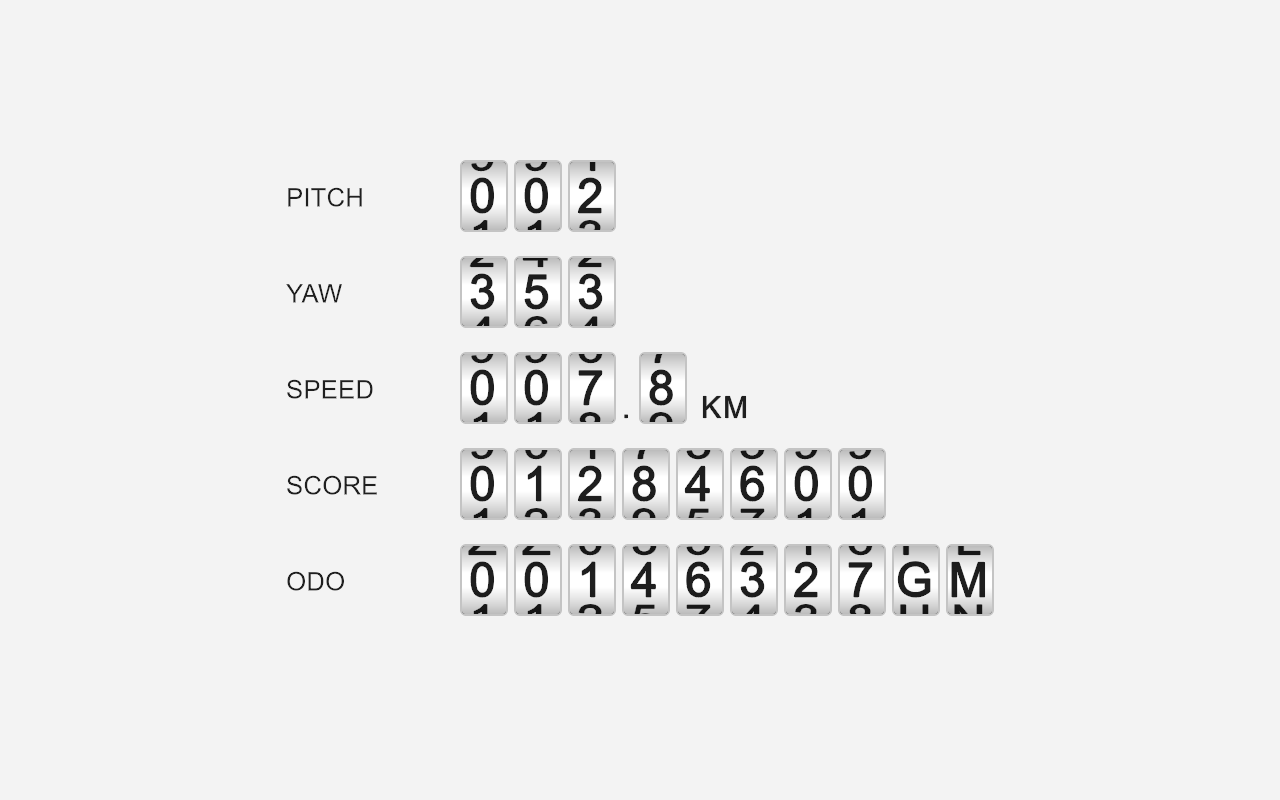
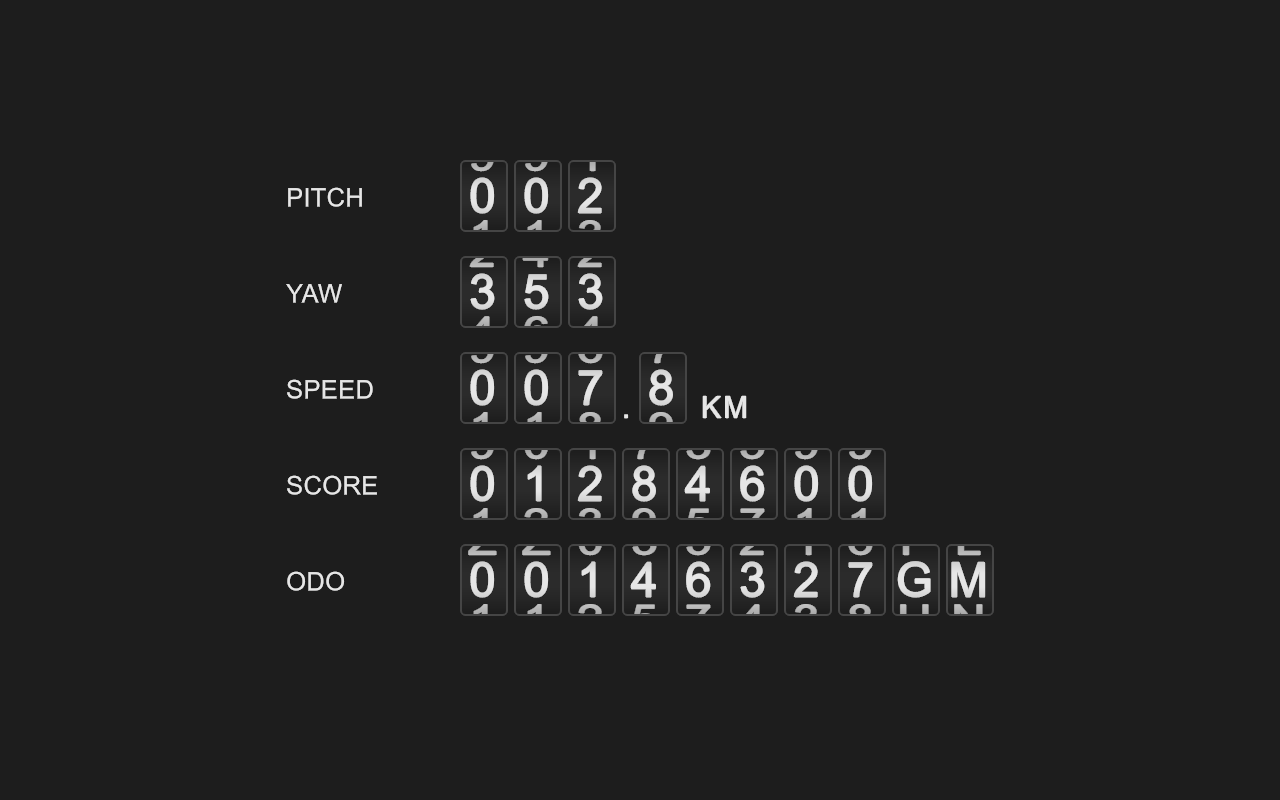
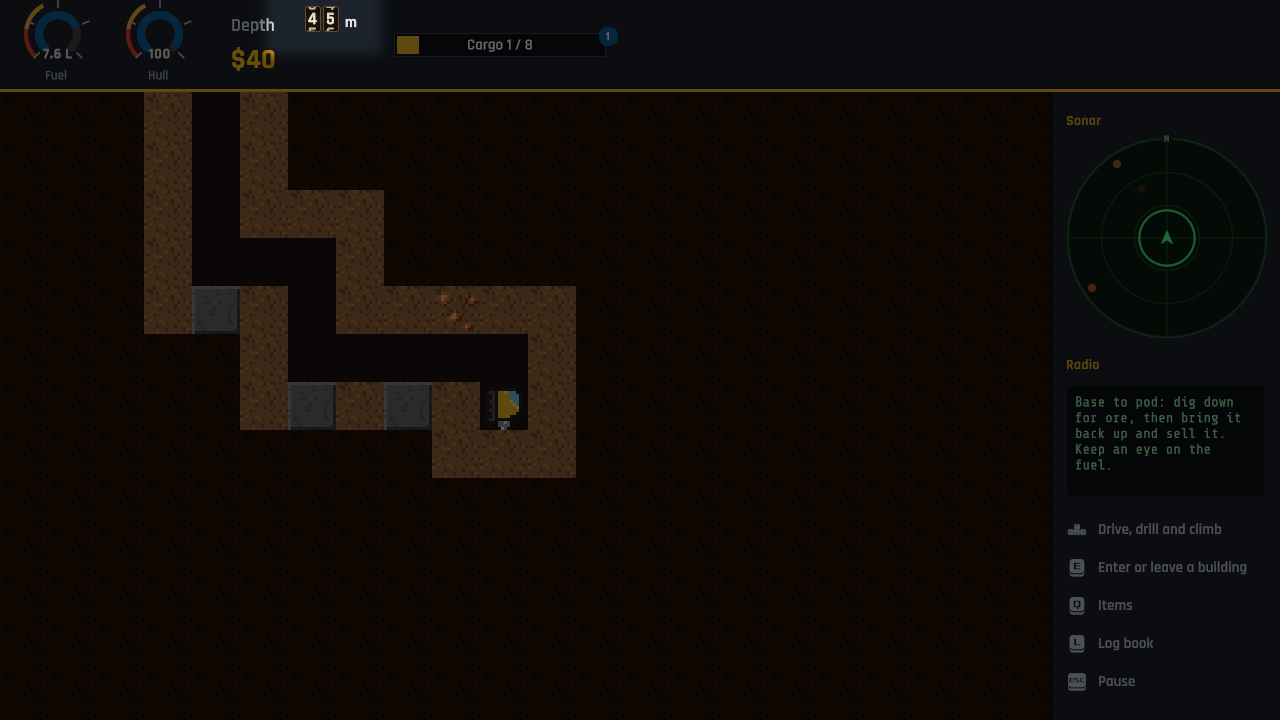
Demo scene: RollingDigitsDemo.unity. Samples: the depth gauge of Driller and the drum option of ResourceCounter.
How to add a row of drums:
<!-- PITCH 002 -->
<tb:RollingDigits name="pitch" digits="3" value="2" />

<!-- SPEED 007.8 KM -->
<tb:RollingDigits name="speed" digits="3" fraction-digits="1"
                  value="7.8" unit="KM" />

<!-- A score that spins to each new value -->
<tb:RollingDigits name="score" digits="8" mode="Animated"
                  direction="Forward" />

<!-- Letters and digits: a drum for each character of the text -->
<tb:RollingDigits name="plate" text="AB-1234"
                  characters="A-Z0-9-" />
How to change the value from code:
var pitch = root.Q<RollingDigits>("pitch");

// Continuous: each frame sets the value, the drums follow it
pitch.Value = aircraft.Pitch;

var score = root.Q<RollingDigits>("score");

score.Value += 250;               // the drums spin to the new score
score.SetValue(0, animate: false); // a load: no spin

// A row of letters
var plate = root.Q<RollingDigits>("plate");
plate.Text = "XY-0042";           // each drum turns to its character
plate.Settled += () => Debug.Log("stopped");
The two modes
Continuous(the default) follows the value on every frame, with no easing, like the wheels of an odometer. The lowest drum turns with the value. A higher drum waits until the drum below it reaches 9, and then turns with it during the last unit before the carry. For9.5the units drum shows half of 9 and half of 0, and the tens drum shows half of 0 and half of 1, so009.5rolls into010.0with no jump. Use it for a value that changes all the time.Animatedspins the drums to a new value overDuration. The lowest drum starts first and each next drum startsStaggerlater, so a carry follows the units. Each drum overshoots a little and settles. Use it for a score, a counter or a price.
A value with more digits than the drums wraps like an odometer: 1000 on 3 drums shows 000. A negative value adds a minus sign before the drums.
Direction sets how an Animated drum turns. Shortest takes the shorter way, up or down. Forward always rolls up, and a higher drum turns once for each carry, like a counter that is driven forward.
Text rows
With Text set, the row shows one drum for each character of the text, and Value is not used. Each drum holds the glyphs of Characters in order, and a new text spins each drum to its character, from the first drum, in Animated style whatever the Mode. Direction and Duration apply. Characters takes ranges: A-Z is the letters, A-Z0-9 adds the digits, and a - at the end is a minus. A character that is not in the set, and a space, leave the drum empty. Set Text to an empty string to show Value again.
A bigger set makes a longer spin: a Forward drum visits every glyph between the old one and the new one. A reel with 0-9A-Z shows more motion than one with the digits.
Symbol reels
For a slot machine, put symbols on the drums instead of characters. A symbol is a short text (7, BAR, a glyph of the font) or a picture. SetSymbols takes the list, Reels (reels in UXML) is the number of drums, and ShowSymbols turns each reel to a symbol with the same easing, Duration and Stagger as a text row: the first reel starts and stops first. Without symbols the row works as before.
var reels = root.Q<RollingDigits>("reels"); // reels="3"

// Pictures: Background.FromSprite works too
reels.SetSymbols(new[]
{
    Background.FromTexture2D(cherry),
    Background.FromTexture2D(bell),
    Background.FromTexture2D(seven)
});
// Or texts: reels.SetSymbols(new[] { "7", "BAR", "BELL" });

reels.Duration = 1200;
reels.Stagger = 300;
reels.Settled += () => CheckWin();

// Reel i turns to the symbol indexes[i]. Two extra turns make
// each reel spin, even one that lands on its own symbol.
reels.ShowSymbols(new[] { 2, 0, 1 }, extraTurns: 2);
A picture keeps its colors and fits the drum. A drum with 16 symbols or fewer has a label for each symbol, and a bigger set keeps a window of five labels, so a spin allocates nothing in either case. SetSymbols replaces Text and Value on the row, and a new Text replaces the symbols; ClearSymbols shows Value again. With the animations off the reels show the symbols at once and Settled does not run, so read IsRolling after ShowSymbols. The symbols come from code because a picture is an asset. The Slot machine tab of the demo has three reels, a win line and a payout on a second row of drums.
Members
| Member | Description |
|---|---|
Value (value) |
The number that the drums show. Default 0. |
Digits (digits) |
The number of drums before the decimal point, from 1 to 12. Default 3. |
FractionDigits (fraction-digits) |
The number of drums after the decimal point, from 0 to 6. With 1 or more the row has a decimal point. Default 0. |
LeadingZeros (leading-zeros) |
Shows the zeros before the first digit (002). Off leaves those drums empty. On by default. |
Unit (unit) |
The text after the drums, such as KM. Empty shows none. |
Text (text) |
The characters of a row of letters. Empty (the default) shows Value instead. |
Characters (characters) |
The glyphs on each drum of a text row, in the order that the drum turns. Ranges such as A-Z work. Default 0123456789. |
Reels (reels) |
The number of drums of a symbol row, from 1 to 12. Default 3. |
SetSymbols(list) |
Gives the drums a list of symbols: texts, Background pictures or sprites. At most 256 symbols. |
ShowSymbols(indexes, extraTurns) |
Turns reel i to the symbol indexes[i]. extraTurns adds whole turns up. |
GetSymbolIndex(reel), SymbolCount |
The symbol that a reel shows or turns to, and the number of symbols. |
ClearSymbols() |
Takes the symbols away. The row shows Value again. |
Mode (mode) |
Continuous (the default) or Animated. |
Duration (duration) |
The milliseconds that the roll of a drum takes in Animated mode, before its settle. 0 shows a change at once. Default 700. |
Stagger (stagger) |
The milliseconds between the start of one drum and the next. 0 starts all drums together. Default 90. |
Direction (direction) |
Shortest (the default) or Forward. |
Animate (animate) |
Turns the drums. Off shows each change at once, with the drums on whole glyphs. On by default. |
SetValue(value, animate) |
Sets the value. With animate false the drums show it at once. |
Advance(seconds) |
Moves the drums forward. The row calls it by itself while a drum moves. A test can call it. |
Settled |
Every drum has stopped after a change. It does not run in Continuous mode. |
IsRolling |
A drum is spinning. |
DrumCount, ShownText |
The number of drums, and the text that the drums show now. |
GetPosition(index), GetDrum(index) |
The position of a drum in glyphs, and its element. |
SignLabel |
The label of the minus sign, or null. |
RollingDigitsMode, RollingDigitsDirection |
The values of Mode and Direction. |
The row takes no input and no keyboard focus. Make it focusable in your own code or UXML (focusable="true") when a drum is a control, as in the code lock of the demo, and turn it with a NavigationMoveEvent handler.
- The first value that is set shows at once.
- A new value during a roll continues from the glyph that shows now.
- Animations that are off (the toolbox setting, or
Animatefalse) and the UI Builder show the end state, with no spin. - The drums are labels that move with
translateandscale, and the shade is drawn ingenerateVisualContent. A row at rest runs nothing, and a turning row allocates no memory. - The row steps at most 0.1 seconds in one frame, so a frame that takes long does not finish a spin at once.
- A
Textor aCharacterschange that keeps the count of drums keeps the drums and turns them. A longer text adds drums.
Use it in ResourceCounter
ResourceCounter shows its amount on drums with drum="true". The drums follow the rolling amount, so a gain turns them like the wheels of an odometer and a carry turns the next drum. drum-digits sets the number of drums with the zeros shown. 0 (the default) sizes the drums to the amount.
<tb:ResourceCounter name="gold" value="120" drum="true"
                    drum-digits="5" />
DrumElement is the RollingDigits of the counter, to change its look from code.
In the examples
Styling
| Class | Element |
|---|---|
tb-rolling-digits |
The row. |
tb-rolling-digits__drum |
A drum: a dark plate that clips its glyphs. |
tb-rolling-digits__glyph |
A glyph on a drum. Five labels sit on each drum. |
tb-rolling-digits__picture |
A glyph that shows a picture, besides tb-rolling-digits__glyph. |
tb-rolling-digits__shade |
The dark at the top and the bottom of a drum. |
tb-rolling-digits__point |
The decimal point. |
tb-rolling-digits__unit |
The unit. |
tb-rolling-digits__sign |
The minus sign. |
| Variable | Description |
|---|---|
--tb-rolling-digits-face |
The color of a drum. Default the surface color of the theme. |
--tb-rolling-digits-text |
The color of the glyphs. Default the text color of the theme. |
--tb-rolling-digits-line |
The color of the outline of a drum. Default the border color of the theme. |
--tb-rolling-digits-shade |
The color of the dark at the top and the bottom of a drum. Default a black at half strength. |
--tb-rolling-digits-width, --tb-rolling-digits-height |
The size of a drum. Default 24px by 36px. |
--tb-rolling-digits-gap |
The space between the drums. Default 3px. |
--tb-rolling-digits-size |
The font size of the glyphs. Default 24px. |
--tb-rolling-digits-unit-size |
The font size of the point and the unit. Default the large font size of the theme. |
The size of a drum and the font size are separate variables, so set them together. The drums read the shade color when they draw, so a skin can set it for a light or a dark drum.
/* A big white-on-black cockpit readout */
.cockpit .tb-rolling-digits {
    --tb-rolling-digits-face: rgb(14, 16, 22);
    --tb-rolling-digits-text: rgb(238, 242, 250);
    --tb-rolling-digits-line: rgb(58, 64, 80);
    --tb-rolling-digits-shade: rgba(0, 0, 0, 0.62);
    --tb-rolling-digits-width: 34px;
    --tb-rolling-digits-height: 52px;
    --tb-rolling-digits-size: 34px;
}
UI Builder
RollingDigits is in the library under UI Toolbox / HUD. The Inspector shows every attribute, and the canvas shows the end state of the drums.
Performance
- A row at rest runs no scheduled item and allocates no memory.
- A turning row allocates no memory per frame. A glyph label gets a text that the row made once, so a drum that moves to a new glyph makes no garbage.
- The drums move with
translateandscale, so a step needs no layout. - Setting the same value again does nothing, so a game can set
Valueon every frame.
Tips
- Use
Continuousfor an instrument that reads a live value (heading, speed, depth) andAnimatedfor a value that jumps (a score, a price). - With a heading, set the value modulo 360. The hundreds drum jumps from 3 to 0 at the wrap, as the heading does.
- Use
Forwardfor a counter that only grows, andShortestfor a value that goes up and down. - Put the unit in
Unitand the sign in the value. The row adds the minus sign itself. - Set
Staggerto 0 for a slot reel that stops all at once, or to a few hundred milliseconds for a reel that stops from the left. - A drum that is a control needs its own focus style. The demo uses a focus ring on the drum.